
Add transitions between states
To make movement between states smooth, you can use Transitions to animate the changes between states.
First, you need to add states in the States view and edit some properties that can be animated, such as colors or numbers, in the Properties view. For example, you can animate the changes in the position of a component.
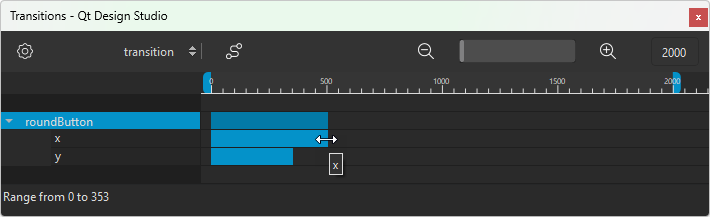
In Transitions, you can set the start frame, end frame, and duration for the transition of each property. You can also set an easing curve for each animation and the maximum duration of the whole transition.
Zoom in Transitions
Use the slider on the toolbar to set the zooming level in Transitions. Select the  and
and  buttons to zoom out of or into the view.
Animate transitions between states
To animate transitions:
- Select View > Views > Transitions.
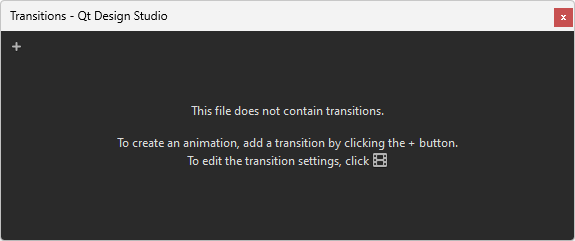
- Select
 (Add Transition) to add a transition. This works only if you added at least one state and modified at least one property in it.
 - Move the blue bar next to the component or property name to set the start and end frame of the animation of the property. Pull its left and right edges to set the duration of the animation.
- To attach an easing curve to the selected transition, select the
 (Easing Curve Editor (C)) button.
Specify transition settings
To modify transition settings, select  (Transition Settings (S)) in Transitions.
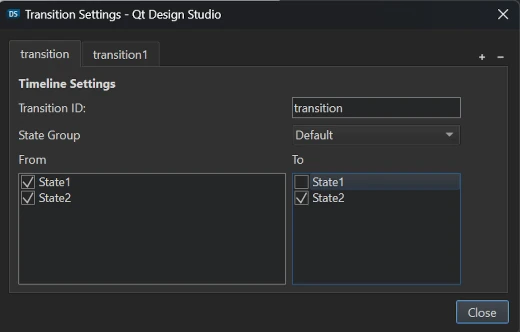
To add transitions:
- Select (Add Transition).
- In Transition ID, enter an ID for the transition.
- In From, select the state to transition from.
- In To, select the state to transition to.
To remove the current transition, select the  (Remove Transition) button.
To change the state group, select it from State Group.
See also How to: Add animation, Qt Quick UI design, and Designing Qt Quick UIs.
Copyright © The Qt Company Ltd. and other contributors. Documentation contributions included herein are the copyrights of their respective owners. The documentation provided herein is licensed under the terms of the GNU Free Documentation License version 1.3 as published by the Free Software Foundation. Qt and respective logos are trademarks of The Qt Company Ltd in Finland and/or other countries worldwide. All other trademarks are property of their respective owners.
