
Convert masked layers
In Figma, masks show and hide some areas of objects. Masking does not change the masked layers nor remove content from them.
QML does not support masks. By default, the plugin applies the mask, converts masked layers to assets, and creates instances of QML Image for them.
If you don't want to apply a mask when converting a design into code, but still want to keep it in the design, you can turn off applying masks.
To turn off applying masks when converting code:
- In the plugin, go to
 (Settings) > Code.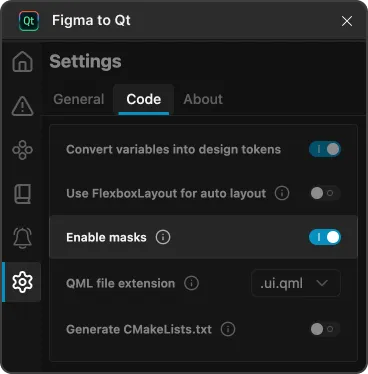
Enable masks in Code settings on the Settings page in the plugin.
- Turn off Enable masks.
- Select
 (Preview) to review the results.
See also Download converted designs and Preview converted designs.
© 2026 The Qt Company Ltd. Documentation contributions included herein are the copyrights of their respective owners. The documentation provided herein is licensed under the terms of the GNU Free Documentation License version 1.3 as published by the Free Software Foundation. Qt and respective logos are trademarks of The Qt Company Ltd in Finland and/or other countries worldwide. All other trademarks are property of their respective owners.
