
Apply auto layout
You can use auto layout in Figma on frames or components to have designs respond dynamically to content changes. Elements in a frame are automatically arranged based on direction, spacing, padding, alignment, and other auto layout properties. For example, you can create resizable screens, buttons, and lists.
The plugin converts horizontal and vertical auto layout frames and components into instances of QML FlexboxLayout.
FlexboxLayout follows all four of its parent's edges, with the frame's padding as the spacing. Layers inside the frame are positioned by the layout, unless you convert into Qt for MCUs or turn off the auto layout setting. Layers that you set to Ignore auto layout in Figma keep following their constraints in QML.
Note the following restrictions:
- Grid auto layout frames are converted into other types of QML components.
- Due to Qt framework limitations, only one axis per direction (horizontal or vertical) works correctly.
- Auto layout doesn't work well with effects, rotations, flips, and advanced auto layout properties.
- FlexboxLayout is not supported on Qt for MCUs.
To turn on conversion into FlexboxLayout:
- In the plugin, go to
 (Settings) > Code.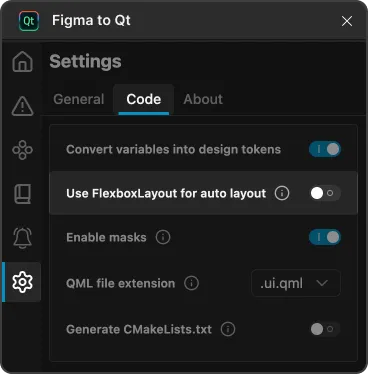
Use FlexboxLayout for auto layout in Code settings on the Settings page in the plugin.
- Select Use FlexboxLayout for auto layout.
- In Figma, select a horizontal or vertical auto layout frame or component.
- In the plugin, select
 (Preview) to review the results.
See also Convert constraints into anchors, Convert designs, Preview converted designs, Download converted designs, and Save assets.
© 2026 The Qt Company Ltd. Documentation contributions included herein are the copyrights of their respective owners. The documentation provided herein is licensed under the terms of the GNU Free Documentation License version 1.3 as published by the Free Software Foundation. Qt and respective logos are trademarks of The Qt Company Ltd in Finland and/or other countries worldwide. All other trademarks are property of their respective owners.
