
Add comments to converted code
 Development
 Figma to Qt converts Figma layers into QML code. To pass notes to the developers who read the converted code, you can annotate a layer in Figma. Figma to Qt converts the annotations in the Development category into comments in the QML code.
The comment appears above the QML code that Figma to Qt generates from the layer.
Comment a layer
To add a comment to the code that Figma to Qt generates from a layer:
- In Figma, select a single layer.
- Add an annotation to the layer and set its category to Development.
- Enter the note as the annotation text.
When you convert the design, Figma to Qt adds the note as a comment above the QML code. For example, an annotation with the text Shown while the data loads on a rectangle produces:
// Shown while the data loads
Rectangle {
    // ...
}
Add several comments to one layer
You can add more than one Development annotation to the same layer. Figma to Qt combines them into a single comment, keeps them in the order that you added them, and separates them with a blank line.
Note: Figma to Qt converts only Development annotations. It ignores annotations in other categories, annotations without a category, and annotations that have no text.
Turn annotation comments off
Figma to Qt converts annotations in the Development category into comments by default. To convert a design without adding comments:
- Go to
 (Settings) > Code.
 - Clear Export annotations.
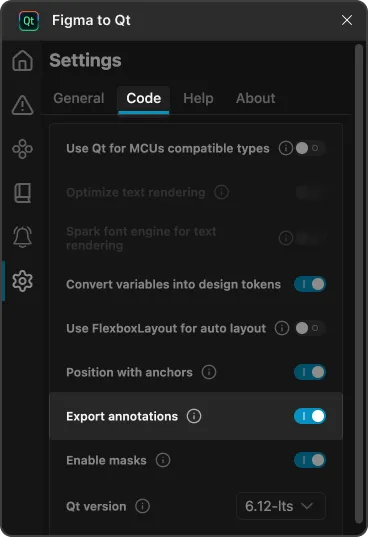
The setting only affects annotations. Component descriptions and documentation links become comments regardless of it.
Document a component
Components and their variants in Figma carry a description and can link to external documentation. Figma to Qt adds the description and the documentation links as a comment at the top of the generated QML file, before any comment that comes from annotations on the component itself.
For example, a component with the description A themed button produces:
import QtQuick

// A themed button
Rectangle {
    // ...
}
Figma to Qt uses the plain text of the description, so any text formatting from Figma is not carried over. Each documentation link goes on its own line, separated from the description by a blank line. A comment that spans several lines, or is longer than 100 characters, appears as a block comment.
Comment variants
Figma to Qt converts variants into a component with states, one state for each variant. An annotation on a layer inside a variant becomes a comment on the matching state, so the note stays with the variant it describes.
See also Download converted designs and Preview converted designs.
© 2026 The Qt Company Ltd. Documentation contributions included herein are the copyrights of their respective owners. The documentation provided herein is licensed under the terms of the GNU Free Documentation License version 1.3 as published by the Free Software Foundation. Qt and respective logos are trademarks of The Qt Company Ltd in Finland and/or other countries worldwide. All other trademarks are property of their respective owners.
