
Convert constraints into anchors
In Figma, constraints describe the position of a layer in relationship with its parent. Constraints correspond to anchors and margins or fixed positioning using X and Y coordinates in QML.
Anchors position a QML component next to or inside another one by attaching their anchor-points: top, bottom, left, right, fill, horizontal center, vertical center, or baseline.
Figma constraints and QML don't have all the same properties. For example, QML does not have a scale property.
When using anchors for positioning, the plugin uses the layer constraints to set the position of the corresponding QML component as follows:
- Left or top: at the distance specified by a margin from the parent's left or top edge.
- Right and bottom: at the distance specified by a margin from the parent's right or bottom edge.
- Left and right or top and bottom: at the distance specified by a margin from both edges, so it grows and shrinks with the parent.
- Center: centered horizontally and vertically within the parent.
- Scale: preserves the position and size in proportion to the parent.
To convert constraints into anchors and margins:
- In the plugin, go to
 (Settings) > Code.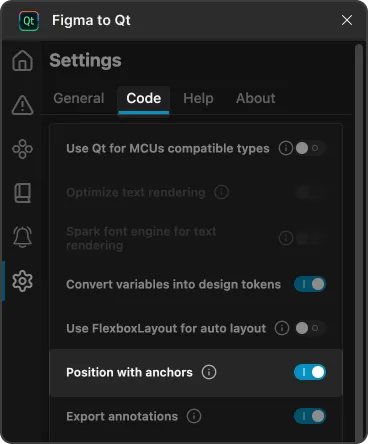
Position with anchors in Code settings on the Settings page in the plugin.
- Turn on Position with anchors.
- Select
 (Preview) to review the results.
See also Apply auto layout, Download converted designs, Preview converted designs, and Save assets.
© 2026 The Qt Company Ltd. Documentation contributions included herein are the copyrights of their respective owners. The documentation provided herein is licensed under the terms of the GNU Free Documentation License version 1.3 as published by the Free Software Foundation. Qt and respective logos are trademarks of The Qt Company Ltd in Finland and/or other countries worldwide. All other trademarks are property of their respective owners.
