
Qt Quick 3D - Volumetric Rendering Example
Demonstrates how to do volumetric rendering in Qt Quick 3D.
Introduction
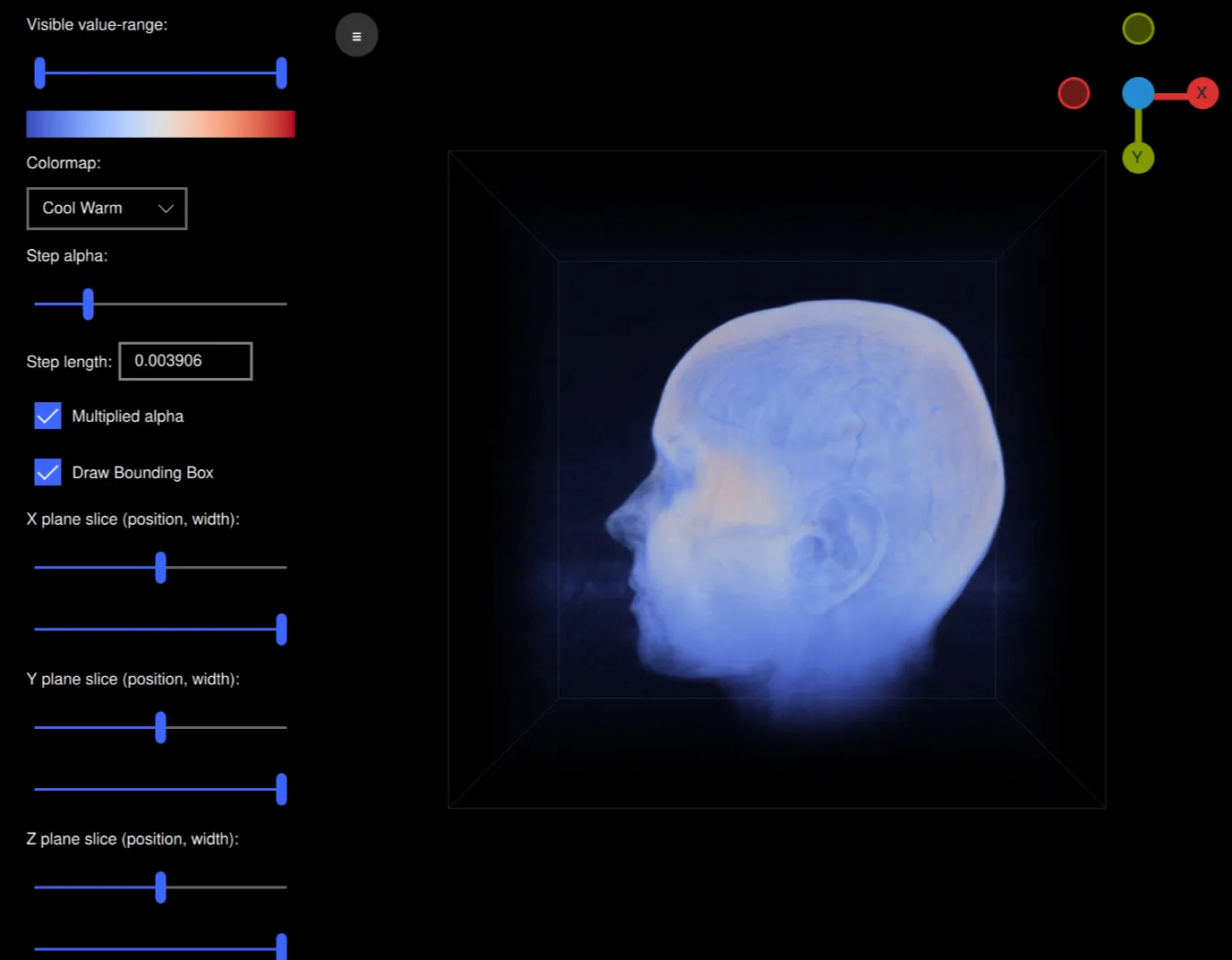
This example demonstrates how to do volumetric rendering using a custom shader and a 3D volume texture with a technique called Volume ray casting. This example is an application that can read raw volume files and render them while being able to interactively modify various rendering settings such as the colormap, alpha and slice planes used. It is designed to work well with the volumes hosted at https://klacansky.com/open-scivis-datasets/ and automatically set the correct dimensions and scaling.
Implementation
The application is using QML and is a ApplicationWindow with a View3D containing the volume and a ScrollView containing the settings. To render our volume we create a scene in our View3D object with just a cube model in the middle.
Model {
    id: cubeModel
    source: "#Cube"
    visible: true
    materials: CustomMaterial {
        shadingMode: CustomMaterial.Unshaded
        vertexShader: "alpha_blending.vert"
        fragmentShader: "alpha_blending.frag"

        property TextureInput volume: TextureInput {
            texture: Texture {
                textureData: VolumeTextureData {
                    id: volumeTextureData
                    source: "file:///default_colormap"
                    dataType: dataTypeComboBox.currentText ? dataTypeComboBox.currentText : "uint8"
                    width: parseInt(dataWidth.text)
                    height: parseInt(dataHeight.text)
                    depth: parseInt(dataDepth.text)
                }
                minFilter: Texture.Nearest
                mipFilter: Texture.None
                magFilter: Texture.Nearest
                tilingModeHorizontal: Texture.ClampToEdge
                tilingModeVertical: Texture.ClampToEdge
                //tilingModeDepth: Texture.ClampToEdge // Qt 6.7
            }
        }

        property TextureInput colormap: TextureInput {
            enabled: true
            texture: Texture {
                id: colormapTexture
                tilingModeHorizontal: Texture.ClampToEdge
                source: window.getColormapSource(colormapCombo.currentIndex)
            }
        }
        property real stepLength: Math.max(0.0001, parseFloat(
                                               stepLengthText.text,
                                               1 / cubeModel.maxSide))
        property real minSide: 1 / cubeModel.minSide
        property real stepAlpha: stepAlphaSlider.value
        property bool multipliedAlpha: multipliedAlphaBox.checked

        property real tMin: tSlider.first.value
        property real tMax: tSlider.second.value
        property vector3d sliceMin: window.sliceSliderMin(
                                        xSliceSlider.value,
                                        xSliceWidthSlider.value,
                                        ySliceSlider.value,
                                        ySliceWidthSlider.value,
                                        zSliceSlider.value,
                                        zSliceWidthSlider.value)
        property vector3d sliceMax: window.sliceSliderMax(
                                        xSliceSlider.value,
                                        xSliceWidthSlider.value,
                                        ySliceSlider.value,
                                        ySliceWidthSlider.value,
                                        zSliceSlider.value,
                                        zSliceWidthSlider.value)

        sourceBlend: CustomMaterial.SrcAlpha
        destinationBlend: CustomMaterial.OneMinusSrcAlpha
    }
    property real maxSide: Math.max(parseInt(dataWidth.text),
                                    parseInt(dataHeight.text),
                                    parseInt(dataDepth.text))
    property real minSide: Math.min(parseInt(dataWidth.text),
                                    parseInt(dataHeight.text),
                                    parseInt(dataDepth.text))
    scale: Qt.vector3d(parseFloat(scaleWidth.text),
                       parseFloat(scaleHeight.text),
                       parseFloat(scaleDepth.text))

    Model {
        visible: drawBoundingBox.checked
        geometry: LineBoxGeometry {}
        materials: PrincipledMaterial {
            baseColor: "#323232"
            lighting: PrincipledMaterial.NoLighting
        }
        receivesShadows: false
        castsShadows: false
    }

    Model {
        visible: drawBoundingBox.checked
        geometry: LineBoxGeometry {}
        materials: PrincipledMaterial {
            baseColor: "#323232"
            lighting: PrincipledMaterial.NoLighting
        }
        receivesShadows: false
        castsShadows: false
        position: window.sliceBoxPosition(xSliceSlider.value,
                                   ySliceSlider.value,
                                   zSliceSlider.value,
                                   xSliceWidthSlider.value,
                                   ySliceWidthSlider.value,
                                   zSliceWidthSlider.value)
        scale: Qt.vector3d(xSliceWidthSlider.value,
                           ySliceWidthSlider.value,
                           zSliceWidthSlider.value)
    }
}
This cube is using a custom shader with a 3D texture for the volume and an image texture for the colormap. There are also various properties for the transfer function, slice planes etc. The volume texture's textureData is a custom QML type called VolumeTextureData and is defined in volumetexturedata.cpp and volumetexturedata.h.
property TextureInput volume: TextureInput {
    texture: Texture {
        textureData: VolumeTextureData {
            id: volumeTextureData
            source: "file:///default_colormap"
            dataType: dataTypeComboBox.currentText ? dataTypeComboBox.currentText : "uint8"
            width: parseInt(dataWidth.text)
            height: parseInt(dataHeight.text)
            depth: parseInt(dataDepth.text)
        }
        minFilter: Texture.Nearest
        mipFilter: Texture.None
        magFilter: Texture.Nearest
        tilingModeHorizontal: Texture.ClampToEdge
        tilingModeVertical: Texture.ClampToEdge
        //tilingModeDepth: Texture.ClampToEdge // Qt 6.7
    }
}
It contains the options source, dataType, width, height and depth that define how the raw volume file should be interpreted. VolumeTextureData also contains the function loadAsync for asynchronously loading a volume. It will send either a loadSucceeded or a loadFailed signal.
This cube model also contains two models containing a LineBoxGeometry. These are boxes showing the bounding box of the volume and the slice planes.
Model {
    visible: drawBoundingBox.checked
    geometry: LineBoxGeometry {}
    materials: PrincipledMaterial {
        baseColor: "#323232"
        lighting: PrincipledMaterial.NoLighting
    }
    receivesShadows: false
    castsShadows: false
}

Model {
    visible: drawBoundingBox.checked
    geometry: LineBoxGeometry {}
    materials: PrincipledMaterial {
        baseColor: "#323232"
        lighting: PrincipledMaterial.NoLighting
    }
    receivesShadows: false
    castsShadows: false
    position: window.sliceBoxPosition(xSliceSlider.value,
                               ySliceSlider.value,
                               zSliceSlider.value,
                               xSliceWidthSlider.value,
                               ySliceWidthSlider.value,
                               zSliceWidthSlider.value)
    scale: Qt.vector3d(xSliceWidthSlider.value,
                       ySliceWidthSlider.value,
                       zSliceWidthSlider.value)
}
Let's have a look at the shaders. The vertex shader is very simple and will, aside from the MVP projection of the position, calculate the direction of the ray from the camera to the model in model space:
void MAIN()
{
    POSITION = MODELVIEWPROJECTION_MATRIX * vec4(VERTEX, 1.0);
    ray_direction_model = VERTEX - (inverse(MODEL_MATRIX) * vec4(CAMERA_POSITION, 1.0)).xyz;
}
The fragment shader will start with calculating where our ray-marching ray will start in model space taking into account the slice planes. The while loop will step along the ray, sampling the voxels at equal distance adding the color and opactiy for the voxel's value in the colormap.
void MAIN()
{
    FRAGCOLOR = vec4(0);

    // The camera position (eye) in model space
    const vec3 ray_origin_model = (inverse(MODEL_MATRIX) * vec4(CAMERA_POSITION, 1)).xyz;

    // Get the ray intersection with the sliced box
    float t_0, t_1;
    const vec3 top_sliced = vec3(100)*sliceMax - vec3(50);
    const vec3 bottom_sliced = vec3(100)*sliceMin - vec3(50);
    if (!ray_box_intersection(ray_origin_model, ray_direction_model, bottom_sliced, top_sliced, t_0, t_1))
        return; // No ray intersection with sliced box, nothing to render

    // Get the start/end points of the ray in original box
    const vec3 top = vec3(50, 50, 50);
    const vec3 bottom = vec3(-50, -50, -50);
    const vec3 ray_start = (ray_origin_model + ray_direction_model * t_0 - bottom) / (top - bottom);
    const vec3 ray_stop =  (ray_origin_model + ray_direction_model * t_1 - bottom) / (top - bottom);

    vec3 ray = ray_stop - ray_start;
    float ray_length = length(ray);
    vec3 step_vector = stepLength * ray / ray_length;

    vec3 position = ray_start;

    // Ray march until reaching the end of the volume, or color saturation
    while (ray_length > 0) {
        ray_length -= stepLength;
        position += step_vector;

        float val = textureLod(volume, position, 0).r;
        if (val == 0 || val < tMin || val > tMax)
            continue;

        const float alpha = multipliedAlpha ? val * stepAlpha : stepAlpha;
        vec4 val_color = vec4(textureLod(colormap, vec2(val, 0.5), 0).rgb, alpha);
        // Opacity correction
        val_color.a = 1.0 - pow(max(0.0, 1.0 - val_color.a), 1.0);
        FRAGCOLOR.rgb += (1.0 - FRAGCOLOR.a) * val_color.a * val_color.rgb;
        FRAGCOLOR.a += (1.0 - FRAGCOLOR.a) * val_color.a;
        if (FRAGCOLOR.a >= 0.95)
            break;
    }
}
To control the view we add a custom Item called ArcballController that implements an arcball controller so we can freely rotate the model and zoom the camera.
ArcballController {
    id: arcballController
    camera: cameraNode
    controlledObject: cubeModel

    function jumpToAxis(axis) {
        cameraRotation.from = arcballController.controlledObject.rotation
        cameraRotation.to = originGizmo.quaternionForAxis(
                    axis, arcballController.controlledObject.rotation)
        cameraRotation.duration = 200
        cameraRotation.start()
    }

    function jumpToRotation(qRotation) {
        cameraRotation.from = arcballController.controlledObject.rotation
        cameraRotation.to = qRotation
        cameraRotation.duration = 200
        cameraRotation.start()
    }

    QuaternionAnimation {
        id: cameraRotation
        target: arcballController.controlledObject
        property: "rotation"
        type: QuaternionAnimation.Slerp
        running: false
        loops: 1
    }
}
We have another custom Item called OriginGizmo that is a small gizmo to show the orientation of the rotated model.
OriginGizmo {
    id: originGizmo
    anchors.top: parent.top
    anchors.right: parent.right
    anchors.margins: 10
    width: 120
    height: 120
    targetNode: cubeModel

    onAxisClicked: axis => {
                       arcballController.jumpToAxis(axis)
                   }
}
To control all the settings we have ScrollView to the left with a bunch of ui elements:
ScrollView {
    id: settingsPane
    height: parent.height
    property bool hidden: false

    function toggleHide() {
        if (settingsPane.hidden) {
            settingsPaneAnimation.from = settingsPane.x
            settingsPaneAnimation.to = 0
        } else {
            settingsPaneAnimation.from = settingsPane.x
            settingsPaneAnimation.to = -settingsPane.width
        }
        settingsPane.hidden = !settingsPane.hidden
        settingsPaneAnimation.running = true
    }

    NumberAnimation on x {
        id: settingsPaneAnimation
        running: false
        from: view.width
        to: view.width
        duration: 100
    }

    Column {
        topPadding: 10
        bottomPadding: 10
        leftPadding: 20
        rightPadding: 20

        spacing: 10

        Label {
            text: qsTr("Visible value-range:")
        }

        RangeSlider {
            id: tSlider
            from: 0
            to: 1
            first.value: 0
            second.value: 1
        }

        Image {
            width: tSlider.width
            height: 20
            source: window.getColormapSource(colormapCombo.currentIndex)
        }

        Label {
            text: qsTr("Colormap:")
        }

        ComboBox {
            id: colormapCombo
            model: [qsTr("Cool Warm"), qsTr("Plasma"), qsTr("Viridis"), qsTr("Rainbow"), qsTr("Gnuplot")]
        }

        Label {
            text: qsTr("Step alpha:")
        }

        Slider {
            id: stepAlphaSlider
            from: 0
            value: 0.2
            to: 1
        }

        Grid {
            horizontalItemAlignment: Grid.AlignHCenter
            verticalItemAlignment: Grid.AlignVCenter
            spacing: 5
            Label {
                text: qsTr("Step length:")
            }

            TextField {
                id: stepLengthText
                text: "0.00391" // ~1/256
                width: 100
            }
        }

        CheckBox {
            id: multipliedAlphaBox
            text: qsTr("Multiplied alpha")
            checked: true
        }

        CheckBox {
            id: drawBoundingBox
            text: qsTr("Draw Bounding Box")
            checked: true
        }

        CheckBox {
            id: autoRotateCheckbox
            text: qsTr("Auto-rotate model")
            checked: false
        }

        // X plane
        Label {
            text: qsTr("X plane slice (position, width):")
        }

        Slider {
            id: xSliceSlider
            from: 0
            to: 1
            value: 0.5
        }

        Slider {
            id: xSliceWidthSlider
            from: 0
            value: 1
            to: 1
        }

        // Y plane
        Label {
            text: qsTr("Y plane slice (position, width):")
        }

        Slider {
            id: ySliceSlider
            from: 0
            to: 1
            value: 0.5
        }

        Slider {
            id: ySliceWidthSlider
            from: 0
            value: 1
            to: 1
        }

        // Z plane
        Label {
            text: qsTr("Z plane slice (position, width):")
        }

        Slider {
            id: zSliceSlider
            from: 0
            to: 1
            value: 0.5
        }

        Slider {
            id: zSliceWidthSlider
            from: 0
            value: 1
            to: 1
        }

        // Dimensions
        Label {
            text: qsTr("Dimensions (width, height, depth):")
        }

        Row {
            spacing: 5
            TextField {
                id: dataWidth
                text: "256"
                validator: IntValidator {
                    bottom: 1
                    top: 2048
                }
            }
            TextField {
                id: dataHeight
                text: "256"
                validator: IntValidator {
                    bottom: 1
                    top: 2048
                }
            }
            TextField {
                id: dataDepth
                text: "256"
                validator: IntValidator {
                    bottom: 1
                    top: 2048
                }
            }
        }

        Label {
            text: qsTr("Scale (x, y, z):")
        }

        Row {
            spacing: 5
            TextField {
                id: scaleWidth
                text: "1"
                validator: DoubleValidator {
                    bottom: 0.001
                    top: 1000
                    decimals: 4
                }
            }
            TextField {
                id: scaleHeight
                text: "1"
                validator: DoubleValidator {
                    bottom: 0.001
                    top: 1000
                    decimals: 4
                }
            }
            TextField {
                id: scaleDepth
                text: "1"
                validator: DoubleValidator {
                    bottom: 0.001
                    top: 1000
                    decimals: 4
                }
            }
        }

        Label {
            text: qsTr("Data type:")
        }

        ComboBox {
            id: dataTypeComboBox
            model: ["uint8", "uint16", "int16", "float32", "float64"]
        }

        Label {
            text: qsTr("Load Built-in Volume:")
        }

        Row {
            spacing: 5

            Button {
                text: qsTr("Helix")
                onClicked: {
                    volumeTextureData.loadAsync("file:///default_helix",
                                                256, 256, 256, "uint8")
                    spinner.running = true
                }
            }

            Button {
                text: qsTr("Box")
                onClicked: {
                    volumeTextureData.loadAsync("file:///default_box", 256,
                                                256, 256, "uint8")
                    spinner.running = true
                }
            }

            Button {
                text: qsTr("Colormap")
                onClicked: {
                    volumeTextureData.loadAsync("file:///default_colormap",
                                                256, 256, 256, "uint8")
                    spinner.running = true
                }
            }
        }

        Button {
            text: qsTr("Load Volume...")
            onClicked: fileDialog.open()
        }
    }
}
With all these parts working together the application is able to render and interactively control our volumes. Note that the size of the volumes that this example can render as well as the performance will be limited by your specific GPU.
© 2026 The Qt Company Ltd. Documentation contributions included herein are the copyrights of their respective owners. The documentation provided herein is licensed under the terms of the GNU Free Documentation License version 1.3 as published by the Free Software Foundation. Qt and respective logos are trademarks of The Qt Company Ltd. in Finland and/or other countries worldwide. All other trademarks are property of their respective owners.
