Robot Monitor
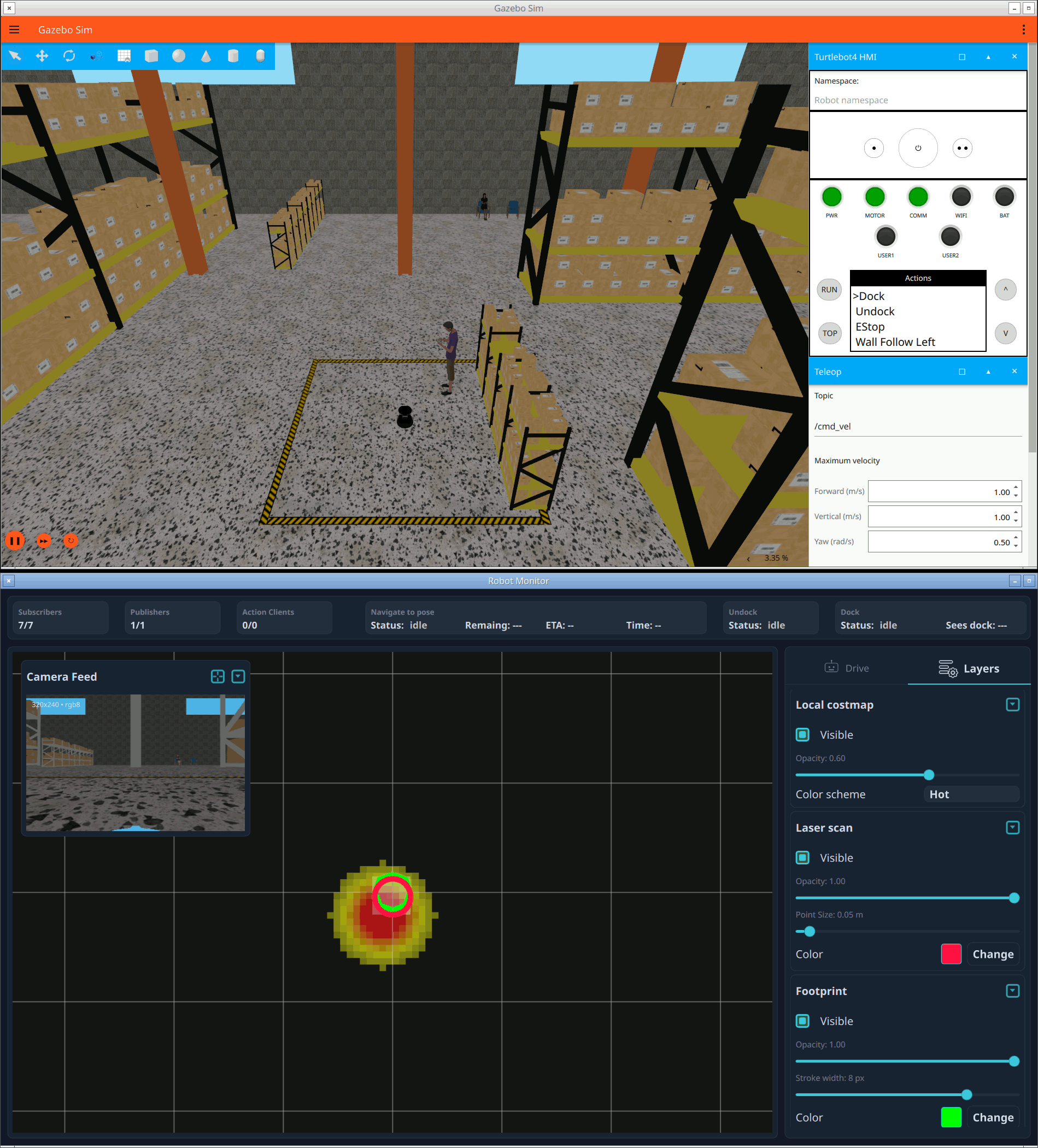
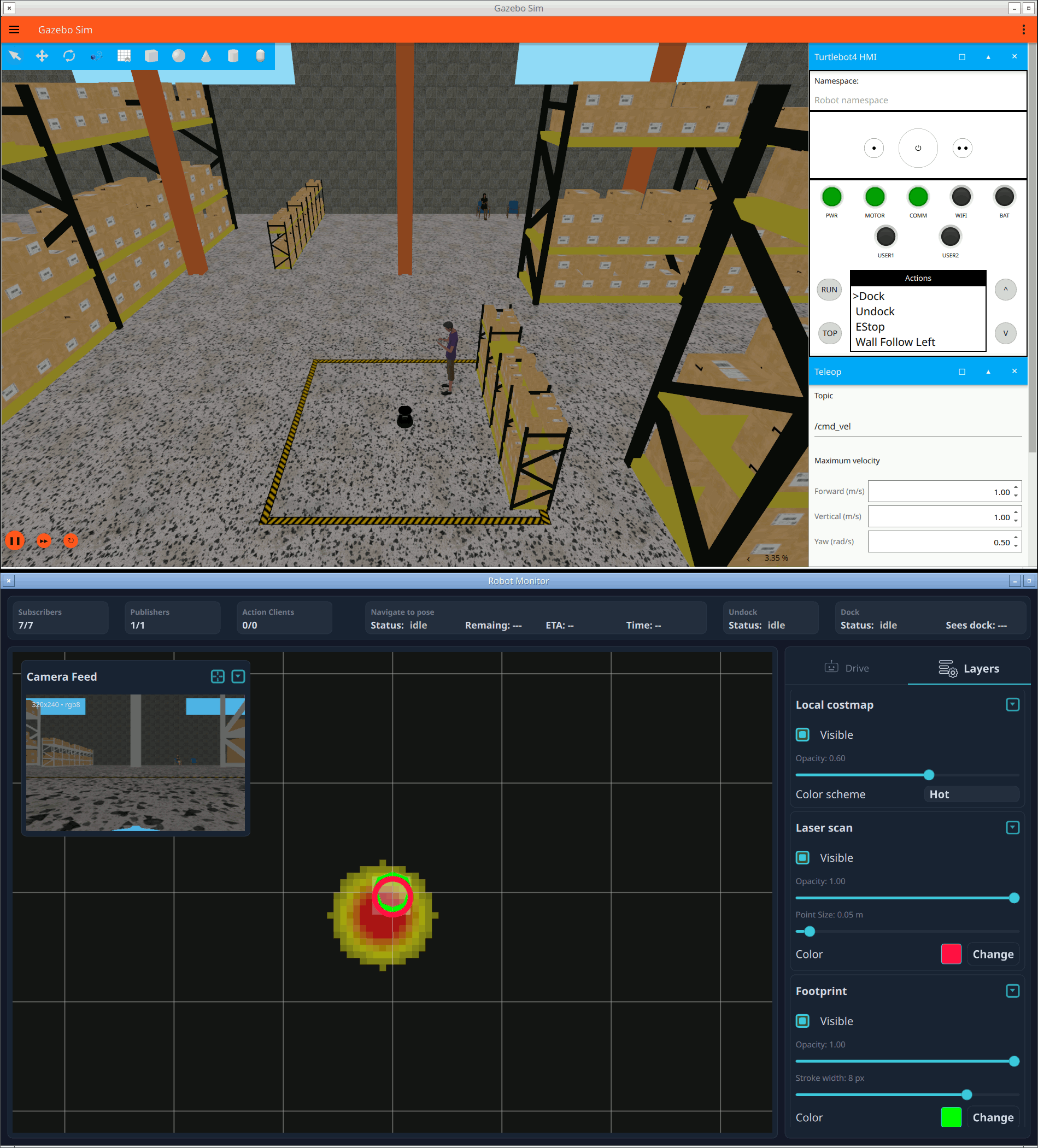
An RViz-style monitoring and control dashboard for a Nav2 mobile robot, combining a live 3D scene, a camera feed, and navigation actions.
Robot Monitor is a production-scale example: a live dashboard for a mobile robot running the Nav2 navigation stack (a simulated TurtleBot4 / iRobot Create3). It renders the SLAM map, costmaps, laser scan, planned path, and robot footprint in a Qt Quick 3D scene, streams the robot's camera into the UI, and drives the robot with both direct velocity commands and Nav2/docking actions. It brings together most of what the other examples show individually: many subscribers, a publisher, action clients, TF, and QoS tuning.
Running the example
- Install the TurtleBot4 simulation (this pulls in
nav2_msgs,irobot_create_msgs, and other dependencies):sudo apt-get install ros-jazzy-turtlebot4-simulator - Source your ROS 2 environment and launch Qt Creator from that shell.
- Open
examples/RobotMonitor/CMakeLists.txtin Qt Creator, then build and run. - Launch the simulation in a separate, ROS-sourced terminal:
ros2 launch turtlebot4_gz_bringup turtlebot4_gz.launch.py \
    nav2:=true slam:=true localization:=false rviz:=false
Note: You can add rviz:=true to compare the Robot Monitor scene with RViz, but running both may strain simulation performance on some systems.
Modules and imported packages
The example links the built-in NavMsgs, GeometryMsgs, and SensorMsgs modules, and additionally wraps distribution packages on demand. Its CMakeLists.txt builds IMPORT_PACKAGES conditionally with find_package(... QUIET), so the application still builds and runs when an optional package is missing:
qt_ros2_configure_target(appRobotMonitor
    CAPABILITIES PUBLISHER SUBSCRIBER ACTION
    MODULES QtRos2NavigationMessages QtRos2GeometryMessages QtRos2SensorMessages
    IMPORT_PACKAGES ${_optional_import_packages}  # nav2_msgs, irobot_create_msgs, ...
)
Wrapped packages appear under the QtRos2.Imported namespace — here QtRos2.Imported.Nav2Msgs (Nav2 actions) and QtRos2.Imported.IrobotCreateMsgs (dock/undock actions). Because those types may be absent, the example isolates them in a separate QML file loaded through a Loader (see Actions and reactive state below), so the app degrades gracefully rather than failing to load.
One node, many entities
All ROS entities are declared as children of a single Node { nodeName: "qt_robot_monitor" } in MainViewModel.qml. The node also computes connection statistics by reducing over its entities and testing them against the base types (Ros2SubscriberBase, Ros2PublisherBase, Ros2ActionClientBase) — which is what drives the "connected vs total" counters in the status row.
Subscribers and QoS presets
Different ROS topics need different Quality of Service, and the example deliberately picks a preset to match each one via the QualityOfService factory:
- The map is latched (published once and kept), so its subscriber uses
QualityOfService.transientLocal()to receive the last value on connect. - The laser scan and camera are high-rate sensor streams, so they use
QualityOfService.sensorData()(best-effort). - Costmaps, the planned path, the footprint, and
cmd_veluse the reliable default.
import QtRos2.Core
import QtRos2.NavMsgs
import QtRos2.SensorMsgs

OccupancyGridSubscriber {
    id: mapSubscriber
    topic: "map"
    qos: QualityOfService.transientLocal()   // latched map
}

LaserScanSubscriber {
    topic: "scan"
    qos: QualityOfService.sensorData()        // best-effort sensor stream
    onMessageReceived: _d.updateInstanceList(message)
}
The laser scan handler converts polar ranges into XY points and feeds a Qt Quick 3D InstanceList, so the whole scan is drawn as instanced geometry. The map and costmaps are rendered by an OccupancyGrid component, the planned path (nav_msgs/Path) and footprint (geometry_msgs/PolygonStamped) as polylines.
The 3D scene as a TF tree
The scene mirrors the robot's TF tree: nested Qt Quick 3D Node items whose position and rotation are bound to live transforms. Transforms come from a single FrameTransformer, which maintains a TF buffer from its own /tf and /tf_static subscriptions and emits transformsChanged whenever the tree updates. TFManager.qml reads each edge from it:
import QtRos2.Transforms

FrameTransformer { id: tfXform }

// Inside TFManager, refreshed on every transformsChanged:
if (frameTransformer.canTransform(parent, child)) {
    const tr = frameTransformer.lookupTransform(parent, child).transform
    root[prefix + "_p"] = GeometryHeleper.toVector3d(tr.translation)
    root[prefix + "_q"] = GeometryHeleper.toQuaternion(tr.rotation)
}
Each lookupTransform(parent, child) returns the child frame expressed in its parent — exactly the local transform a nested scene-graph node needs.
Bridging the camera image
The camera feed shows how a C++ item can consume a ROS message value type directly. RosImageItem is a QQuickItem with a single property typed as the sensor_msgs/Image value type:
Q_PROPERTY(Qtros2SensorMsgs::Image image READ image WRITE setImage NOTIFY imageChanged)In QML, the item is bound straight to the subscriber's message — there is no separate C++ subscription; the bridge delivers the message as an assignable value type:
import QtRos2.SensorMsgs

ImageSubscriber {
    id: cameraSubscriber
    topic: "oakd/rgb/preview/image_raw"
    qos: QualityOfService.sensorData()
}

RosImageItem { image: cameraSubscriber.message }   // in VideoView.qml
On the scene-graph thread the item maps the ROS encoding string to a QImage format, wraps the message bytes without copying, and uploads them as a texture. This is the general pattern for high-throughput data: let C++ consume the strongly-typed message value, not a raw ROS subscription.
Actions and reactive state
Driving the robot and commanding navigation use a publisher and three action clients. Direct driving publishes geometry_msgs/TwistStamped:
TwistStampedPublisher { id: cmdVelPublisher; topic: "cmd_vel" }

function publishVelocity(vel) {
    rosNode.cancelCurrentAction()          // manual driving preempts navigation
    cmdVelPublisher.publish({ twist: vel })
}
The action clients — NavigateToPoseActionClient (Nav2) plus DockActionClient and UndockActionClient (iRobot Create3) — live in Nav2IrobotActions.qml, which is brought in through a Loader so the app still runs when those imported packages are unavailable:
Loader {
    id: _actions
    source: "Nav2IrobotActions.qml"
    onLoaded: item.node = rosNode
}
// Every access is guarded: _actions.item?.navigateToPose(pose, yaw)
Although sendGoal() returns a JavaScript promise that resolves with the result, this example intentionally does not await it. Instead it drives the UI reactively from each client's state (an Ros2ActionClientBase action state) and feedback properties, and cancels with the imperative cancelGoal(). This "bind to state" style is often the cleanest way to keep a dashboard in sync with several concurrent operations.
The UI at a glance
- A top status row shows connection counters and live action status (navigation distance/time remaining, dock/undock progress).
- The center is a top-down Qt Quick 3D view: pan/zoom/rotate with the mouse, and Ctrl+drag to draw a navigation-goal arrow.
- A collapsible Camera Feed panel hosts the live video.
- A right-hand side panel offers a Drive tab (velocity D-pad plus dock/undock) and a Layers tab (per-layer visibility, opacity, and color scheme).
Files:
- RobotMonitor/CMakeLists.txt
- RobotMonitor/ColorSettingsEntry.qml
- RobotMonitor/DrivePanel.qml
- RobotMonitor/ExpandablePanel.qml
- RobotMonitor/GeometryHeleper.qml
- RobotMonitor/GridNode.qml
- RobotMonitor/GridPalette.qml
- RobotMonitor/GridVisualSettings.qml
- RobotMonitor/LaserScan.qml
- RobotMonitor/LaserScanVisualSettings.qml
- RobotMonitor/LayersPanel.qml
- RobotMonitor/Main.qml
- RobotMonitor/MainViewModel.qml
- RobotMonitor/MapVisualSettings.qml
- RobotMonitor/Nav2IrobotActions.qml
- RobotMonitor/NodeStatus.qml
- RobotMonitor/OccupancyGrid.qml
- RobotMonitor/SceneView.qml
- RobotMonitor/SchemeSelector.qml
- RobotMonitor/ShapeData.qml
- RobotMonitor/ShapeNode.qml
- RobotMonitor/SidePanel.qml
- RobotMonitor/StatusRow.qml
- RobotMonitor/StyledButton.qml
- RobotMonitor/StyledCheckBox.qml
- RobotMonitor/StyledSlider.qml
- RobotMonitor/TFManager.qml
- RobotMonitor/Theme.qml
- RobotMonitor/VideoView.qml
- RobotMonitor/VisualSettings.qml
- RobotMonitor/images/arrow.svg
- RobotMonitor/images/draghandle.svg
- RobotMonitor/images/gear.svg
- RobotMonitor/images/robot.svg
- RobotMonitor/images/triangle.svg
- RobotMonitor/main.cpp
- RobotMonitor/rosimageitem.cpp
- RobotMonitor/rosimageitem.h
Images:
See also TurtleSim Controller, R6 Robot Teach Pendant, Qt ROS2 Transforms QML Types, and Teleoperation and Remote Control.
© 2026 The Qt Company Ltd. Documentation contributions included herein are the copyrights of their respective owners. The documentation provided herein is licensed under the terms of the GNU Free Documentation License version 1.3 as published by the Free Software Foundation. Qt and respective logos are trademarks of The Qt Company Ltd. in Finland and/or other countries worldwide. All other trademarks are property of their respective owners.