
C
Qt Quick Ultralite listmodel Example
Demonstrates how to create mutable list models.
Overview
The example shows how to make a mutable model using Qul::ListModel. The model is used in a ListView to build a minimal alarm application.
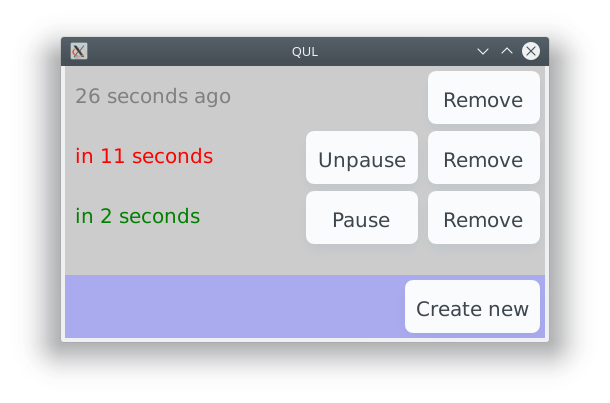
The example shows a list of alarms that can be paused, resumed, and removed. The Create new button adds a new alarm on every selection.
Target platforms
Project structure
List model
The mylistmodel.h file defines the list model.
First, it declares the list element data type:
// To create a custom ListModel<T>, we need to declare a type T that holds
// the data for each element and is equality comparable.
//
// Here, the data type is AlarmData and it holds the number of seconds before
// the alarm should trigger (negative if it has already triggered), as well
// as a running flag.
//! [ListModel data]
struct AlarmData
{
    AlarmData()
        : seconds(0)
        , running(false)
    {}

    AlarmData(int argSeconds, bool argRunning)
        : seconds(argSeconds)
        , running(argRunning)
    {}

    int seconds;
    bool running;
};

inline bool operator==(const AlarmData &lhs, const AlarmData &rhs)
{
    return lhs.seconds == rhs.seconds && lhs.running == rhs.running;
}
Then the AlarmModel is implemented based on ListModel<AlarmData>:
// Declare our AlarmModel.
//
// The only requirement is that we implement the pure virtual functions
// count() and data() from ListModel.
//
// We add the other functions to allow our UI to affect the model.
//! [custom ListModel]
struct AlarmModel : Qul::ListModel<AlarmData>
{
private:
    Qul::DynamicList<AlarmData> m_data;

public:
    // Implement the ListModel interface
    int count() const QUL_DECL_OVERRIDE { return m_data.count(); }
    AlarmData data(int index) const QUL_DECL_OVERRIDE { return m_data[index]; }
The model also contains functions for modifying the model from QML, like the addEntry() function.
    void addEntry(int seconds)
    {
        m_data.append(AlarmData(seconds, true));
        modelReset();
    }
List view
The ListView in listmodel.qml needs the AlarmModel, an instance of which is created as a child of the root object:
    // Create an instance of the custom AlarmModel
    AlarmModel {
        id: alarmModel
    }
The ListView uses the model instance to fill the alarmDelegate with data:
    // This ListView is the main display element. It creates an alarmDelegate
    // instance for each entry in alarmModel and listens to alarmModel changes.
    ListView {
        width: parent.width
        anchors.top: parent.top
        anchors.bottom: controls.top

        model: alarmModel
        delegate: alarmDelegate
    }
When the Create new button is clicked, a function on the model is called to add a new alarm:
        Button {
            id: createNewButton
            text: "Create new"
            anchors.right: parent.right
            onClicked: alarmModel.addEntry(15)
        }
Delegate
The delegate controls the look-and-feel of each entry in the ListView based on the data from the model.
    // Declare the delegate that the ListView (below) instantiates for each
    // entry in the alarm model.
    //
    // It shows information about the entry and two buttons, one to pause or
    // unpause the alarm, and one to remove it from the list.
    Component {
        id: alarmDelegate

        Item {
            width: root.width
            height: 60
For example, the state and labels of the buttons on each alarm is defined like this:
            Row {
                anchors.right: parent.right
                Button {
                    text: model.running ? "Pause" : "Unpause"
                    visible: model.seconds > 0
                    // The "index" property contains the model index for
                    // the current delegate instance.
                    onClicked: alarmModel.togglePause(index)
                }
                Button {
                    text: "Remove"
                    onClicked: alarmModel.remove(index)
                }
            }
Files:
See also Qul::ListModel and ListView.
Available under certain Qt licenses.
Find out more.
