
Climate Control QML Example
The Example shows how to access the climate control from QML.
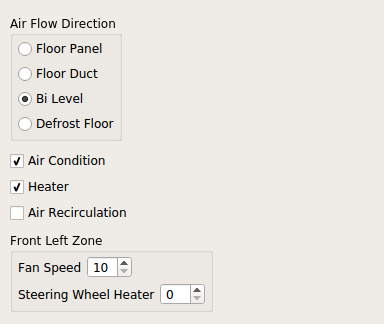
The example shows how to access the climate control from QML.
In the example, ClimateControl is created and autoDiscovery enabled. When autoDiscovery is enabled, the module starts searching for the presence of a plugin that implements QIfClimateControlBackendInterface.
ClimateControl {
    id: climateControl
    discoveryMode: ClimateControl.LoadOnlySimulationBackends
}
Note: To simplify the deployment process, this example loads a simulation backend.
If discovery fails, a message dialog is shown:
Component.onCompleted: {
    if (!climateControl.isValid)
        messageDialog.open()
}
As a Climate System can support multiple climate zones, we need to differentiate between the zones. A general zone can be used for settings that are applied to all zones.
General ClimateControl attribute values are handled in check boxes as follows:
GroupBox {
    title: "Air Flow Direction"

    ColumnLayout {
        CheckBox {
            text: "Windshield"
            checked: climateControl.airflowDirections & ClimateControl.Windshield
            onClicked: {
                if (checked)
                    climateControl.airflowDirections |= ClimateControl.Windshield
                else
                    climateControl.airflowDirections &= ~ClimateControl.Windshield
            }
        }

        CheckBox {
            text: "Dashboard"
            checked: climateControl.airflowDirections & ClimateControl.Dashboard
            onClicked: {
                if (checked)
                    climateControl.airflowDirections |= ClimateControl.Dashboard
                else
                    climateControl.airflowDirections &= ~ClimateControl.Dashboard
            }
        }

        CheckBox {
            text: "Floor"
            checked: climateControl.airflowDirections & ClimateControl.Floor
            onClicked: {
                if (checked)
                    climateControl.airflowDirections |= ClimateControl.Floor
                else
                    climateControl.airflowDirections &= ~ClimateControl.Floor
            }
        }
    }
}

CheckBox {
    text: "Air Condition"
    checked: climateControl.airConditioningEnabled
    onClicked: {
            climateControl.airConditioningEnabled = checked
    }
}

CheckBox {
    text: "Heater"
    checked: climateControl.heaterEnabled
    onClicked: {
            climateControl.heaterEnabled = checked
    }
}

CheckBox {
    text: "Air Recirculation"
    checked: climateControl.recirculationMode === ClimateControl.RecirculationOn
    onClicked: {
        if (checked)
            climateControl.recirculationMode = ClimateControl.RecirculationOn
        else
            climateControl.recirculationMode = ClimateControl.RecirculationOff
    }
}

ColumnLayout {
    RowLayout {

        Label {
            text: "Fan Speed"
        }

        SpinBox {
            value: climateControl.fanSpeedLevel
            onValueModified: {
                climateControl.fanSpeedLevel = value
            }
        }
    }

    RowLayout {

        Label {
            text: "Steering Wheel Heater"
        }

        SpinBox {
            value: climateControl.steeringWheelHeater
            onValueModified: {
                climateControl.steeringWheelHeater = value
            }
        }
    }
}
For the zoned ClimateControl, the zoneAt property is used for controlling the values from the front left climate zone:
GroupBox {
    id: zoneBox
    title: "Front Left Zone"

    ColumnLayout {
        RowLayout {

            Label {
                text: "Temperature"
            }

            SpinBox {
                value: climateControl.zoneAt.FrontLeft.targetTemperature
                onValueModified: {
                    climateControl.zoneAt.FrontLeft.targetTemperature = value
                }
            }
        }

        RowLayout {

            Label {
                text: "Seat Heater"
            }

            SpinBox {
                value: climateControl.zoneAt.FrontLeft.seatHeater
                onValueModified: {
                    climateControl.zoneAt.FrontLeft.seatHeater = value
                }
            }
        }
    }
}

GroupBox {
    title: "Front Right Zone"

    ColumnLayout {
        RowLayout {

            Label {
                text: "Temperature"
            }

            SpinBox {
                value: climateControl.zoneAt.FrontRight.targetTemperature
                onValueModified: {
                    climateControl.zoneAt.FrontRight.targetTemperature = value
                }
            }
        }

        RowLayout {

            Label {
                text: "Seat Heater"
            }

            SpinBox {
                value: climateControl.zoneAt.FrontRight.seatHeater
                onValueModified: {
                    climateControl.zoneAt.FrontRight.seatHeater = value
                }
            }
        }
    }
}

GroupBox {
    title: "Rear Zone"

    ColumnLayout {
        RowLayout {

            Label {
                text: "Temperature"
            }

            SpinBox {
                value: climateControl.zoneAt.Rear.targetTemperature
                onValueModified: {
                    climateControl.zoneAt.Rear.targetTemperature = value
                }
            }
        }

        RowLayout {

            Label {
                text: "Seat Heater"
            }

            SpinBox {
                value: climateControl.zoneAt.Rear.seatHeater
                onValueModified: {
                    climateControl.zoneAt.Rear.seatHeater = value
                }
            }
        }
    }
}© 2026 The Qt Company Ltd. Documentation contributions included herein are the copyrights of their respective owners. The documentation provided herein is licensed under the terms of the GNU Free Documentation License version 1.3 as published by the Free Software Foundation. Qt and respective logos are trademarks of The Qt Company Ltd. in Finland and/or other countries worldwide. All other trademarks are property of their respective owners.
