
Imagine Style
The Imagine Style is based on configurable image assets. More...
| Import Statement: | import QtQuick.Controls.Imagine |
| Since: | Qt 5.10 |
Attached Properties
- path : string
Detailed Description
The Imagine style is based on image assets. The style comes with a default set of images, but the images can be easily changed by providing a directory with images using a predefined naming convention.
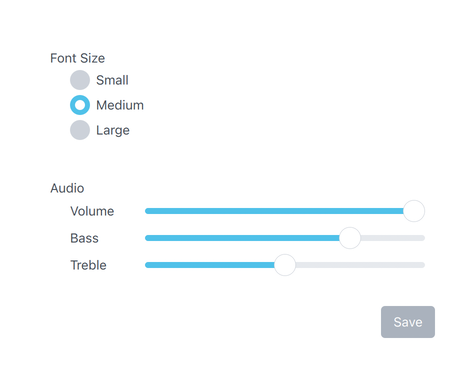
The Imagine style with the default images
To run an application with the Imagine style, see Using Styles in Qt Quick Controls.
File Names
The image files are named using the following convention:
<control>-<element>-<states>
The <control> and <element> sections are mandatory, but the <states> section is optional. For example, if a single file named "button-background.9.png" is provided for Button, it will be used for every state that Button supports. It is up to the developer to decide the set of states that they will provide images for. However, it is recommended to provide images for the most common control states where possible, such as disabled, pressed, etc. This will ensure that interactive controls visually behave as the end user would expect them to.
Element Reference
The following table lists which elements are supported for each control, along with the possible states for that element, and the file extension that it expects. An element is an image that represents a certain visual part of the control. For example, Button's "background" element represents its background.
| Control | Element | States | Extension |
|---|---|---|---|
| ApplicationWindow | background | active | .9.png (or .png) |
| BusyIndicator | animation | disabled, running, mirrored, hovered | .webp |
| background | same as above | .webp | |
| Button | background | disabled, pressed, checked, checkable, focused, highlighted, flat, mirrored, hovered | .9.png |
| CheckBox | background | disabled, pressed, checked, partially-checked, focused, mirrored, hovered | .9.png (or .png) |
| indicator | same as above | .png | |
| CheckDelegate | background | disabled, pressed, checked, partially-checked, focused, highlighted, mirrored, hovered | .9.png (or .png) |
| indicator | same as above | .png | |
| ComboBox | background | disabled, pressed, editable, open, focused, mirrored, hovered, flat | .9.png (or .png) |
| indicator | same as above | .png | |
| popup | same as above | .9.png (or .png) | |
| DelayButton | background | disabled, pressed, checked, checkable, focused, mirrored, hovered | .9.png (or .png) |
| progress | same as above | .9.png (or .png) | |
| mask | same as above | .9.png (or .png) | |
| Dial | background1 | disabled, pressed, focused, mirrored, hovered | .9.png (or .png) |
| handle | same as above | .9.png (or .png) | |
| Dialog | background | modal, dim | .9.png (or .png) |
| title | same as above | .9.png (or .png) | |
| overlay | modal | .9.png (or .png) | |
| DialogButtonBox | background | disabled, mirrored | .9.png (or .png) |
| Drawer | background | modal, dim, top, left, right, bottom | .9.png (or .png) |
| overlay | modal | .9.png (or .png) | |
| Frame | background | disabled, mirrored | .9.png (or .png) |
| GroupBox | background | disabled, mirrored | .9.png (or .png) |
| title | same as above | .9.png (or .png) | |
| ItemDelegate | background | disabled, pressed, focused, highlighted, mirrored, hovered | .9.png (or .png) |
| Label | background | disabled, mirrored, hovered | .9.png (or .png) |
| Menu | background | modal, dim | .9.png (or .png) |
| overlay | modal | .9.png (or .png) | |
| MenuItem | arrow | disabled, pressed, checked, focused, highlighted, mirrored, hovered | .png |
| background | same as above | .9.png (or .png) | |
| indicator | same as above | .png | |
| MenuSeparator | background | disabled, mirrored | .9.png (or .png) |
| separator | same as above | .9.png (or .png) | |
| Page | background | disabled, mirrored | .9.png (or .png) |
| PageIndicator | background | disabled, mirrored, hovered | .9.png (or .png) |
| delegate | disabled, pressed, current, mirrored, hovered | .png | |
| Pane | background | disabled, mirrored | .9.png (or .png) |
| Popup | background | modal, dim | .9.png (or .png) |
| overlay | modal | .9.png (or .png) | |
| ProgressBar | animation | disabled, mirrored, hovered | .png |
| background | disabled, indeterminate, mirrored, hovered | .9.png (or .png) | |
| mask | same as above | .9.png (or .png) | |
| progress | same as above | .9.png (or .png) | |
| RadioButton | background | disabled, pressed, checked, focused, mirrored, hovered | .9.png (or .png) |
| indicator | same as above | .png | |
| RadioDelegate | background | disabled, pressed, checked, focused, highlighted, mirrored, hovered | .9.png (or .png) |
| indicator | same as above | .png | |
| RangeSlider | background | vertical, horizontal, disabled, focused, mirrored, hovered | .9.png (or .png) |
| RangeSlider | progress | same as above | .9.png (or .png) |
| handle | first, second, vertical, horizontal, disabled, pressed, focused, mirrored, hovered | .png | |
| RoundButton | background | disabled, pressed, checked, checkable, focused, highlighted, flat, mirrored, hovered | .9.png (or .png) |
| ScrollBar | background | vertical, horizontal, disabled, interactive, pressed, mirrored, hovered | .9.png (or .png) |
| handle | same as above | .9.png (or .png) | |
| ScrollIndicator | background | vertical, horizontal, disabled, mirrored, hovered | .9.png (or .png) |
| handle | same as above | .9.png (or .png) | |
| ScrollView | background | disabled, mirrored | .9.png (or .png) |
| Slider | background | vertical, horizontal, disabled, pressed, focused, mirrored, hovered | .9.png (or .png) |
| handle | same as above | .9.png (or .png) | |
| progress | same as above | .9.png (or .png) | |
| SpinBox | background | disabled, editable, focused, mirrored, hovered | .9.png (or .png) |
| editor | disabled, focused, mirrored, hovered | .9.png (or .png) | |
| indicator | up, down, disabled, editable, pressed, focused, mirrored, hovered | .9.png (or .png) | |
| StackView | background | disabled, mirrored | .9.png (or .png) |
| SwipeDelegate | background | disabled, pressed, focused, highlighted, mirrored, hovered | .9.png (or .png) |
| SwipeView | background | vertical, horizontal, disabled, interactive, focused, mirrored | .9.png (or .png) |
| Switch | background | disabled, pressed, checked, focused, mirrored, hovered | .9.png (or .png) |
| handle | same as above | .9.png (or .png) | |
| indicator | same as above | .9.png (or .png) | |
| SwitchDelegate | background | disabled, pressed, checked, focused, highlighted, mirrored, hovered | .9.png (or .png) |
| handle | same as above | .9.png (or .png) | |
| indicator | same as above | .9.png (or .png) | |
| TabBar | background | disabled, header, footer, mirrored | .9.png (or .png) |
| TabButton | background | disabled, pressed, checked, focused, mirrored, hovered | .9.png (or .png) |
| TextArea | background | disabled, focused, mirrored, hovered | .9.png (or .png) |
| TextField | background | disabled, focused, mirrored, hovered | .9.png (or .png) |
| ToolBar | background | disabled, header, footer, mirrored | .9.png (or .png) |
| ToolButton | background | disabled, pressed, checked, checkable, focused, highlighted, flat, mirrored, hovered | .9.png (or .png) |
| ToolSeparator | background | vertical, horizontal, disabled, mirrored | .9.png (or .png) |
| separator | same as above | .9.png (or .png) | |
| ToolTip | background | .9.png (or .png) | |
| Tumbler | background | disabled, focused, mirrored, hovered | .9.png (or .png) |
Note: 1) The Imagine style Dial does not yet support the startAngle and endAngle properties that were introduced in Qt 6.6, and instead uses a fixed background image.
Asset Examples
The following table lists examples of assets (taken from the default Imagine style assets) for all controls. The list is not exhaustive, as not all elements need assets, but it can be used as a guide when creating your own assets.
The template that these assets were exported from is available as a Sketch project.
| Control | Element | States | Asset | Notes |
|---|---|---|---|---|
| ApplicationWindow | background |
| See footnote 1 | |
| overlay |
| See footnote 1 | ||
| overlay | modal |
| See footnote 1 | |
| Button | background |
| ||
| background | disabled |
| ||
| background | focused |
| ||
| background | pressed |
| ||
| background | checked |
| ||
| background | checked, disabled |
| ||
| background | checked, focused |
| ||
| background | checked, hovered |
| ||
| background | highlighted |
| ||
| background | highlighted, disabled |
| ||
| background | highlighted, focused |
| ||
| background | highlighted, hovered |
| ||
| background | highlighted, pressed |
| ||
| background | highlighted, checked |
| ||
| background | hovered |
| ||
| background | flat |
| ||
| background | flat, disabled |
| ||
| background | flat, hovered |
| ||
| background | flat, pressed |
| ||
| background | flat, checked |
| ||
| CheckBox | indicator |
| ||
| indicator | disabled |
| ||
| indicator | pressed |
| ||
| indicator | checked |
| ||
| indicator | checked, pressed |
| ||
| indicator | checked, hovered |
| ||
| indicator | checked, focused |
| ||
| indicator | partially, checked |
| ||
| indicator | partially, checked, pressed |
| ||
| indicator | partially, checked, focused |
| ||
| indicator | partially, checked, hovered |
| ||
| indicator | focused |
| ||
| indicator | hovered |
| ||
| CheckDelegate | background |
| ||
| background | disabled |
| ||
| background | pressed |
| ||
| background | focused |
| ||
| background | hovered |
| ||
| indicator |
| |||
| indicator | disabled |
| ||
| indicator | pressed |
| ||
| indicator | checked |
| ||
| indicator | checked, pressed |
| ||
| indicator | checked, focused |
| ||
| indicator | checked, hovered |
| ||
| indicator | focused |
| ||
| indicator | hovered |
| ||
| indicator | partially, checked |
| ||
| indicator | partially, checked, pressed |
| ||
| indicator | partially, checked, focused |
| ||
| indicator | partially, checked, hovered |
| ||
| indicator | hovered |
| ||
| ComboBox | background |
| ||
| background | disabled |
| ||
| background | focused |
| ||
| background | hovered |
| ||
| background | pressed |
| ||
| background | open |
| ||
| background | editable |
| ||
| background | editable, focused |
| ||
| background | editable, disabled |
| ||
| indicator |
| |||
| indicator | disabled |
| ||
| indicator | editable |
| ||
| indicator | editable, disabled |
| ||
| indicator | editable, mirrored |
| ||
| indicator | editable, mirrored, disabled |
| ||
| popup |
| |||
| DelayButton | background |
| ||
| background | disabled |
| ||
| background | disabled, checked |
| ||
| background | focused |
| ||
| background | pressed |
| ||
| background | checked |
| ||
| background | checked, focused |
| ||
| background | checked, hovered |
| ||
| background | hovered |
| ||
| progress |
| |||
| progress | disabled |
| ||
| mask |
| |||
| Dial | background |
| ||
| background | disabled |
| ||
| background | focused |
| ||
| handle |
| |||
| handle | disabled |
| ||
| handle | focused |
| ||
| handle | focused, pressed |
| ||
| handle | focused, hovered |
| ||
| handle | pressed |
| ||
| handle | hovered |
| ||
| Dialog | background |
| ||
| overlay |
| See footnote 1 | ||
| overlay | modal |
| See footnote 1 | |
| DialogButtonBox | background |
| ||
| Drawer | background | left |
| |
| background | right |
| ||
| background | top |
| ||
| background | bottom |
| ||
| overlay |
| See footnote 1 | ||
| overlay | modal |
| See footnote 1 | |
| Frame | background |
| ||
| GroupBox | background |
| ||
| title |
| |||
| ItemDelegate | background |
| ||
| background | disabled |
| ||
| background | pressed |
| ||
| background | focused |
| ||
| background | hovered |
| ||
| background | highlighted |
| ||
| Menu | background |
| ||
| MenuItem | background |
| ||
| background | highlighted |
| ||
| arrow |
| |||
| arrow | mirrored |
| ||
| arrow | disabled |
| ||
| arrow | mirrored, disabled |
| ||
| indicator |
| |||
| indicator | disabled |
| ||
| indicator | pressed |
| ||
| indicator | checked |
| ||
| indicator | checked, pressed |
| ||
| indicator | checked, focused |
| ||
| indicator | checked, hovered |
| ||
| indicator | focused |
| ||
| indicator | hovered |
| ||
| MenuSeparator | separator |
| ||
| Page | background |
| See footnote 1 | |
| PageIndicator | delegate |
| ||
| delegate | disabled |
| ||
| delegate | disabled, current |
| ||
| delegate | pressed |
| ||
| delegate | current |
| ||
| Pane | background |
| ||
| Popup | background |
| See footnote 1 | |
| overlay |
| See footnote 1 | ||
| overlay | modal |
| ||
| ProgressBar | background |
| ||
| progress |
| |||
| mask |
| |||
| RadioButton | indicator |
| ||
| indicator | disabled |
| ||
| indicator | pressed |
| ||
| indicator | checked |
| ||
| indicator | checked, focused |
| ||
| indicator | checked, hovered |
| ||
| indicator | checked, pressed |
| ||
| indicator | focused |
| ||
| indicator | hovered |
| ||
| RadioDelegate | background |
| ||
| background | disabled |
| ||
| background | pressed |
| ||
| background | focused |
| ||
| background | hovered |
| ||
| indicator |
| |||
| indicator | disabled |
| ||
| indicator | pressed |
| ||
| indicator | checked |
| ||
| indicator | checked, focused |
| ||
| indicator | checked, hovered |
| ||
| indicator | checked, pressed |
| ||
| indicator | focused |
| ||
| indicator | hovered |
| ||
| RangeSlider | background | vertical |
| |
| background | horizontal |
| ||
| progress | vertical |
| ||
| progress | vertical, disabled |
| ||
| progress | horizontal |
| ||
| progress | horizontal, disabled |
| ||
| handle |
| |||
| handle | disabled |
| ||
| handle | focused |
| ||
| handle | focused, hovered |
| ||
| handle | focused, pressed |
| ||
| handle | hovered |
| ||
| handle | pressed |
| ||
| RoundButton | background |
| ||
| background | disabled |
| ||
| background | disabled, checked |
| ||
| background | focused |
| ||
| background | pressed |
| ||
| background | checked |
| ||
| background | checked, focused |
| ||
| background | checked, hovered |
| ||
| background | highlighted |
| ||
| background | highlighted, pressed |
| ||
| background | highlighted, focused |
| ||
| background | highlighted, hovered |
| ||
| background | hovered |
| ||
| ScrollBar | handle |
| ||
| handle | disabled |
| ||
| handle | interactive |
| ||
| handle | interactive, disabled |
| ||
| handle | interactive, pressed |
| ||
| handle | interactive, hovered |
| ||
| ScrollIndicator | handle |
| ||
| Slider | background | vertical |
| |
| background | horizontal |
| ||
| progress | vertical |
| ||
| progress | vertical, disabled |
| ||
| progress | horizontal |
| ||
| progress | horizontal, disabled |
| ||
| handle |
| |||
| handle | disabled |
| ||
| handle | focused |
| ||
| handle | focused, hovered |
| ||
| handle | focused, pressed |
| ||
| handle | hovered |
| ||
| handle | pressed |
| ||
| SpinBox | background |
| ||
| background | disabled |
| ||
| background | focused |
| ||
| background | editable |
| ||
| indicator | up |
| ||
| indicator | up, disabled |
| ||
| indicator | up, pressed |
| ||
| indicator | up, focused |
| ||
| indicator | up, mirrored |
| ||
| indicator | up, hovered |
| ||
| indicator | up, editable |
| ||
| indicator | up, editable, pressed |
| ||
| indicator | up, editable, focused |
| ||
| indicator | up, editable, mirrored |
| ||
| indicator | up, editable, hovered |
| ||
| indicator | down |
| ||
| indicator | down, disabled |
| ||
| indicator | down, pressed |
| ||
| indicator | down, focused |
| ||
| indicator | down, mirrored |
| ||
| indicator | down, hovered |
| ||
| indicator | down, editable |
| ||
| indicator | down, editable, pressed |
| ||
| indicator | down, editable, focused |
| ||
| indicator | down, editable, mirrored |
| ||
| indicator | down, editable, hovered |
| ||
| SwipeDelegate | background |
| ||
| background | disabled |
| ||
| background | pressed |
| ||
| background | focused |
| ||
| background | hovered |
| ||
| Switch | indicator |
| ||
| indicator | disabled |
| ||
| indicator | pressed |
| ||
| indicator | checked |
| ||
| indicator | checked, focused |
| ||
| indicator | checked, hovered |
| ||
| indicator | checked, pressed |
| ||
| indicator | focused |
| ||
| indicator | hovered |
| ||
| handle |
| |||
| handle | disabled |
| ||
| handle | pressed |
| ||
| SwitchDelegate | background |
| ||
| background | disabled |
| ||
| background | pressed |
| ||
| background | focused |
| ||
| background | hovered |
| ||
| indicator |
| |||
| indicator | disabled |
| ||
| indicator | pressed |
| ||
| indicator | checked |
| ||
| indicator | checked, focused |
| ||
| indicator | checked, hovered |
| ||
| indicator | checked, pressed |
| ||
| indicator | focused |
| ||
| indicator | hovered |
| ||
| handle |
| |||
| handle | disabled |
| ||
| TabBar | background |
| ||
| TabButton | background |
| ||
| background | disabled |
| ||
| background | pressed |
| ||
| background | checked |
| ||
| background | hovered |
| ||
| background | disabled, checked |
| ||
| TextArea | background |
| ||
| background | disabled |
| ||
| background | focused |
| ||
| TextField | background |
| ||
| background | disabled |
| ||
| background | focused |
| ||
| ToolBar | background |
| ||
| ToolButton | background |
| ||
| background | disabled, checked |
| ||
| background | focused |
| ||
| background | pressed |
| ||
| background | checked |
| ||
| background | checked, focused |
| ||
| background | checked, hovered |
| ||
| background | hovered |
| ||
| ToolSeparator | separator | horizontal |
| |
| separator | vertical |
| ||
| ToolTip | background |
|


































1 A 1x1 image containing one color, stretched to fill the control.
9-Patch Images
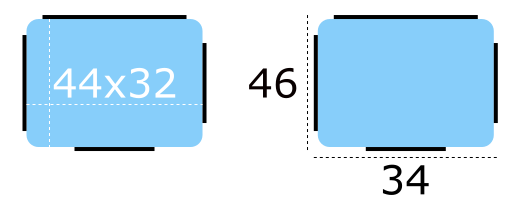
The Imagine style uses 9-patch images in order to give designers control over how a particular element responds to being resized. Here is an example of a 9-patch image that represents a Button's background, alongside a magnified version (to make it easier to see the 9-patch lines):

The content of the image is 44 pixels wide by 32 pixels high. Every 9-patch image needs a one pixel thick line (collectively referred to as "9-patch lines") around every side, so the actual size of the image becomes 46 pixels wide by 34 pixels high. Note that the 9-patch lines must be one pixel thick regardless of the target DPI of the image. For example, the 9-patch lines for button-background.9.png and button-background@2x.9.png must both be one pixel thick.
The 9-patch lines must be black, and the remaining areas must be transparent or white:
Stretchable Areas
The 9-patch lines on the top and left edges determine which parts of the image are stretched when it is resized.
Below are examples of the 9-patch image being resized to one and a half times its original size in various dimensions:
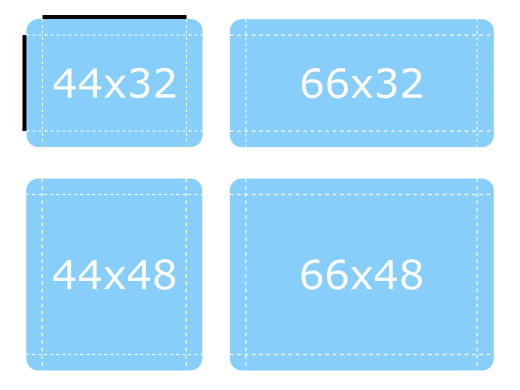
Notice how the the rounded corners keep their original size, as they are outside the range of the lines.
Padding Areas
The 9-patch lines on the right and bottom edges determine how much space is available for the control's contentItem, which means it can also be thought of as controlling the padding. For a diagram that illustrates padding, see Control Layout.
Below are more examples of the 9-patch image being resized, but this time demonstrating how the padding 9-patch lines work.
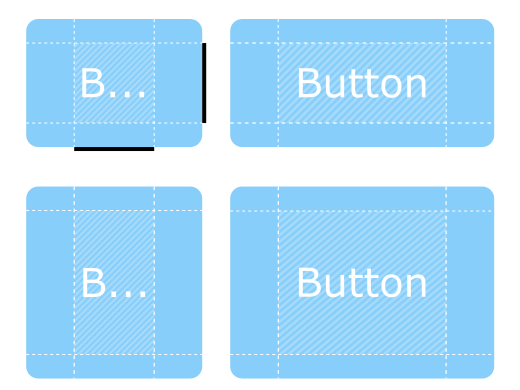
The contentItem can take up as much space as it needs within the shaded areas. If the padding lines are left out, the contentItem will take as much space as it needs without exceeding the stretchable areas.
Inset Areas
In some cases it is necessary for a control to have a drop shadow, for example. However, if we were to add a drop shadow to the button above, it would affect its size, which presents problems for both layouting and mouse/touch input boundaries.
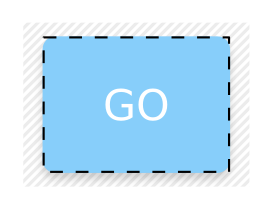
Inset areas accounts for this by telling the control that a certain area of the 9-patch image should go outside of the control:
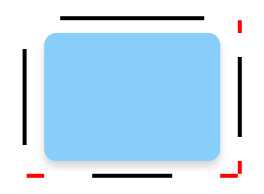
In the image below, the dashed line represents the button's clickable area, as well as the space that it will take up in a layout. The shadow is marked by the striped area behind it:
Exporting 9-Patch Images
Various vector and bitmap editors can be used to create 9-patch images suitable for use with the Imagine style. The following sections briefly explain the export process for each editor, and the last section explains how to ensure the exported images are 9-patch-conformant.
Affinity Designer
See Affinity's Export Settings documentation.
Adobe Illustrator
See Adobe's Asset Export panel documentation.
Adobe Photoshop
See Adobe's Generate image assets from layers documentation.
Inkscape
The Inkscape 9-Patch Export Extension can be used to export assets with Inkscape.
Sketch
See Sketch's Exporting documentation.
Qt Quick Controls also provides a plugin for Sketch that automatically fixes the thickness of the 9-patch lines after the assets are exported. To install this file, double-click on it. Once Sketch has confirmed that the 9-patch export plugin has been installed, the plugin will automatically process images when they are exported.
Fixing 9-Patch Lines
When exporting 9-patch images in several DPI variants (@2x, @3x, etc.), the 9-patch lines will typically be scaled up along with the image. There are several ways to fix this, but perhaps the simplest approach is to use ImageMagick's mogrify tool. The tool has a -shave feature that can be used to crop the image to reduce the thickness of the 9-patch lines:
mogrify -shave 1x1 -path path/to/images *@2x.9.png
mogrify -shave 2x2 -path path/to/images *@3x.9.png
mogrify -shave 3x3 -path path/to/images *@4x.9.png
Regular DPI images (those without the @Nx prefix) are not affected, so it is only necessary to run the command on images intended for high DPI displays.
Animated Images
The WebP and GIF animated image formats are supported by the Imagine style.
Customization
Path
The Imagine style allows customizing the path that is used to do the image asset selection. The path can be specified for any window or item, and it automatically propagates to children in the same manner as fonts. In the following example, the window and all three radio buttons appear with dark image assets (files that are located in "qrc:/themes/dark").
|
|
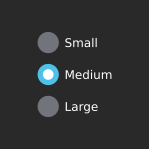
In addition to specifying the path in QML, it is also possible to specify it via an environment variable or in a configuration file. Attributes specified in QML take precedence over all other methods.
Configuration File
| Variable | Description |
|---|---|
Path | Specifies the path to the directory that contains the Imagine style assets. If not specified, the built-in assets are used. For example, to specify a path to a directory stored in the resource system: To specify a relative path to a local directory: Note: Due to a technical limitation, the path should not be named "imagine" if it is relative to the |
See Qt Quick Controls Configuration File for more details about the configuration file.
Environment Variables
| Variable | Description |
|---|---|
QT_QUICK_CONTROLS_IMAGINE_PATH | Specifies the path to the directory that contains the Imagine style assets. If not specified, the built-in assets are used. For example, to specify a path to a directory stored in the resource system: To specify a relative path to a local directory: Note: Due to a technical limitation, the path should not be named "imagine" if it is relative to the |
QT_QUICK_CONTROLS_IMAGINE_SMOOTH | Set to 1 to enable smooth scaling for 9-patch images. This environment variable was added in Qt 6.5. |
See Supported Environment Variables in Qt Quick Controls for the full list of supported environment variables.
Palette
The Imagine style supports palette customization via the palette property and the qtquickcontrols2.conf file. As with other styles, the exact palette roles that the Imagine style uses are style-dependent. However, as most of the visual appearance of controls (for example: backgrounds) are managed through image assets, only the roles that are typically used for text will have an effect.
Font
Custom fonts can be set via the font property and the configuration file.
Dependency
The Imagine style must be separately imported to gain access to the attributes that are specific to the Imagine style. It should be noted that regardless of the references to the Imagine style, the same application code runs with any other style. Imagine-specific attributes only have an effect when the application is run with the Imagine style.
If the Imagine style is imported in a QML file that is always loaded, the Imagine style must be deployed with the application in order to be able to run the application regardless of which style the application is run with. By using file selectors, style-specific tweaks can be applied without creating a hard dependency to a style.
See also Styling Qt Quick Controls
Attached Property Documentation
Imagine.path : string |
This attached property holds the path to the image assets...
Button {
    Imagine.path: "qrc:/themes/dark"
}
Related Information
© 2026 The Qt Company Ltd. Documentation contributions included herein are the copyrights of their respective owners. The documentation provided herein is licensed under the terms of the GNU Free Documentation License version 1.3 as published by the Free Software Foundation. Qt and respective logos are trademarks of The Qt Company Ltd. in Finland and/or other countries worldwide. All other trademarks are property of their respective owners.
