
Using UI components
A component is specified within one file (with the file extension ui.qml or .qml). For example, a Button component may be defined in Button.ui.qml. Typically, the visual appearance of a component is defined in a UI file (ui.qml). To create component files, you can use wizard templates, or move component instances into separate component files.
The Component view lists the available components.
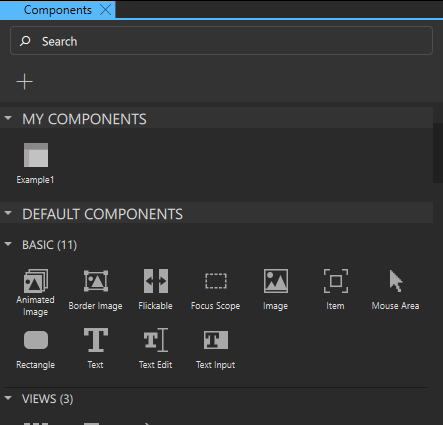
Components displays QML types from Qt modules that you import to the project. The modules contain visual components, such as basic shapes and UI controls, and add functionality to the project.
You can style the UI controls to have the look and feel of a particular operating system, such as macOS, Windows, Android, or iOS.
Some modules have no visible components. For example, the Qt.Multimedia module adds support for audio and video files to your UI.
For more information about creating your own components, see Create custom components.
Component IDs
Each component and each instance of a component has an ID that uniquely identifies it and enables other components' properties to be bound to it. An ID must be unique, it must begin with a lower-case letter or an underscore character, and it can contain only letters, numbers, and underscore characters.
For more information, see The id Attribute.
Using components economically
Components come with performance costs. To use components efficiently and economically:
- Componentize your design by packaging your resources into reusable components that can be conveniently recombined to suit the needs of your UI.
- Use as few components as necessary. To minimize the number of components, use alias properties and states to create the differences in your component instances. We recommend reusing components instead of duplicating them, so the components do not need to be processed as completely new component types. This reduces loading and compilation time as well as the size of the binary.
- Any content that is data-driven should be exported as a public property (alias property) of the relevant component. For example, a speedometer should have an
intorrealproperty for speed to which the UI is bound. - Separate UI from the application logic. Designers should work with the UI files (
.ui.qml), while developers should work on the corresponding implementation files (.qml) to define their programmatic behaviors or JavaScript. This enables iteration from both the design and development side of the process without the risk of overwriting each other's work.
See also How to: Use UI components, Qt Quick UI design, and Designing Qt Quick UIs.
Copyright © The Qt Company Ltd. and other contributors. Documentation contributions included herein are the copyrights of their respective owners. The documentation provided herein is licensed under the terms of the GNU Free Documentation License version 1.3 as published by the Free Software Foundation. Qt and respective logos are trademarks of The Qt Company Ltd in Finland and/or other countries worldwide. All other trademarks are property of their respective owners.
