
Combo Widget Mapper Example
The Combo Widget Mapper example shows how to use a QDataWidgetMapper to map information from a model to specific widgets on a form.
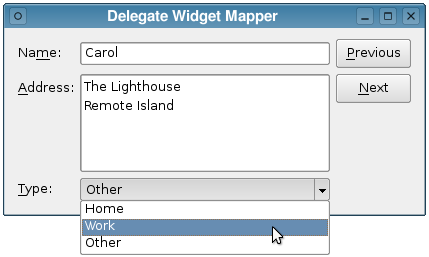
We create a Window class with an almost identical user interface, except that, instead of providing a spin box so that each person's age can be entered, we provide a combo box to allow their addresses to be classified as "Home", "Work" or "Other".
Window Class Definition
The class provides a constructor, a slot to keep the buttons up to date, and a private function to set up the model:
class Window : public QWidget
{
    Q_OBJECT

public:
    Window(QWidget *parent = nullptr);

private slots:
    void updateButtons(int row);

private:
    void setupModel();

    QLineEdit *nameEdit;
    QTextEdit *addressEdit;
    QComboBox *typeComboBox;
    QPushButton *nextButton;
    QPushButton *previousButton;

    QStandardItemModel *model = nullptr;
    QDataWidgetMapper *mapper = nullptr;
};
In addition to the QDataWidgetMapper object and the controls used to make up the user interface, we use a QStandardItemModel to hold our data.
Window Class Implementation
The constructor of the Window class can be explained in three parts. In the first part, we set up the widgets used for the user interface:
Window::Window(QWidget *parent)
    : QWidget(parent),
      nameEdit(new QLineEdit),
      addressEdit(new QTextEdit),
      typeComboBox(new QComboBox),
      nextButton(new QPushButton(tr("&Next"))),
      previousButton(new QPushButton(tr("&Previous")))
{
Note that we set up the mapping the combo box in the same way as for other widgets, but that we apply its own model holding information about the types of address to it, so that it will display the address type string rather than the data from the model containing data about each person:
typeComboBox->setModel(new QStringListModel({ tr("Home"), tr("Work"), tr("Other") }, this));
Next, we set up the widget mapper, relating each input widget to a column in the model specified by the call to setModel():
    mapper = new QDataWidgetMapper(this);
    mapper->setModel(model);
    mapper->addMapping(nameEdit, 0);
    mapper->addMapping(addressEdit, 1);
    mapper->addMapping(typeComboBox, 2, "currentIndex");
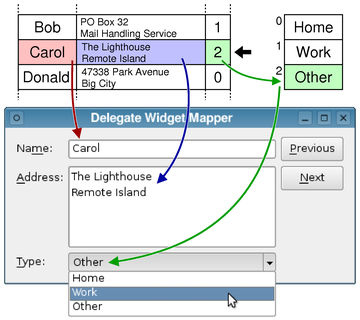
For the combo box, we pass an extra argument to tell the widget mapper which property to relate to values from the model. As a result, the user is able to select an item from the combo box, and the corresponding value stored in the widget's currentIndex property will be stored in the model.
The rest of the constructor sets up connections and layouts:
    connect(previousButton, &QAbstractButton::clicked,
            mapper, &QDataWidgetMapper::toPrevious);
    connect(nextButton, &QAbstractButton::clicked,
            mapper, &QDataWidgetMapper::toNext);
    connect(mapper, &QDataWidgetMapper::currentIndexChanged,
            this, &Window::updateButtons);

    auto *formLayout = new QFormLayout;
    formLayout->addRow(tr("Na&me:"), nameEdit);
    formLayout->addRow(tr("&Address:"), addressEdit);
    formLayout->addRow(tr("&Type:"), typeComboBox);

    auto *buttonLayout = new QVBoxLayout;
    buttonLayout->addWidget(previousButton);
    buttonLayout->addWidget(nextButton);
    buttonLayout->addStretch();

    auto *mainLayout = new QHBoxLayout(this);
    mainLayout->addLayout(formLayout);
    mainLayout->addLayout(buttonLayout);

    setWindowTitle(tr("Delegate Widget Mapper"));
    mapper->toFirst();
}
The model is initialized in the window's setupModel() function. Here, we create a standard model with 5 rows and 3 columns, populated from an array of struct Person. In each row, we insert a name, address, and a value that indicates the type of address. The address types are stored in a string list model.
struct Person
{
    QString name;
    QString address;
    QString type;
};

void Window::setupModel()
{
    static const std::array<Person, 5> people = {
        Person{u"Alice"_s,  u"<qt>123 Main Street<br/>Market Town</qt>"_s,                      u"0"_s},
        Person{u"Bob"_s,    u"<qt>PO Box 32<br/>Mail Handling Service<br/>Service City</qt>"_s, u"1"_s},
        Person{u"Carol"_s,  u"<qt>The Lighthouse<br/>Remote Island</qt>"_s,                     u"2"_s},
        Person{u"Donald"_s, u"<qt>47338 Park Avenue<br/>Big City</qt>"_s,                       u"0"_s},
        Person{u"Emma"_s,   u"<qt>Research Station<br/>Base Camp<br/>Big Mountain</qt>"_s,      u"2"_s}
    };

    model = new QStandardItemModel(0, 3, this);
    for (const auto &person : people) {
        model->appendRow({new QStandardItem(person.name), new QStandardItem(person.address),
                          new QStandardItem(person.type)});
    }
}
As we insert each row into the model, like a record in a database, we store values that correspond to items in typeModel for each person's address type. When the widget mapper reads these values from the final column of each row, it will need to use them as references to values in typeModel, as shown in the following diagram. This is where the delegate is used.
We show the implementation of the updateButtons() slot for completeness:
void Window::updateButtons(int row)
{
    previousButton->setEnabled(row > 0);
    nextButton->setEnabled(row < model->rowCount() - 1);
}
Summary and Further Reading
The use of a separate model for the combo box provides a menu of choices that are separate from the data stored in the main model. Using a named mapping that relates the combo box's currentIndex property to a column in the model effectively allows us to store a look-up value in the model.
However, when reading the model outside the context of the widget mapper, we need to know about the typeModel to make sense of these look-up values. It would be useful to be able to store both the data and the choices held by the typeModel in one place. This is covered by the SQL Widget Mapper Example.
© 2026 The Qt Company Ltd. Documentation contributions included herein are the copyrights of their respective owners. The documentation provided herein is licensed under the terms of the GNU Free Documentation License version 1.3 as published by the Free Software Foundation. Qt and respective logos are trademarks of The Qt Company Ltd. in Finland and/or other countries worldwide. All other trademarks are property of their respective owners.
