
C
AnchorChanges QML Type
Specifies how to change the anchors of an item in a state. More...
| Import Statement: | import QtQuick |
| Since: | Qt Quick Ultralite 1.0 |
Properties
- anchors
- anchors.baseline : AnchorLine
- anchors.bottom : AnchorLine
- anchors.horizontalCenter : AnchorLine
- anchors.left : AnchorLine
- anchors.right : AnchorLine
- anchors.top : AnchorLine
- anchors.verticalCenter : AnchorLine
- target : Item
Detailed Description
The AnchorChanges type is used to modify the anchors of an item in a State.
AnchorChanges cannot be used to modify the margins on an item. For this, use PropertyChanges intead.
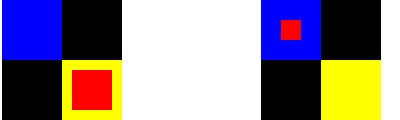
In the following example we change the top and bottom anchors of an item using AnchorChanges, and the top and bottom anchor margins using PropertyChanges:
import QtQuick 2.15

Rectangle {
    id: window
    width: 120; height: 120
    color: "black"

    Rectangle { id: anchorRectStart; x: 60; y: 60; height: 60; width: 60; color: "yellow"}
    Rectangle { id: anchorRectEnd; x: 0; y: 0; height: 60; width: 60; color: "blue"}

    Rectangle {
        id: myRect; color: "red"
        anchors {
            top: anchorRectStart.top
            bottom: anchorRectStart.bottom
            left: anchorRectStart.left
            right: anchorRectStart.right
            topMargin: 10
            bottomMargin: 10
            leftMargin: 10
            rightMargin: 10
        }
    }

    states: State {
        name: "reanchored"
        AnchorChanges {
            target: myRect
            anchors {
                top: anchorRectEnd.top
                bottom: anchorRectEnd.bottom
                left: anchorRectEnd.left
                right: anchorRectEnd.right
            }
        }
        PropertyChanges {
            target: myRect
            anchors {
                topMargin: 20
                bottomMargin: 20
                leftMargin: 20
                rightMargin: 20
            }
        }
    }

    MouseArea { anchors.fill: parent; onClicked: window.state = "reanchored" }
}
Changes to anchor margins can be animated using NumberAnimation.
For more information on anchors see Anchor Layouts.
Property Documentation
anchors group
anchors.baseline : AnchorLine
anchors.bottom : AnchorLine
anchors.horizontalCenter : AnchorLine
anchors.left : AnchorLine
anchors.right : AnchorLine
anchors.top : AnchorLine
anchors.verticalCenter : AnchorLine
These properties change the respective anchors of the item.
target : Item
This property holds the Item for which the anchor changes will be applied.
Available under certain Qt licenses.
Find out more.
