
C
Qt Quick Ultralite static_library Example
Demonstrates how to create and use Qt Quick Ultralite static library.
Overview
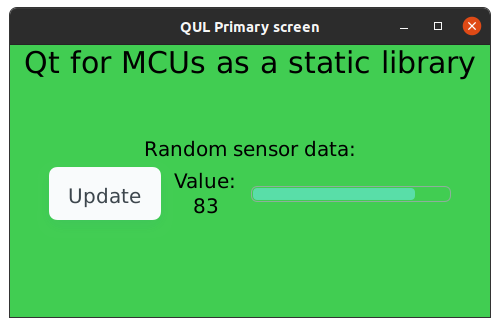
This example shows how to create and integrate Qt Quick Ultralite static library with different application. It contains two targets: a Qt Quick Ultralite GUI compiled as a static library and an executable application that links to the static library. Application also provides a simple API to simulate sensor data. The Qt Quick Ultralite GUI uses this interface to receive sensor data and display it on screen.
You can read more about building Qt Quick Ultralite as a static library here.
Note: The static library setup does not work on FreeRTOS.
Project structure
Project includes two subprojects: a Qt Quick Ultralite GUI static library and an executable application. Both these projects have their own CMakeLists.txt file, which create corresponding target and add dependent files.
Static library CMake project
To create static library target, the Qt Quick Ultralite application target must be created using qul_add_library. This target is used as the backing target for a QML module defined using qul_add_qml_module in the same CMakeLists.txt
...
qul_add_library(Qt4MCU_GUI)
qul_add_qml_module(Qt4MCU_GUI
...
Next, pass the sensorData.h header file to qul_add_qml_module using the SOURCES argument, to let qmlinterfacegenerator process it and make it available in QML. It enbales receiving sensor data from the main application. Methods from that interface are used in mainGui.qml, which is added to the module using the QML_FILES argument.
    QML_FILES
        mainGui.qml
    SOURCES
        sensorData.h
Add the folder containting the sensorAPI.h header file to the include directories list.
Note: EXAMPLE_ROOT_DIR is derived from the application CMake file.
...
target_include_directories(Qt4MCU_GUI
    PRIVATE
        ${EXAMPLE_ROOT_DIR}/include
)
...
The mainGui.qml uses the QtQuick.Controls QML module, which requires linking the Qt4MCU_GUI target to the Qul::Controls library. For more information, refer to the Qt Quick Ultralite styling Example.
target_link_libraries(Qt4MCU_GUI PRIVATE Qul::Controls)
Use the app_target_default_entrypoint() CMake command to generate a default entrypoint for the static library. It generates the qul_run.h header file, containing the qul_run() entrypoint function. The application must call this function to configure and start the Qt Quick Ultralite engine.
...
app_target_default_entrypoint(Qt4MCU_GUI mainGui MODULE StaticLibraryApp)
...
Note: Qul::initHardware() won't get called if qul_run() is called with initializeHardware set to false.
Application CMake project
To create a Qt Quick Ultralite application, call the add_executable CMake function. In addition, include the main.cpp file in the target sources list.
...
add_executable(static_library_example
        src/main.cpp
)
...
The Qt Quick Ultralite static libraries in release configuration come with inter-procedural optimization (link time optimization) enabled. This means that the application linking to such libraries must have the same setup. The following snippet demonstrates how to do IPO config check on the Qt Quick Ultralite static library and apply the same to the application.
...
get_target_property(QUL_LIB_IPO_CONFIG Qt4MCU_GUI INTERPROCEDURAL_OPTIMIZATION)
set_target_properties(static_library_example PROPERTIES INTERPROCEDURAL_OPTIMIZATION ${QUL_LIB_IPO_CONFIG})
...
The application must include the Qt Quick Ultralite root directory and path to folder containing qul_run.h. In this example though, sensorAPI.h is an additional header file that is included.
...
target_include_directories(static_library_example
    PRIVATE
        # Add folder containing qul_run.h header file
        ${CMAKE_CURRENT_BINARY_DIR}/lib/Qt_for_MCU
        # Add folder containing sensorAPI.h header file
        ${CMAKE_CURRENT_SOURCE_DIR}/include
)
...
The application must also link to the static library Qt Quick Ultralite application target
target_link_libraries(static_library_example
    PRIVATE
        Qt4MCU_GUI
        Qul::Controls
        Qt4MCU_GUI
)
Interfacing with the Qt Quick Ultralite static library
As mentioned earlier, the example application provides sensor data through an API. The Qt Quick Ultralite static library is using this API to get sensor data and expose it to QML using the Qt Quick Ultralite C++ interface.
Note: Qt Quick Ultralite does not provide a thread-safe way to change QML properties from a separate task.
...
#include "sensorAPI.h"

struct SensorData : Qul::Singleton<SensorData>
{
    SensorData()
        : sensorRawValue(0)
    {}
    Qul::Property<int> sensorRawValue;
    void updateSensorValue() { sensorRawValue.setValue(getSensorValue()); }
};
...
The getSensorValue() function in this example is returns a random value.
...
int getSensorValue()
{
    return static_cast<uint32_t>(static_cast<double>(100) * Qul::Platform::getPlatformInstance()->rand());
}
...
Files:
Available under certain Qt licenses.
Find out more.
