Object List Model Example
A list of QObject values can also be used as a model.
A list[QObject,] provides the properties of the objects in the list as roles.
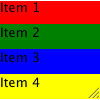
The following application creates a DataObject class with Property values that will be accessible as named roles when a list[DataObject,] is exposed to QML:
from __future__ import annotations

from pathlib import Path
import sys
from PySide6.QtCore import QObject
from PySide6.QtGui import QGuiApplication
from PySide6.QtQuick import QQuickView
from PySide6.QtQmlFeatures import auto_properties, watch, Change

# This example illustrates exposing a list of QObjects as a model in QML


# @auto_properties turns the plain "self.name = ..." / "self.color = ..."
# assignments into real Q_PROPERTYs with nameChanged/colorChanged notify
# signals, so QML can read them as model roles and write them back. The
# @watch method then runs whenever the color is changed from QML.
@auto_properties
class DataObject(QObject):

    def __init__(self, name, color, parent=None):
        super().__init__(parent)
        self.name = name
        self.color = color

    @watch("color")
    def on_color_changed(self, change: Change):
        print(f"{self.name}: color {change.old} -> {change.new}")


if __name__ == '__main__':
    app = QGuiApplication(sys.argv)

    dataList = [DataObject("Item 1", "red"),
                DataObject("Item 2", "green"),
                DataObject("Item 3", "blue"),
                DataObject("Item 4", "yellow")]

    view = QQuickView()
    view.setResizeMode(QQuickView.ResizeMode.SizeRootObjectToView)
    view.setInitialProperties({"model": dataList})

    qml_file = Path(__file__).parent / "view.qml"
    view.engine().addImportPath(Path(__file__).parent)
    view.loadFromModule("ObjectListModel", "Main")
    view.show()

    r = app.exec()
    del view
    sys.exit(r)
import QtQuick
import QtQuick.Controls

ListView {
    id: listview
    width: 200; height: 320
    required model
    ScrollBar.vertical: ScrollBar { }

    delegate: Rectangle {
        id: row
        width: listview.width; height: 25

        required property string name
        required property var modelData

        // Explicit binding so the Rectangle tracks modelData.colorChanged
        // directly. A plain Python list of QObjects never emits dataChanged()
        // This would have not been needed if 'dataList' was done through
        // a QAbstractListModel subclass, which emits dataChanged() on every
        // role update.
        color: modelData.color

        Text { text: parent.name }

        // Click a row to recolor it. Writing modelData.color from QML runs
        // the DataObject's @watch("color") callback on the Python side, and
        // emits colorChanged so this binding refreshes.
        TapHandler {
            onTapped: {
                const palette = ["red", "green", "blue", "yellow", "magenta"]
                const next = (palette.indexOf(row.modelData.color) + 1) % palette.length
                row.modelData.color = palette[next]
            }
        }
    }
}
module ObjectListModel
Main 1.0 Main.qml