
Squish License Model Overview
License Models Available in Squish
Squish is a licensed software product. The type of Squish license you need depends on several factors that are outlined in this chapter. The following license models are available:
- Local license key: a static license string used by Squish evaluators, configured locally without any license server
- Squish Floating License Server (FLS): a network-based license server used with Squish 6.7 and newer to share tester and execution licenses among multiple users.
- Qt License Server (QLS): a modern network-based license server used with Squish 9.2 and newer that provides unified license model for Squish and all other Qt products.
Read sections below to determine which license model applies to you, based on your role (evaluator, regular user, or license manager) and version(s) of Squish you use. Each section explains when a specific license model is required, and how it is typically set up.
Licensing For Squish Evaluators
Evaluators use a local license key that can be obtained from the Qt Customer Portal. After logging into the portal, navigate to the My Licenses section and copy the provided license key (typically a long base64-formatted string).
The license key must be set up as a Local License Key when installing or configuring Squish. For detailed instructions, see:
- the Squish installation documentation, or
- the Squish IDE user guide
License servers, whether FLS or QLS, are (at the time of writing) not available when evaluating Squish.
Licensing For Commercial Squish Users
Commercial Squish users should contact their license manager or system administrator to determine which license server to use and to obtain the required connection details. In particular, you will need to know:
- Which license server type is used in your organization:
- Squish Floating License Server, or
- Qt License Server
- The license server address:
- for FLS: host name and port number (e.g.
fls.example.com:1234) - for QLS: server URL (e.g.
http[s]://qls.example.com)
- for FLS: host name and port number (e.g.
Note: If you do not know who your license manager is, navigate to the My Licenses section of the customer portal, select your Squish license and click License Details to see it listed there.
During Squish installation, you must select the appropriate license server type (FLS or QLS) and enter the host and port of the running license server, as provided by your license manager.
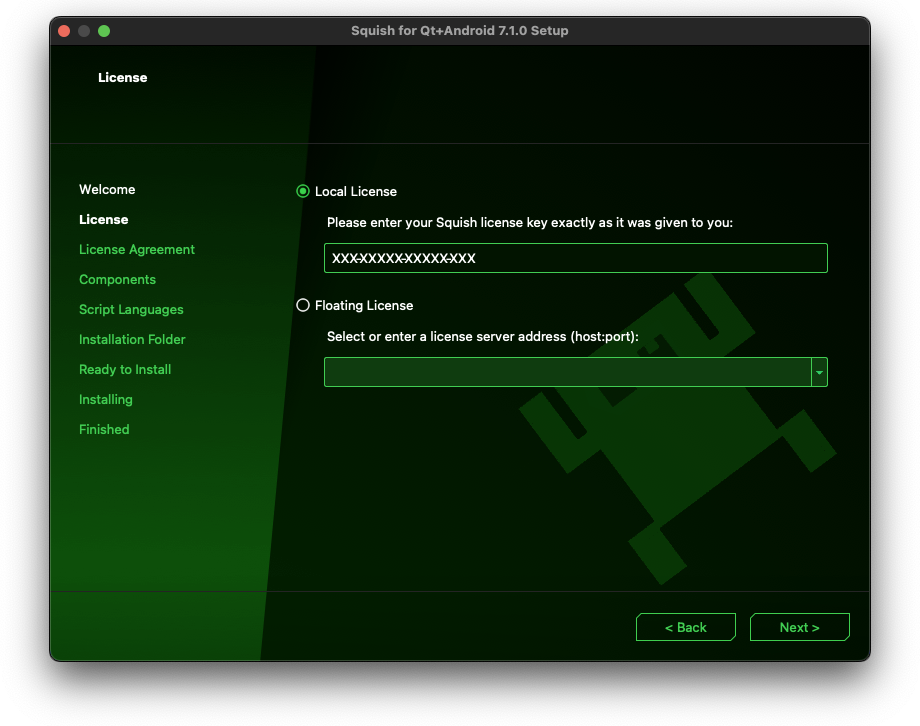
For detailed instructions how to set Squish up with either of the license servers, see:
- the Squish installation documentation on FLS, or QLS
- the Squish IDE user guide
Licensing For License Managers
License managers are responsible for setting up and maintaining a license server within the network so that all entitled users, including continuous integration (CI) hosts, can obtain a license when needed. At the same time, they must ensure that the number of concurrently used licenses does not exceed the number of available licenses.
License managers choose the appropriate license server set-up based on the scope of licenses being served and the Squish versions in use. The following scenarios cover the most common deployments.
Scenario 1: Serving Squish GUI Tester licenses only
In this scenario, the license server is used to serve Squish GUI Tester licenses exclusively, no other commercial Qt products are involved. The choice of suitable server depends on Squish versions in use:
- Squish 6.7 and newer: install and configure the Squish Floating License Server
- only Squish 9.2 and newer: we recommend to install and configure on-premise Qt License Server (QLS).
Download the QLS installer from the Qt Customer Portal > Downloads > Software Quality, then select the Qt License Server product tab. This installer is intended for Software Quality license entitlements and does not require Qt Online Installer login.
- a mix of older (≤ 9.1.1) and newer (≥ 9.2) versions of Squish: this scenario has two alternatives, you may:
- continue using FLS if already deployed in your organization, as both newer and older versions of Squish are capable of consuming FLS licenses, or
- replace FLS with on-premise QLS with FLS bridge; that way all licenses will be served by QLS, but 'translated' to FLS format by the FLS bridge so that even legacy Squish clients can consume them.
Scenario 2: Serving Squish GUI Tester and commercial Qt product licenses with on-premise QLS
In this scenario, Squish licenses can be served alongside licenses for other Qt products (such as commercial versions of Qt, Qt Creator etc.) by on-premise Qt License Server. The exact configuration of the server depends on Squish versions in use:
- Squish 9.2 and newer: install and configure on-premise QLS, or add Squish licenses to an existing on-premise QLS, if already deployed in your organization.
- Squish 9.1.1 and older or a mix of older (≤ 9.1.1) and newer (≥ 9.2) versions of Squish: install install and configure QLS with FLS bridge. If an on-premise QLS is already deployed in your organization, install missing FLS components and re-configure the server to use FLS bridge.
Scenario 3: Serving Squish GUI Tester and commercial Qt product licenses with cloud-based QLS
When using Squish together with commercial Qt products, special considerations apply if your organization relies on the cloud-based Qt License Server. At the time of writing, licenses served by the cloud-based QLS cannot be consumed by a Squish client. As a result, license managers must provide an alternative license server solution for Squish users.
Combining an on-premise QLS with a cloud-based QLS under the same user account can be problematic. In such setups, a single user may not be able to use Squish (which requires a license from an on-premise QLS) and other Qt tools such as Qt Creator (which receives a license from the cloud-based QLS) at the same time.
In some environments, installing a Squish Floating License Server may be a temporary alternative, until the missing functionality is implemented in Squish. However, this is a legacy solution and may not be suitable for all deployments. If your organization requires a setup where individual users need to access both on-premise–licensed Squish and cloud-licensed Qt products, contact technical support to discuss available configuration options.
© 2025 The Qt Company Ltd.
Documentation contributions included herein are the copyrights of
their respective owners.
The documentation provided herein is licensed under the terms of the GNU Free Documentation License version 1.3 as published by the Free Software Foundation.
Qt and respective logos are trademarks of The Qt Company Ltd. in Finland and/or other countries worldwide. All other trademarks are property
of their respective owners.
