PySide6.QtCanvasPainter.QCanvasBoxShadow
- class QCanvasBoxShadow
QCanvasBoxShadowis a brush for painting rectangle shadows / glows.Details
QCanvasBoxShadowis a rounded rectangle brush with blur applied. The performance ofQCanvasBoxShadowis much better than a general shadow that creates blurred shadow/glow of any shaped item, as it uses SDF approach.The features of
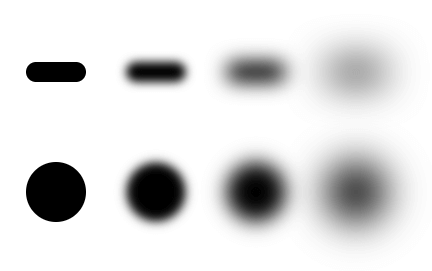
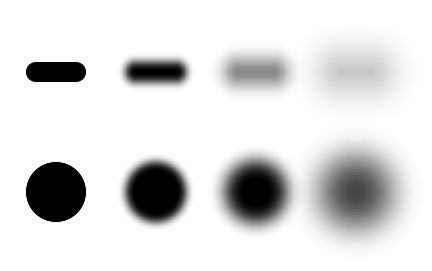
QCanvasBoxShadoware similar to CSS box-shadow, with radius, spread, blur and color values. The rendering output also matches the CSS box-shadow, with few notable differences to make theQCanvasBoxShadowas high-performance as possible. Blurring is calculated mathematically in the shader rather than using Gaussian blur, which CSS box-shadow implementations often use. This makes the shadow look slightly different, especially when the blur amount grows bigger than half of the shadow width / height.Here are screenshots to compare the rendering output of
QCanvasBoxShadowand CSS box-shadow in the Chrome browser. These show how blur radius of 0, 10, 20 and 40 pixels affect smaller shadows.CSS box-shadow:
Synopsis
Methods
def
__init__()def
blur()def
boundingRect()def
color()def
__ne__()def
__eq__()def
radius()def
rect()def
setBlur()def
setColor()def
setRadius()def
setRect()def
setSpread()def
spread()def
swap()def
topLeftRadius()def
topRightRadius()
Note
This documentation may contain snippets that were automatically translated from C++ to Python. We always welcome contributions to the snippet translation. If you see an issue with the translation, you can also let us know by creating a ticket on https:/bugreports.qt.io/projects/PYSIDE
- __init__()
Constructs a default box shadow. The box shadow position is (0, 0) and size (100, 100). Shadow corner radius is
0.0and blur0.0. Shadow color isQt::black.- __init__(arg__1)
- Parameters:
arg__1 –
QCanvasBoxShadow
- __init__(rect)
- Parameters:
rect –
QRectF
Constructs a black box shadow with position of
rect, and without corner radius or blur.- __init__(x, y, width, height)
- Parameters:
x – float
y – float
width – float
height – float
Constructs a box shadow with position at
x,yand sizewidth,height.- blur()
- Return type:
float
Returns the blur of shadow box.
See also
- bottomLeftRadius()
- Return type:
float
Returns the bottom-left radius of shadow box. When this is
-1, painting of the shadow will use the value ofradius()for this corner. The default value is-1.See also
- bottomRightRadius()
- Return type:
float
Returns the bottom-right radius of shadow box. When this is
-1, painting of the shadow will use the value ofradius()for this corner. The default value is-1.See also
Returns the area covered by the shadow. This takes into account the shadow
rect(),blur()andspread(). If you don’t want to usedrawBoxShadow()helper method, this can be used to for e.g. adding correctly sizedrect()into the path.See also
Returns the color of shadow box.
See also
- __ne__(rhs)
- Parameters:
rhs –
QCanvasBoxShadow- Return type:
bool
- __eq__(rhs)
- Parameters:
rhs –
QCanvasBoxShadow- Return type:
bool
- radius()
- Return type:
float
Returns the radius of shadow box.
See also
Returns the rect area of shadow box.
See also
- setBlur(blur)
- Parameters:
blur – float
Sets the shadow blur to
blurin pixels. The default value is0.0meaning no blur.See also
- setBottomLeftRadius(radius)
- Parameters:
radius – float
Sets the bottom-left corner radius to
radius. The default value is-1which means that individual radius has not been set for this corner, and commonradius()is used instead.See also
- setBottomRightRadius(radius)
- Parameters:
radius – float
Sets the bottom-right corner radius to
radius. The default value is-1which means that individual radius has not been set for this corner, and commonradius()is used instead.See also
Sets the shadow color to
color. The default value is black with full opacity.See also
- setRadius(radius)
- Parameters:
radius – float
Sets the shadow corner radius to
radiusin pixels. The default value is0.0meaning no radius.See also
Sets the rect area of shadow box to
rect.- setRect(x, y, width, height)
- Parameters:
x – float
y – float
width – float
height – float
Sets the rect area of shadow box to (
x,y,width,height).See also
- setSpread(spread)
- Parameters:
spread – float
Sets the shadow spread to
spreadin pixels. The default value is0.0meaning no spread.See also
- setTopLeftRadius(radius)
- Parameters:
radius – float
Sets the top-left corner radius to
radius. The default value is-1which means that individual radius has not been set for this corner, and commonradius()is used instead.See also
- setTopRightRadius(radius)
- Parameters:
radius – float
Sets the top-right corner radius to
radius. The default value is-1which means that individual radius has not been set for this corner, and commonradius()is used instead.See also
- spread()
- Return type:
float
Returns the spread of shadow box.
See also
- swap(other)
- Parameters:
other –
QCanvasBoxShadow
- topLeftRadius()
- Return type:
float
Returns the top-left radius of shadow box. When this is
-1, painting of the shadow will use the value ofradius()for this corner. The default value is-1.See also
- topRightRadius()
- Return type:
float
Returns the top-right radius of shadow box. When this is
-1, painting of the shadow will use the value ofradius()for this corner. The default value is-1.See also