PySide6.QtCanvasPainter.QCanvasPainter
- class QCanvasPainter
The
QCanvasPainterclass performs hardware-accelerated painting on QRhi. More…Synopsis
Methods
def
__init__()def
addImage()def
addPath()def
arc()def
arcTo()def
beginPath()def
bezierCurveTo()def
circle()def
clearRect()def
closePath()def
createCanvas()def
destroyCanvas()def
drawBoxShadow()def
drawImage()def
ellipse()def
fill()def
fillRect()def
fillText()def
getTransform()def
lineTo()def
moveTo()def
rect()def
removeImage()def
reset()def
resetClipping()def
resetTransform()def
restore()def
rotate()def
roundRect()def
save()def
scale()def
setAntialias()def
setClipRect()def
setFillRule()def
setFillStyle()def
setFont()def
setGlobalAlpha()def
setLineCap()def
setLineJoin()def
setLineWidth()def
setMiterLimit()def
setPathWinding()def
setStrokeStyle()def
setTextAlign()def
setTransform()def
skew()def
stroke()def
strokeRect()def
transform()def
translate()
Note
This documentation may contain snippets that were automatically translated from C++ to Python. We always welcome contributions to the snippet translation. If you see an issue with the translation, you can also let us know by creating a ticket on https:/bugreports.qt.io/projects/PYSIDE
Detailed Description
Qt Canvas Painter (
QCanvasPainter) provides painting API optimized for hardware-accelerated (GPU) painting. The API closely follows the HTML Canvas 2D Context specification, ported to Qt C++. It is also influenced by QPainter, but with a more compact API.Here is a simple example of using
QCanvasPainterto create a round button.
QRectF rect(40, 70, 120, 60);
QRectF shadowRect = rect.translated(2, 4);
// Paint shadow
QCanvasBoxShadow shadow(shadowRect);
shadow.setRadius(30);
shadow.setBlur(15);
shadow.setColor("#60373F26");
p->drawBoxShadow(shadow);
// Paint rounded rect
p->beginPath();
p->roundRect(rect, 30);
p->setFillStyle("#DBEB00");
p->fill();
// Paint text
p->setTextAlign(QCanvasPainter::TextAlign::Center);
p->setTextBaseline(QCanvasPainter::TextBaseline::Middle);
QFont font("Titillium Web", 18);
p->setFont(font);
p->setFillStyle("#373F26");
p->fillText("CLICK!", rect);
Here is another example of painting a simple graph.
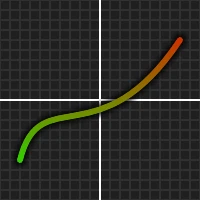
// Paint grid
QCanvasGridPattern grid(0, 0, 10, 10);
grid.setLineColor("#404040");
grid.setBackgroundColor("#202020");
p->setFillStyle(grid);
p->fillRect(0, 0, width(), height());
// Paint axis
p->setFillStyle(QColorConstants::White);
p->fillRect(0, 0.5 * height() - 1, width(), 2);
p->fillRect(0.5 * width() - 1, 0, 2, height());
// Paint shadowed graph
p->beginPath();
p->moveTo(20, height() * 0.8);
p->bezierCurveTo(width() * 0.2, height() * 0.4,
                 width() * 0.5, height() * 0.8,
                 width() - 20, height() * 0.2);
p->setAntialias(10);
p->setLineWidth(12);
p->setStrokeStyle("#D0000000");
p->stroke();
p->setAntialias(1);
p->setLineWidth(6);
QCanvasLinearGradient lg(0, 0, 0, height());
lg.setStartColor(QColorConstants::Red);
lg.setEndColor(QColorConstants::Green);
p->setStrokeStyle(lg);
p->stroke();
Features
For the most part, and from the naming perspective,
QCanvasPainterfollows HTML Canvas 2D Context (https://html.spec.whatwg.org/multipage/canvas.html#2dcontext). This makes the API familiar to use for many developers, and with the ability to easily reuse existing canvas code. But the aim is NOT to be 100% compatible with the HTML canvas.QCanvasPainteromits some of the features to make it simpler, more performant on QRhi hardware accelerated graphics API, and to better target modern UI needs. Due to these reasons,QCanvasPainteralso has additional features compared to HTML Canvas 2D Context.These are some of the functionality that are at least currently missing compared to HTML Canvas:
Clipping: All clipping is (transformed) rectangle and clipping to path shapes is not supported.
Dashes: Strokes are always solid lines, dashed/dotted stroke patterns are not supported.
Path testing: There are no isPointInPath() or isPointInStroke() methods.
Text stroking: No support for outline stroking of text.
Filter: Canvas SVG filter effects are not supported.
CompositeModes: The number of composite modes is limited to 3, which can be supported without rendering into extra buffers.
Shadows: Built-in shadow methods are not supported.
On the other hand, some of the additional features
QCanvasPainteroffers compared to HTML Canvas include:Path groups:
QCanvasPainterallows painting to static paths and caching these paths as groups for optimal GPU usage.Adjustable antialiasing: Due to path vertex antialiasing and SDF text rendering, the pixel amount of antialiasing can be freely adjusted for smoother painting.
Box Gradient: In addition to linear, radial and conical gradients,
QCanvasPainteralso supports rounded rectangle box gradient.Box Shadow:
QCanvasPainteralso supports CSS box-shadow type of brush. The rendering uses a SDF approach similar to Qt Quick RectangularShadow, making it very performant.Grid patterns:
QCanvasPaintersupportsQCanvasGridPatternfor dynamic grid and bar pattern styles.Custom brushes:
QCanvasPainteralso allows filling & stroking with custom vertex and fragment shaders (QCanvasCustomBrush). These custom brushes can also be used for text.Text wrapping:
QCanvasPaintersupports automatic wrapping of text into multiple lines, with different wrapping modes.Color effects: In addition to globalAlpha,
QCanvasPainteralso supports global brightness, contrast and saturation.Tinted images:
QCanvasPainteradds tint color support for painted images and image patterns.
QCanvasPainteris architecture agnostic, and usable for both Qt Quick and Qt Widgets applications. Actually, it is usable even without either of those, with just QWindow and QRhi. To utilizeQCanvasPainter, use it from one of these classes, depending on the architecture of your application:Qt Quick: Use
QCanvasPainterItemandQCanvasPainterItemRenderer.Qt Widgets: Use
QCanvasPainterWidget.QRhi-based QWindow, or offscreen QRhi buffers: Use
QCanvasPainterFactoryandQCanvasRhiPaintDriver.
Winding rules
QCanvasPainterusesNonZero({Qt::WindingFill}) fillrule by default. To select the filling based on the path points direction, disable the winding forcing by callingsetWindingEnforce().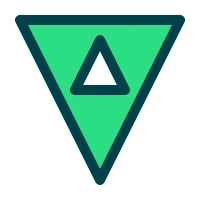
p->setWindingEnforce(false);
p->beginPath();
// Outer shape, counterclockwise
p->moveTo(20, 20);
p->lineTo(100, 180);
p->lineTo(180, 20);
p->closePath();
// Inner shape, clockwise
p->moveTo(100, 40);
p->lineTo(125, 90);
p->lineTo(75, 90);
p->closePath();
p->fill();
p->stroke();
However, a more common case is relying on winding enforcing and setting the preferred winding using
setPathWinding()orbeginHoleSubPath()andbeginSolidSubPath()helpers.
p->beginPath();
p->roundRect(20, 20, 160, 160, 30);
// Start painting holes
p->beginHoleSubPath();
p->roundRect(40, 40, 120, 120, 10);
// Start painting solid
p->beginSolidSubPath();
p->rect(60, 60, 80, 20);
p->circle(100, 120, 20);
p->fill();
p->stroke();
- class PathWinding
PathWinding is used to specify the direction of path drawing. This direction is used to determine if a subpath is solid or hole in the path.
Constant
Description
QCanvasPainter.PathWinding.PathWinding.CounterClockWise
(default) Counter-clockwise winding for solid shapes.
QCanvasPainter.PathWinding.PathWinding.ClockWise
Clockwise winding for holes.
See also
- class PathConnection
With some drawing methods PathConnection is used to specify if the new path should be connected to the last point of the previous path.
Constant
Description
QCanvasPainter.PathConnection.PathConnection.NotConnected
There is no line drawn from the last point of the previous path to the first point of the current path.
QCanvasPainter.PathConnection.PathConnection.Connected
The last point of the previous path will be connected to the first point of the current path.
See also
- class LineCap
LineCap is used to define how the end of the line (cap) is drawn.
Constant
Description
QCanvasPainter.LineCap.LineCap.Butt
(default) Square line ending that does not cover the end point of the line.
QCanvasPainter.LineCap.LineCap.Round
Round line ending.
QCanvasPainter.LineCap.LineCap.Square
Square line ending that covers the end point and extends beyond it by half the line width.
See also
- class LineJoin
LineJoin is used to define how the joins between two connected lines are drawn.
Constant
Description
QCanvasPainter.LineJoin.LineJoin.Round
Circular arc between the two lines is filled.
QCanvasPainter.LineJoin.LineJoin.Bevel
The triangular notch between the two lines is filled.
QCanvasPainter.LineJoin.LineJoin.Miter
(default) The outer edges of the lines are extended to meet at an angle, and this area is filled.
See also
- class TextAlign
TextAlign is used to define how the text is aligned horizontally.
Constant
Description
QCanvasPainter.TextAlign.TextAlign.Left
Align the left side of the text horizontally to the specified position.
QCanvasPainter.TextAlign.TextAlign.Right
Align the right side of the text horizontally to the specified position.
QCanvasPainter.TextAlign.TextAlign.Center
Align the center of the text horizontally to the specified position.
QCanvasPainter.TextAlign.TextAlign.Start
(default) The text is aligned at the normal start of the line (left-aligned for left-to-right locales, right-aligned for right-to-left locales).
QCanvasPainter.TextAlign.TextAlign.End
The text is aligned at the normal end of the line (right-aligned for left-to-right locales, left-aligned for right-to-left locales).
See also
- class TextBaseline
TextBaseline is used to define how the text is aligned (baselined) vertically.
Constant
Description
QCanvasPainter.TextBaseline.TextBaseline.Top
Align the top of the text vertically to the specified position.
QCanvasPainter.TextBaseline.TextBaseline.Hanging
Align the hanging baseline of the text vertically to the specified position.
QCanvasPainter.TextBaseline.TextBaseline.Middle
Align the middle of the text vertically to the specified position.
QCanvasPainter.TextBaseline.TextBaseline.Alphabetic
(default) Align the baseline of the text vertically to the specified position.
QCanvasPainter.TextBaseline.TextBaseline.Bottom
Align the bottom of the text vertically to the specified position.
See also
- class TextDirection
TextDirection is used to define how the text is aligned horizontally.
Constant
Description
QCanvasPainter.TextDirection.TextDirection.LeftToRight
The text direction is left-to-right.
QCanvasPainter.TextDirection.TextDirection.RightToLeft
The text direction is right-to-left.
QCanvasPainter.TextDirection.TextDirection.Inherit
(default) The text direction is inherited from QGuiApplication layoutDirection. See https://doc.qt.io/qt-6/qguiapplication.html#layoutDirection-prop.
QCanvasPainter.TextDirection.TextDirection.Auto
The text direction is detected automatically based from the text string. See QString::isRightToLeft().
Note
As this requires analyzing the text, it is potentially slower than other options.
See also
- class FillRule
This enum specifies how paths are filled.
Constant
Description
QCanvasPainter.FillRule.FillRule.NonZero
The path is filled using the non zero winding rule. With this rule, we determine whether a point is inside the shape by using the following method. Draw a horizontal line from the point to a location outside the shape. Determine whether the direction of the line at each intersection point is up or down. The winding number is determined by summing the direction of each intersection. If the number is non zero, the point is inside the shape. This fill mode can also in most cases be considered as the intersection of closed shapes. This mode is the default.
QCanvasPainter.FillRule.FillRule.EvenOdd
The path is filled using the odd even fill rule. With this rule, we determine whether a point is inside the shape by using the following method. Draw a horizontal line from the point to a location outside the shape, and count the number of intersections. If the number of intersections is an odd number, the point is inside the shape.
See also
Added in version 6.12.
- class CompositeOperation
Qt Canvas Painter supports 3 composite operations:
Constant
Description
QCanvasPainter.CompositeOperation.CompositeOperation.SourceOver
The default value. Draws new shapes on top of the existing content.
QCanvasPainter.CompositeOperation.CompositeOperation.SourceAtop
The new shape is only drawn where it overlaps the existing content.
QCanvasPainter.CompositeOperation.CompositeOperation.DestinationOut
The existing content is kept where it doesn’t overlap with the new shape.
See also
- class WrapMode
WrapMode is used to define how the text is wrapped to multiple lines.
Constant
Description
QCanvasPainter.WrapMode.WrapMode.NoWrap
(default) No wrapping will be performed. If the text contains insufficient newlines, then contentWidth will exceed a set width.
QCanvasPainter.WrapMode.WrapMode.Wrap
If possible, wrapping occurs at a word boundary; otherwise it will occur at the appropriate point on the line, even in the middle of a word.
QCanvasPainter.WrapMode.WrapMode.WordWrap
Wrapping is done on word boundaries only. If a word is too long, content width will exceed a set width.
QCanvasPainter.WrapMode.WrapMode.WrapAnywhere
Wrapping is done at any point on a line, even if it occurs in the middle of a word.
See also
- class ImageFlag
(inherits
enum.Flag) This enum specifies flags related to images. Use withaddImage()to set the flags.Constant
Description
QCanvasPainter.ImageFlag.ImageFlag.GenerateMipmaps
Set this to generate mipmaps for the image. Mipmaps should be used when smoother output is preferred for images which are scaled to smaller than the original size.
QCanvasPainter.ImageFlag.ImageFlag.RepeatX
Use with image pattern to repeat image in X-coordinate.
QCanvasPainter.ImageFlag.ImageFlag.RepeatY
Use with image pattern to repeat image in Y-coordinate.
QCanvasPainter.ImageFlag.ImageFlag.Repeat
Use with image pattern to repeat image in both coordinates.
QCanvasPainter.ImageFlag.ImageFlag.FlipY
Flips (inverses) image in Y direction when rendered.
QCanvasPainter.ImageFlag.ImageFlag.Premultiplied
Image data has premultiplied alpha.
QCanvasPainter.ImageFlag.ImageFlag.Nearest
Image interpolation is Nearest instead Linear
- __init__()
Constructs a painter.
- activeImageCount()
- Return type:
int
Returns the number of active
QCanvasImageobjects registered with thisQCanvasPainter. This also includes the internally created images forgradients.QCanvasImageobjects created by registeringQCanvasOffscreenCanvasinstances or externally managed textures are not taken into account by this function.- activeImageMemoryUsage()
- Return type:
int
Returns an approximation in kilobytes of the memory used by the image (pixel) data for all active
QCanvasImageinstances for this painter that were created by theaddImage()overload taking a QImage. It also includes the data from internally created images forgradients.QCanvasPainterdoes not keep copies of the CPU-side QImage data onceaddImage()has returned. Therefore, the result of this function is an approximation of the GPU memory that is used for textures.Note
The value is only an estimate based on the image format and dimensions. Qt has no knowledge of how the data for textures is stored and laid out in memory on the GPU side.
Offscreen canvases and externally managed textures registered via the other
addImage()overloads are not taken into account by this function.For every valid
QCanvasImage, the individual size in bytes can always be queried by callingsizeInBytes(). That function returns valid results also when theQCanvasImagewas created from aQCanvasOffscreenCanvasor QRhiTexture, but it does not consider mipmap or multisample data.See also
- addImage(texture[, flags={}])
- Parameters:
texture –
QRhiTextureflags – Combination of
ImageFlag
- Return type:
Adds
texturewithflagsavailable for the painter as a texture. The returnedQCanvasImagecan be used withdrawImage()andQCanvasImagePattern.- addImage(canvas[, flags={}])
- Parameters:
canvas –
QCanvasOffscreenCanvasflags – Combination of
ImageFlag
- Return type:
Registers
canvaswithflagsto the painter so that it is available as an image. The returnedQCanvasImagecan be used withdrawImage()andQCanvasImagePattern.Note
canvascontinues to manage the underlying native graphics resources, meaningremoveImage()does not rendercanvasinvalid.See also
- addImage(image[, flags={}])
- Parameters:
- Return type:
Adds
imagewithflagsavailable for the painter as a texture. ReturnsQCanvasImagewith the texture id and other information about the image. ReturnedQCanvasImagecan then be used withdrawImage()andQCanvasImagePattern. After calling this method, theimageQImage does not need to be kept in memory.Calling with the same
imageis a cheap operation, since a cache hit is expected.Care must be taken when optimizing to call addImage() only once. That is not always sufficient, depending on the application design. For example, if the underlying graphics resources are lost, e.g. because the painter is associated with a new QRhi under the hood due to moving a widget to a new top-level, then calling this function is essential in order to re-create the native graphics textures from
image.See also
- addPath(path)
- Parameters:
path –
QPainterPath
Adds
pathinto the current path.Note
QCanvasPainterusesNonZero(Qt::WindingFill) fillrule by default, while QPainterPath defaults to Qt::OddEvenFill. So remember to switch the fillRule if needed, for example, by usingsetFillRule().Note
This method is available mostly for the compatibility with QPainter and QPainterPath. It does not increase performance compared to painting the path directly with
QCanvasPaintermethods.- addPath(path[, transform=QTransform()])
- Parameters:
path –
QCanvasPathtransform –
QTransform
Adds
pathinto the current path, optionally usingtransformto alter the path points. Whentransformis not provided (or it is identity matrix), this operation is very fast as it reuses the path data.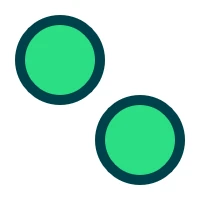
// m_path is QCanvasPath
if (m_path.isEmpty())
    m_path.circle(60, 60, 40);
p->beginPath();
p->addPath(m_path);
p->addPath(m_path, QTransform::fromTranslate(80, 80));
p->fill();
p->stroke();
- addPath(path, start, count[, transform=QTransform()])
- Parameters:
path –
QCanvasPathstart – int
count – int
transform –
QTransform
Adds
pathinto the current path, starting from the command atstartand includingcountamount of commands. Optionally usingtransformto alter the path points. The range ofstartandcountis checked, so that commands are not accessed more thancommandsSize(). In case the path shouldn’t continue from the current path position, call firstmoveTo()e.g. withpath.positionAt(start - 1).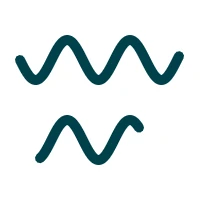
// m_path is QCanvasPath
if (m_path.isEmpty()) {
    m_path.moveTo(20, 60);
    for (int i = 1; i < 160; i++) {
        m_path.lineTo(20 + i,
                      60 + 20 * sin(0.1 * i));
    }
}
p->stroke(m_path);
p->beginPath();
p->addPath(m_path, 20, 100,
           QTransform::fromTranslate(0, 80));
p->stroke();
- arc(centerPoint, radius, a0, a1[, direction=QCanvasPainter.PathWinding.ClockWise[, connection=QCanvasPainter.PathConnection.Connected]])
- Parameters:
centerPoint –
QPointFradius – float
a0 – float
a1 – float
direction –
PathWindingconnection –
PathConnection
Creates a new circle arc shaped sub-path. The arc center is at
centerPoint, withradius, and the arc is drawn from anglea0toa1, and swept indirection(ClockWiseorCounterClockWise). WhenconnectionisNotConnected, arc does not add a line from the previous path position to the start of the arc. Angles are specified in radians.Note
While HTML canvas 2D context uses
arc()for painting circles, withQCanvasPainterit is recommended to usecircle()orellipse()for those.- arc(centerX, centerY, radius, a0, a1[, direction=QCanvasPainter.PathWinding.ClockWise[, connection=QCanvasPainter.PathConnection.Connected]])
- Parameters:
centerX – float
centerY – float
radius – float
a0 – float
a1 – float
direction –
PathWindingconnection –
PathConnection
Creates a new circle arc shaped sub-path. The arc center is at
centerX,centerY, withradius, and the arc is drawn from anglea0toa1, and swept indirection(ClockWiseorCounterClockWise). WhenconnectionisNotConnected, arc does not add a line from the previous path position to the start of the arc. Angles are specified in radians.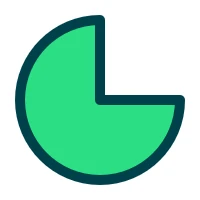
p->beginPath();
p->moveTo(100, 100);
p->arc(100, 100, 80, 0, 1.5 * M_PI);
p->closePath();
p->fill();
p->stroke();
Note
While HTML canvas 2D context uses arc() for painting circles, with
QCanvasPainterit is recommended to usecircle()orellipse()for those.- arcTo(controlPoint1, controlPoint2, radius)
Adds an arc segment at the corner defined by the last path point, and two specified points (
controlPoint1andcontrolPoint2) withradius. The arc is automatically connected to the path’s latest point with a straight line if necessary.- arcTo(x1, y1, x2, y2, radius)
- Parameters:
x1 – float
y1 – float
x2 – float
y2 – float
radius – float
Adds an arc segment at the corner defined by the last path point, and two specified points (
x1,y1andx2,y2) withradius. The arc is automatically connected to the path’s latest point with a straight line if necessary.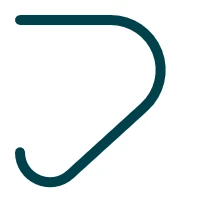
p->beginPath();
p->moveTo(20, 20);
p->arcTo(240, 20, 20, 220, 50);
p->arcTo(20, 220, 20, 20, 30);
p->stroke();
- beginHoleSubPath()
Start a hole subpath. This is equivalent to
setPathWinding(QCanvasPainter::PathWinding::ClockWise))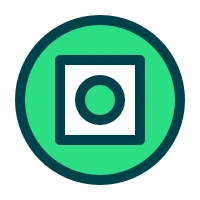
p->beginPath();
p->circle(100, 100, 80);
p->beginHoleSubPath();
p->rect(60, 60, 80, 80);
p->beginSolidSubPath();
p->circle(100, 100, 20);
p->fill();
p->stroke();
See also
- beginPath()
Begins drawing a new path while clearing the current path.
- beginSolidSubPath()
Start a solid subpath. This is equivalent to
setPathWinding(QCanvasPainter::PathWinding::CounterClockWise))See also
- bezierCurveTo(controlPoint1, controlPoint2, endPoint)
Adds a cubic bezier segment from the last point in the path via two control points (
controlPoint1andcontrolPoint2) to the specified pointendPoint.- bezierCurveTo(cp1X, cp1Y, cp2X, cp2Y, x, y)
- Parameters:
cp1X – float
cp1Y – float
cp2X – float
cp2Y – float
x – float
y – float
Adds a cubic bezier segment from the last point in the path via two control points (
cp1X,cp1Yandcp2X,cp2Y) to the specified point (x,y).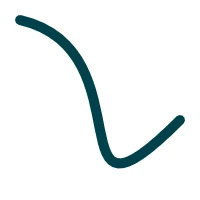
p->beginPath();
p->moveTo(20, 20);
p->bezierCurveTo(150, 50, 50, 250, 180, 120);
p->stroke();
Creates a new circle shaped sub-path centered at
centerPointwithradius.- circle(centerX, centerY, radius)
- Parameters:
centerX – float
centerY – float
radius – float
Creates a new circle shaped sub-path centered at (
centerX,centerY) withradius.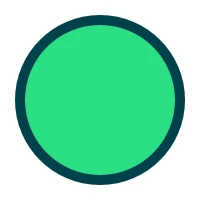
p->beginPath();
p->circle(100, 100, 80);
p->fill();
p->stroke();
- cleanupResources()
Schedules dropping unused textures from the cache.
Additionally, other caches and pools may get shrunk upon calling this function, in order to minimize memory usage. This may potentially lead to more expensive drawing calls afterwards.
Erases the pixels in a rectangular area by filling the rectangle specified by
rectwith transparent black. This is an overloaded method using QRectF.- clearRect(x, y, width, height)
- Parameters:
x – float
y – float
width – float
height – float
Erases the pixels in a rectangular area by filling the rectangle specified by
x,y,width,heightwith transparent black. As clearing does not need blending, it can be faster thanfillRect().
p->beginPath();
p->circle(100, 100, 80);
p->fill();
p->stroke();
p->clearRect(60, 0, 80, 120);
- closePath()
Closes the current sub-path with a line segment. This is equivalent to
lineTo()([starting point]) as the last path element.- createCanvas(pixelSize[, sampleCount=1[, flags={}]])
- Parameters:
- Return type:
Returns a new offscreen canvas with the given
pixelSize,sampleCount, andflags.The size of the canvas is specified in pixels. The
pixelSize,sampleCount, andflagsproperties are immutable afterwards. To get a canvas with a different size, sample count, or flags, create a new one.To target an offscreen canvas with with draw commands, call the appropriate
beginPaint()overload when working with the lower level API, orbeginCanvasPainting()orbeginCanvasPainting()when using the convenience widget or Qt Quick item classes.Normally the contents of the canvas is cleared when painting to it. To disable this, pass
PreserveContentsinflags.To request multisample rendering onto the canvas (multisample antialiasing, MSAA), set a sample count larger than 1, such as 4 or 8. Preserving the canvas contents between render passes is not supported however when multisampling is enabled, and the
PreserveContentsflag will not work in this case.Note
An offscreen canvas is backed by a texture independent from the main render target, and rendering to it always happens with a scale factor (device pixel ratio) of 1. For example, to create a canvas matching the true rendering dimensions of a
QCanvasPainterWidget, passsize() * devicePixelRatio()aspixelSize, because thesize()of the widget is just the logical size without the scale factor included.- destroyCanvas(canvas)
- Parameters:
canvas –
QCanvasOffscreenCanvas
Destroys the resources backing
canvas.canvasbecomes anull canvasthen.The painter automatically does this upon its destruction. Therefore, calling this function is only necessary when releasing the associated resources is desired right away.
- drawBoxShadow(shadow)
- Parameters:
shadow –
QCanvasBoxShadow
Draws a box
shadow. The shadow will be painted with position, size, color, blur etc. defined byshadow. CallingbeginPath()before this method is not required.Note
To visually see the area covered by drawBoxShadow(), set
QCPAINTER_DEBUG_SHADOW_RECTenvironment variable.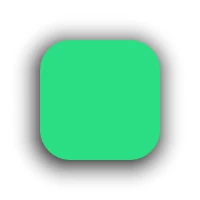
QRectF rect(40, 40, 120, 120);
QRectF shadowRect = rect.translated(-2, 4);
QCanvasBoxShadow shadow(shadowRect);
shadow.setBlur(30);
p->drawBoxShadow(shadow);
p->beginPath();
p->roundRect(rect, 30);
p->setFillStyle("#2CDE85");
p->fill();
See also
- drawImage(image, destinationRect)
- Parameters:
image –
QCanvasImagedestinationRect –
QRectF
Draw
imageinto position and size ofdestinationRect.See also
- drawImage(image, sourceRect, destinationRect)
- Parameters:
image –
QCanvasImagesourceRect –
QRectFdestinationRect –
QRectF
Draw
imageinto position and size ofdestinationRect, fromsourceRectarea of image.
static QImage logo(":/qt_logo.png");
QCanvasImage image = p->addImage(logo);
QRectF sourceRect(20, 30, 54, 76);
QRectF destinationRect(0, 0, 200, 200);
p->drawImage(image, sourceRect, destinationRect);
See also
- drawImage(image, x, y)
- Parameters:
image –
QCanvasImagex – float
y – float
Draw
imageintox,y, at its default size.
static QImage logo(":/qt_logo.png");
QCanvasImage image = p->addImage(logo);
p->drawImage(image, 36, 36);
See also
- drawImage(image, x, y, width, height)
- Parameters:
image –
QCanvasImagex – float
y – float
width – float
height – float
Draw
imageintox,y, at givenwidthandheight.
static QImage logo(":/qt_logo.png");
QCanvasImage image = p->addImage(logo);
p->drawImage(image, 50, 0, 100, 200);
See also
Creates a new ellipse shaped sub-path into
rect. This ellipse will cover therectarea.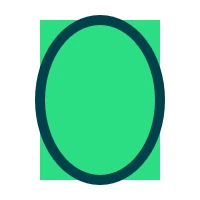
QRectF rect(40, 20, 120, 160);
p->fillRect(rect);
p->beginPath();
p->ellipse(rect);
p->stroke();
- ellipse(centerPoint, radiusX, radiusY)
- Parameters:
centerPoint –
QPointFradiusX – float
radiusY – float
Creates a new ellipse shaped sub-path centered at
centerPointwithradiusXandradiusY.- ellipse(centerX, centerY, radiusX, radiusY)
- Parameters:
centerX – float
centerY – float
radiusX – float
radiusY – float
Creates a new ellipse shaped sub-path centered at (
centerX,centerY) withradiusXandradiusY.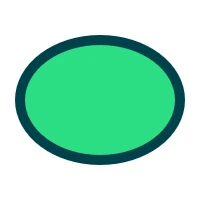
p->beginPath();
p->ellipse(100, 100, 80, 60);
p->fill();
p->stroke();
- fill()
Fills the current path with the current fill style, and the current fill rule.
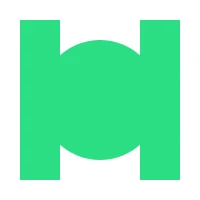
p->beginPath();
p->rect(20, 20, 40, 160);
p->rect(140, 20, 40, 160);
p->circle(100, 100, 60);
p->fill();
See also
- fill(fillRule)
- Parameters:
fillRule –
FillRule
Fills the current path with the current fill style, and fill rule
fillRule.See also
- fill(path[, pathGroup=-1])
- Parameters:
path –
QCanvasPathpathGroup – int
Fills the
pathwith the current fill style and fill rule, and belonging intopathGroup. Painting throughQCanvasPathis optimal when the path contains more commands and is mostly static.When
pathGroupis-1, the path will not be cached on the GPU side. This is the default. To request caching of path data, pass a value equal to or greater than0. More information about using path cache groups can be found in theQCanvasPathdocumentation.Calling
beginPath()before this method is not required.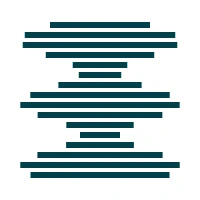
// m_path is QCanvasPath
if (m_path.isEmpty()) {
    for (int i = 0; i < 16; i++) {
        qreal w = 100 + 60 * sin(i);
        m_path.rect(100 - w * 0.5,
                    22 + i * 10,
                    w, 6);
    }
}
p->fill(m_path);
See also
- fill(path, fillRule[, pathGroup=-1])
- Parameters:
path –
QCanvasPathfillRule –
FillRulepathGroup – int
Fills the
pathwith the current fill style and fill rulefillRuleDraws a filled rectangle into
rect. This is an overloaded method using QRectF.Note
This is provided for convenience. When filling more than just a single rect, prefer using
rect().- fillRect(x, y, width, height)
- Parameters:
x – float
y – float
width – float
height – float
Draws a filled rectangle into the specified position (
x,y) with sizewidth,height.Note
This is provided for convenience. When filling more than just a single rect, prefer using
rect().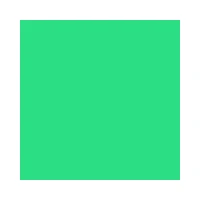
p->fillRect(20, 20, 160, 160);
// The above code does same as:
//  p->beginPath();
//  p->rect(20, 20, 160, 160);
//  p->fill();
Draws
textstring insiderect, with current textAlign and textBaseline. Width of the rect parameter is used as maxWidth.This is an overloaded method using QRectF. It is often useful to set the text baseline to
ToporMiddlewhen painting text with this method.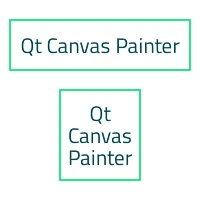
p->setTextAlign(QCanvasPainter::TextAlign::Center);
p->setTextBaseline(QCanvasPainter::TextBaseline::Middle);
QString text("Qt Canvas Painter");
QRectF rect1(10, 20, 180, 50);
p->strokeRect(rect1);
p->fillText(text, rect1);
p->setTextWrapMode(QCanvasPainter::WrapMode::WordWrap);
QRectF rect2(60, 90, 80, 90);
p->strokeRect(rect2);
p->fillText(text, rect2);
- fillText(text, point[, maxWidth=0])
- Parameters:
text – str
point –
QPointFmaxWidth – float
Draws
textstring at the specifiedpoint, with current textAlign and textBaseline. To make the text wrap into multiple lines, set the text wrap mode usingsetTextWrapMode()to something else than the defaultNoWrap. OptionalmaxWidthparameter defaults to0. Meaning that when e.g.WordWraphas been set, text is wrapped on every word. Set themaxWidthparameter to preferred row width in pixels.This is an overloaded method using QPointF.
- fillText(text, x, y[, maxWidth=0])
- Parameters:
text – str
x – float
y – float
maxWidth – float
Draws
textstring at the specified location (x,y), with current textAlign and textBaseline. To make the text wrap into multiple lines, set the text wrap mode usingsetTextWrapMode()to something else than the defaultNoWrap. OptionalmaxWidthparameter defaults to0. Meaning that when e.g.WordWraphas been set, text is wrapped on every word. Set themaxWidthparameter to preferred row width in pixels.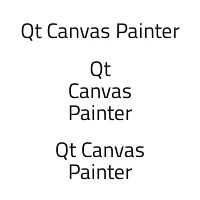
p->setTextAlign(QCanvasPainter::TextAlign::Center);
p->setTextBaseline(QCanvasPainter::TextBaseline::Middle);
QString text("Qt Canvas Painter");
p->fillText(text, 100, 30);
p->setTextWrapMode(QCanvasPainter::WrapMode::WordWrap);
p->fillText(text, 100, 90);
p->fillText(text, 100, 160, 120);
- getTransform()
- Return type:
Returns the current transform.
Adds line segment from the last point in the path to the
point.- lineTo(x, y)
- Parameters:
x – float
y – float
Adds line segment from the last point in the path to the (
x,y) point.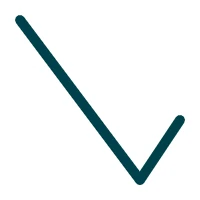
p->beginPath();
p->moveTo(20, 20);
p->lineTo(140, 180);
p->lineTo(180, 120);
p->stroke();
Starts a new sub-path with
pointas the first point.- moveTo(x, y)
- Parameters:
x – float
y – float
Starts a new sub-path with (
x,y) as the first point.Adds a quadratic bezier segment from the last point in the path via a
controlPointto the specifiedendPoint.- quadraticCurveTo(cpX, cpY, x, y)
- Parameters:
cpX – float
cpY – float
x – float
y – float
Adds a quadratic bezier segment from the last point in the path via a control point (
cpX,cpY) to the specified point (x,y).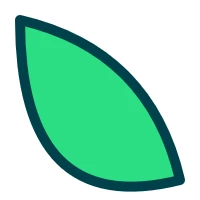
p->beginPath();
p->moveTo(20, 20);
p->quadraticCurveTo(150, 50, 180, 180);
p->quadraticCurveTo(20, 220, 20, 20);
p->fill();
p->stroke();
Creates a new rectangle shaped sub-path at
rect. This is an overloaded method using QRectF.- rect(x, y, width, height)
- Parameters:
x – float
y – float
width – float
height – float
Creates a new rectangle shaped sub-path in position
x,ywith sizewidth,height.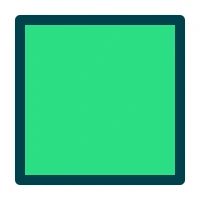
p->beginPath();
p->rect(20, 20, 160, 160);
p->fill();
p->stroke();
- removeImage(image)
- Parameters:
image –
QCanvasImage
Releases the resources associated with
imageand removes the image from the painter.Note
This does not need to be normally called, because resources such as textures are released in the painter destructor anyway. This function is useful when there is a need to reduce memory usage due to having a lot images, and some of them are not used anymore.
Note
Removed images can not be used in paint operations anymore.
Note
Resources such as the textures created with the underlying 3D API may not get released immediately. Such operations may get deferred to subsequent frames, typically when this
QCanvasPainterbegins painting again after the active set of draw calls has been submitted.See also
- removePathGroup(pathGroup)
- Parameters:
pathGroup – int
Removes
pathGroupfrom the painter cache. Callingfill()orstroke()forpathGroupafter this, will regenerate the path into the group cache.Note
This does not need to be normally called as paths are removed in the painter destructor. Only use this to reduce memory usage when
pathGroupis not needed anymore or e.g. when the path has a lot less commands that it has had in the past and buffer size should be reduced.- reset()
Resets the current painter state to default values.
This includes the stroke and fill styles and the related properties, the transformation matrix, the clipping region, the text-related settings, the compositing properties, the drawing state stack, the antialiasing settings.
Note
This method differs from the HTML Canvas 2D Context reset() method in that it doesn’t visually clear the canvas buffers.
Note
The values of
setWindingEnforce()andsetHighQualityStroking()are not changed.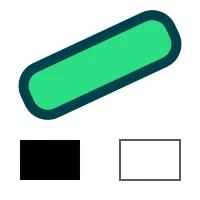
// Adjust the paint state
p->setStrokeStyle("#00414A");
p->setFillStyle("#2CDE85");
p->setLineWidth(10);
QRectF rect(20, 40, 160, 50);
p->translate(rect.center());
p->rotate(qDegreesToRadians(-25));
p->translate(-rect.center());
p->beginPath();
p->roundRect(rect, 20);
p->fill();
p->stroke();
// Reset to default paint state
p->reset();
p->fillRect(20, 140, 60, 40);
p->strokeRect(120, 140, 60, 40);
- resetClipping()
Resets and disables clipping.
See also
- resetTransform()
Resets the current transform to an identity matrix.
- restore()
Pops and restores the current render state. So previously saved state will be restored. If
save()has not been called and the state stack is empty, calling this does nothing.See also
- rotate(angle)
- Parameters:
angle – float
Rotates the current coordinate system clockwise by
angle.The angle is specified in radians. Use qDegreesToRadians() to convert from degrees to radians.
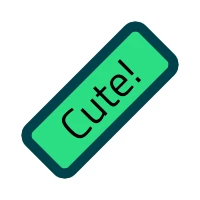
QRectF rect(20, 70, 160, 60);
p->translate(rect.center());
p->rotate(-M_PI / 4);
p->translate(-rect.center());
p->beginPath();
p->roundRect(rect, 10);
p->fill();
p->stroke();
p->setFillStyle(QColorConstants::Black);
p->fillText("Cute!", rect);
Creates a new rounded rectangle shaped sub-path at
rectwithradiuscorners. This is an overloaded method using QRectF.- roundRect(rect, radiusTopLeft, radiusTopRight, radiusBottomRight, radiusBottomLeft)
- Parameters:
rect –
QRectFradiusTopLeft – float
radiusTopRight – float
radiusBottomRight – float
radiusBottomLeft – float
Creates a new rounded rectangle shaped sub-path at
rect. Corners rounding can be varying per-corner, withradiusTopLeft,radiusTopRight,radiusBottomRight,radiusBottomLeft.- roundRect(x, y, width, height, radius)
- Parameters:
x – float
y – float
width – float
height – float
radius – float
Creates a new rounded rectangle shaped sub-path in position
x,ywith sizewidth,height. Corners rounding will beradius.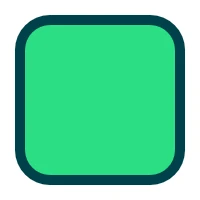
p->beginPath();
p->roundRect(20, 20, 160, 160, 30);
p->fill();
p->stroke();
- roundRect(x, y, width, height, radiusTopLeft, radiusTopRight, radiusBottomRight, radiusBottomLeft)
- Parameters:
x – float
y – float
width – float
height – float
radiusTopLeft – float
radiusTopRight – float
radiusBottomRight – float
radiusBottomLeft – float
Creates a new rounded rectangle shaped sub-path in position
x,ywith sizewidth,height. Corners rounding can be varying per-corner, withradiusTopLeft,radiusTopRight,radiusBottomRight,radiusBottomLeft.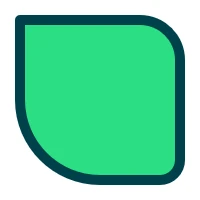
p->beginPath();
p->roundRect(20, 20, 160, 160,
             0, 40, 20, 80);
p->fill();
p->stroke();
- save()
Pushes and saves the current render state into a state stack. A matching
restore()must be used to restore the state.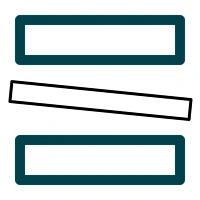
p->strokeRect(20, 20, 160, 40);
// Save and adjust the paint state
p->save();
p->setStrokeStyle(QColorConstants::Black);
p->setLineWidth(3);
p->rotate(0.1);
p->strokeRect(20, 80, 180, 20);
// Restore the saved paint state
p->restore();
p->strokeRect(20, 140, 160, 40);
See also
- scale(scale)
- Parameters:
scale – float
Scales the current coordinate system by
scale. Both x and y coordinates are scaled evenly.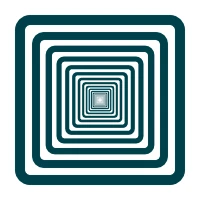
QRectF rect(20, 20, 160, 160);
for (int i = 0; i < 20; i++) {
    p->beginPath();
    p->roundRect(rect, 10);
    p->stroke();
    p->translate(rect.center());
    p->scale(0.8);
    p->translate(-rect.center());
}
- scale(scaleX, scaleY)
- Parameters:
scaleX – float
scaleY – float
Scales the current coordinate system by
scaleXandscaleY.- setAntialias(antialias)
- Parameters:
antialias – float
Sets the current antialiasing amount to
antialiasin pixels. More antialias means smoother painting. This only affects fill and stroke painting, not images or texts. The default value is1.0and the maximum value is10.0.Antialiasing can be modified per-path so it can be set before each stroke/fill. To disable antialiasing and reduce the rendering cost, set the antialias to
0.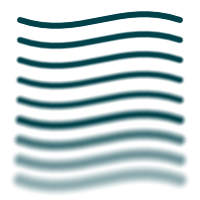
p->setLineWidth(6);
for (int i = 1; i < 10 ; i++) {
    int y = i * 20;
    p->setAntialias(i);
    p->beginPath();
    p->moveTo(20, y);
    p->bezierCurveTo(80, y + 20, 120,
                     y - 20, 180, y);
    p->stroke();
}
See also
Sets the current scissor rectangle to
rect. The scissor rectangle is transformed by the current transform.Note
Clipping has some performance cost and it should only be used when needed.
See also
- setClipRect(x, y, width, height)
- Parameters:
x – float
y – float
width – float
height – float
Sets the current scissor rectangle to (
x,y,width,height). The scissor rectangle is transformed by the current transform.Note
Clipping has some performance cost and it should only be used when needed.
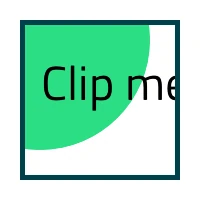
QRectF viewArea(20, 20, 160, 160);
p->setClipRect(viewArea);
p->beginPath();
p->circle(40, 40, 110);
p->fill();
p->setFillStyle(Qt::black);
p->fillText("Clip me...", 40, 100);
p->strokeRect(viewArea);
See also
Sets the path fill rule to
fillRule. This value is applied to allfill()calls after the rule has been set. The default fill rule isQCanvasPainter::FillRule::NonZero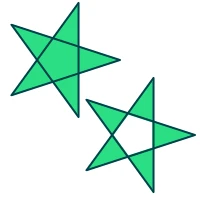
auto paintStar = [p]() {
    p->beginPath();
    p->moveTo(120, 60);
    for (int i = 1; i < 6; ++i) {
        p->lineTo(60 + 60 * cos(0.8 * i * M_PI),
                  60 + 60 * sin(0.8 * i * M_PI));
    }
    p->fill();
    p->stroke();
};
p->setFillRule(QCanvasPainter::FillRule::NonZero);
paintStar();
p->translate(75, 75);
p->setFillRule(QCanvasPainter::FillRule::EvenOdd);
paintStar();
Sets the fill style to a solid
color. The default fill style is solid black (0, 0, 0, 1).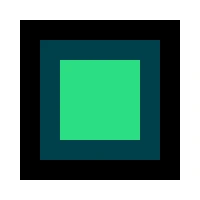
p->setFillStyle(QColorConstants::Black);
p->fillRect(20, 20, 160, 160);
p->setFillStyle(QColor(0, 65, 74));
p->fillRect(40, 40, 120, 120);
p->setFillStyle("#2CDE85");
p->fillRect(60, 60, 80, 80);
- setFillStyle(brush)
- Parameters:
brush –
QCanvasBrush
Sets the fill style to
brush. The default fill style is solid black (0, 0, 0, 1).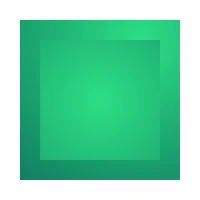
QCanvasRadialGradient g2(140, 40, 0, 300);
g2.setStartColor(QColor(44, 222, 133));
g2.setEndColor(QColor(0, 65, 74));
p->setFillStyle(g2);
p->fillRect(20, 20, 160, 160);
g2.setCenterPosition(100, 100);
p->setFillStyle(g2);
p->fillRect(40, 40, 120, 120);
Sets the
fontas currently active font.- setGlobalAlpha(alpha)
- Parameters:
alpha – float
Sets the global alpha (transparency) value to
alpha. This alpha value is applied to all rendered shapes. Already transparent paths will get proportionally more transparent as well. Alpha should be between 0.0 (fully transparent) and 1.0 (fully opaque). By default alpha is1.0.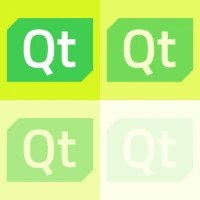
static QImage logo(":/qt_logo2.png");
QCanvasImage image = p->addImage(logo);
p->setFillStyle("#d9f720");
for (int i = 0; i < 4; i++) {
    qreal x = 100 * (i % 2);
    qreal y = 100 * (i / 2);
    QRectF rect(x, y, 100, 100);
    p->setGlobalAlpha(1.0 - i * 0.3);
    p->fillRect(rect);
    p->drawImage(image, rect);
}
- setGlobalBrightness(value)
- Parameters:
value – float
Sets the global brightness to
value. This brightness is applied to all rendered shapes. A value of 0 will cause painting to be completely black. Value can also be bigger than 1.0, to increase the brightness. By default, brightness is1.0.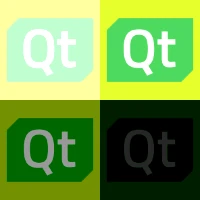
static QImage logo(":/qt_logo2.png");
QCanvasImage image = p->addImage(logo);
p->setFillStyle("#d9f720");
for (int i = 0; i < 4; i++) {
    qreal x = 100 * (i % 2);
    qreal y = 100 * (i / 2);
    QRectF rect(x, y, 100, 100);
    p->setGlobalBrightness(1.5 - i * 0.45);
    p->fillRect(rect);
    p->drawImage(image, rect);
}
- setGlobalCompositeOperation(operation)
- Parameters:
operation –
CompositeOperation
Sets the global composite operation mode to
operation. This mode is applied to all painting operations. The default mode isQCanvasPainter::CompositeOperation::SourceOver.Note
To work properly, composite modes require enabling
alphaBlendingand using a transparent background for the canvas.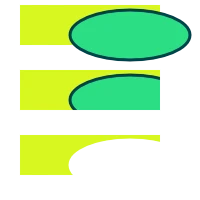
QList<QCanvasPainter::CompositeOperation> modes = {
    QCanvasPainter::CompositeOperation::SourceOver,
    QCanvasPainter::CompositeOperation::SourceAtop,
    QCanvasPainter::CompositeOperation::DestinationOut
};
for (int i = 0; i < modes.size(); i++) {
    // First item - SourceOver mode
    p->setGlobalCompositeOperation(QCanvasPainter::CompositeOperation::SourceOver);
    qreal y = 5 + i * 65;
    p->setFillStyle("#D9F720");
    p->fillRect(20, y, 140, 40);
    // Second item - Different modes
    p->setGlobalCompositeOperation(modes[i]);
    p->beginPath();
    p->ellipse(130, y + 30, 60, 25);
    p->setStrokeStyle("#00414A");
    p->setFillStyle("#2CDE85");
    p->fill();
    p->stroke();
}
- setGlobalContrast(value)
- Parameters:
value – float
Sets the global contrast to
value. This contrast is applied to all rendered shapes. A value of 0 will cause painting to be completely gray (0.5, 0.5, 0.5). Value can also be bigger than 1.0, to increase the contrast. By default, contrast is1.0.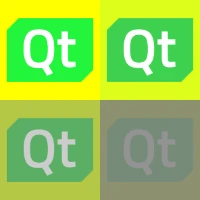
static QImage logo(":/qt_logo2.png");
QCanvasImage image = p->addImage(logo);
p->setFillStyle("#d9f720");
for (int i = 0; i < 4; i++) {
    qreal x = 100 * (i % 2);
    qreal y = 100 * (i / 2);
    QRectF rect(x, y, 100, 100);
    p->setGlobalContrast(1.5 - i * 0.45);
    p->fillRect(rect);
    p->drawImage(image, rect);
}
- setGlobalSaturation(value)
- Parameters:
value – float
Sets the global saturation to
value. This saturation is applied to all rendered shapes. A value of 0 will disable saturation and cause painting to be completely grayscale. Value can also be bigger than 1.0, to increase the saturation. By default, saturation is1.0.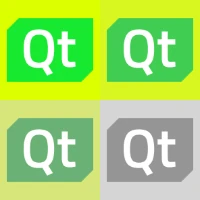
static QImage logo(":/qt_logo2.png");
QCanvasImage image = p->addImage(logo);
p->setFillStyle("#d9f720");
for (int i = 0; i < 4; i++) {
    qreal x = 100 * (i % 2);
    qreal y = 100 * (i / 2);
    QRectF rect(x, y, 100, 100);
    p->setGlobalSaturation(1.5 - i * 0.5);
    p->fillRect(rect);
    p->drawImage(image, rect);
}
- setHighQualityStroking(enabled)
- Parameters:
enabled – bool
Sets the high quality stroking to
enabled. Setting this totruegives a more correct rendering in some less common cases where stroking overlaps and doesn’t have full opacity. Enabling it results into higher rendering cost. The default value isfalse.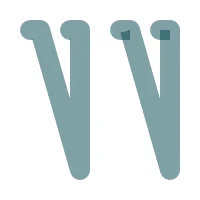
// Increase the line width and reduce opacity to get
// the stroking flaws visible.
p->setLineWidth(20);
p->setGlobalAlpha(0.5);
if (m_path.isEmpty()) {
    m_path.moveTo(30, 30);
    m_path.lineTo(40, 30);
    m_path.lineTo(80, 170);
    m_path.lineTo(80, 30);
    m_path.lineTo(70, 30);
}
p->setHighQualityStroking(true);
p->stroke(m_path);
p->setHighQualityStroking(false);
p->translate(90, 0);
p->stroke(m_path);
Sets the end of the line for strokes to
cap. The default line cap isQCanvasPainter::LineCap::Butt.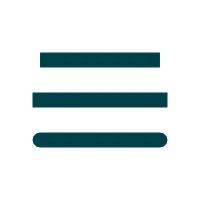
QCanvasPath path;
path.moveTo(40, 60);
path.lineTo(160, 60);
p->setLineCap(QCanvasPainter::LineCap::Butt);
p->stroke(path, -1);
p->setLineCap(QCanvasPainter::LineCap::Square);
p->translate(0, 40);
p->stroke(path, -1);
p->setLineCap(QCanvasPainter::LineCap::Round);
p->translate(0, 40);
p->stroke(path, -1);
Sets the line join of strokes to
join. The default line join isQCanvasPainter::LineJoin::Miter.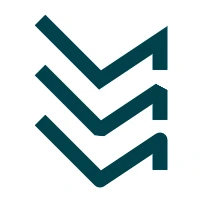
QCanvasPath path;
path.moveTo(40, 20);
path.lineTo(100, 80);
path.lineTo(160, 40);
path.lineTo(160, 70);
p->setLineJoin(QCanvasPainter::LineJoin::Miter);
p->stroke(path, -1);
p->setLineJoin(QCanvasPainter::LineJoin::Bevel);
p->translate(0, 50);
p->stroke(path, -1);
p->setLineJoin(QCanvasPainter::LineJoin::Round);
p->translate(0, 50);
p->stroke(path, -1);
See also
- setLineWidth(width)
- Parameters:
width – float
Sets the line width of strokes to
widthin pixels. The default line width is1.0. When antialiasing is enabled, widths thinner than a single pixel will automatically fade the opacity, creating a smooth output.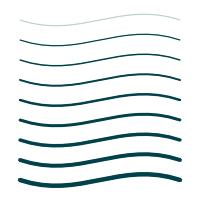
for (int i = 1; i < 10 ; i++) {
    int y = i * 20;
    p->setLineWidth(0.5 * i);
    p->beginPath();
    p->moveTo(20, y);
    p->bezierCurveTo(80, y + 20, 120,
                     y - 20, 180, y);
    p->stroke();
}
See also
- setMiterLimit(limit)
- Parameters:
limit – float
Sets the miter limit to
limit. Miter limit controls when a sharp corner is beveled. When the corner length would become longer than this limit,Bevelwill be applied between the lines instead. This only has effect with theMiterline join. The default limit is10.0.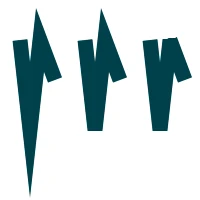
QCanvasPath path;
path.moveTo(20, 40);
path.lineTo(30, 130);
path.lineTo(40, 40);
path.lineTo(55, 80);

p->setLineJoin(QCanvasPainter::LineJoin::Miter);
p->setMiterLimit(20);
p->stroke(path);

p->setMiterLimit(8);
p->translate(65, 0);
p->stroke(path);

p->setMiterLimit(2);
p->translate(65, 0);
p->stroke(path);
See also
- setPathWinding(winding)
- Parameters:
winding –
PathWinding
Sets the current sub-path
windingto eitherCounterClockWise(default) orClockWise.CounterClockWisedraws solid subpaths whileClockWisedraws holes.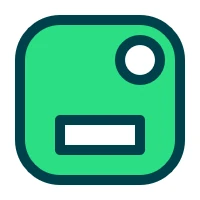
p->beginPath();
p->roundRect(20, 20, 160, 160, 40);
p->setPathWinding(QCanvasPainter::PathWinding::ClockWise);
p->circle(140, 60, 20);
p->rect(60, 120, 80, 30);
p->fill();
p->stroke();
See also
Sets the stroke style to a solid
color. The default stroke style is solid black color (0, 0, 0, 1).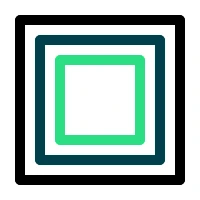
p->setStrokeStyle(QColorConstants::Black);
p->strokeRect(20, 20, 160, 160);
p->setStrokeStyle(QColor(0, 65, 74));
p->strokeRect(40, 40, 120, 120);
p->setStrokeStyle("#2CDE85");
p->strokeRect(60, 60, 80, 80);
- setStrokeStyle(brush)
- Parameters:
brush –
QCanvasBrush
Sets the stroke style to
brush. The default stroke style is solid black (0, 0, 0, 1).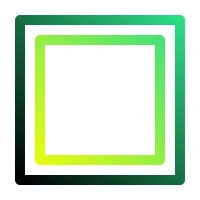
QCanvasLinearGradient g1(180, 20, 20, 180);
g1.setStartColor(QColor(44, 222, 133));
g1.setEndColor(Qt::black);
p->setStrokeStyle(g1);
p->strokeRect(20, 20, 160, 160);
g1.setEndColor(Qt::yellow);
p->setStrokeStyle(g1);
p->strokeRect(40, 40, 120, 120);
Sets the horizontal alignment of text to
align. The default alignment isQCanvasPainter::TextAlign::Start.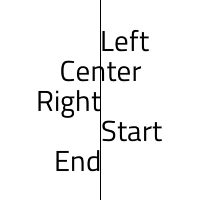
QFont font("Titillium Web", 22);
p->setFont(font);
p->fillRect(100, 0, 1, 200);
p->setTextAlign(QCanvasPainter::TextAlign::Left);
p->fillText("Left", 100, 40);
p->setTextAlign(QCanvasPainter::TextAlign::Center);
p->fillText("Center", 100, 70);
p->setTextAlign(QCanvasPainter::TextAlign::Right);
p->fillText("Right", 100, 100);
p->setTextAlign(QCanvasPainter::TextAlign::Start);
p->fillText("Start", 100, 130);
p->setTextAlign(QCanvasPainter::TextAlign::End);
p->fillText("End", 100, 160);
See also
- setTextAntialias(antialias)
- Parameters:
antialias – float
Sets the current text antialiasing amount. The value
antialiasis a multiplier to normal antialiasing, meaning that0.0disables antialiasing and 2.0 doubles it. The default value is 1.0.Note
Due to the text antialiasing technique used (SDF), the maximum antialiasing amount is quite limited and this affects less when the font size is small.
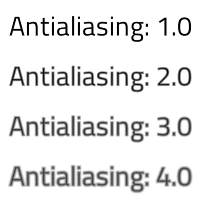
QFont font("Titillium Web", 20);
p->setFont(font);
p->setTextAntialias(1.0);
p->fillText("Antialiasing: 1.0", 100, 25);
p->setTextAntialias(2.0);
p->fillText("Antialiasing: 2.0", 100, 75);
p->setTextAntialias(3.0);
p->fillText("Antialiasing: 3.0", 100, 125);
p->setTextAntialias(4.0);
p->fillText("Antialiasing: 4.0", 100, 175);
- setTextBaseline(baseline)
- Parameters:
baseline –
TextBaseline
Sets the vertical alignment (baseline) of text to
baseline. The default alignment isQCanvasPainter::TextBaseline::Alphabetic.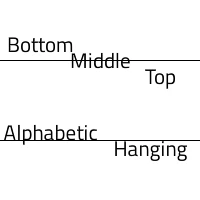
QFont font("Titillium Web", 16);
p->setFont(font);
p->fillRect(0, 60, 200, 1);
p->fillRect(0, 140, 200, 1);
p->setTextBaseline(QCanvasPainter::TextBaseline::Bottom);
p->fillText("Bottom", 40, 60);
p->setTextBaseline(QCanvasPainter::TextBaseline::Middle);
p->fillText("Middle", 100, 60);
p->setTextBaseline(QCanvasPainter::TextBaseline::Top);
p->fillText("Top", 160, 60);
p->setTextBaseline(QCanvasPainter::TextBaseline::Alphabetic);
p->fillText("Alphabetic", 50, 140);
p->setTextBaseline(QCanvasPainter::TextBaseline::Hanging);
p->fillText("Hanging", 150, 140);
See also
- setTextDirection(direction)
- Parameters:
direction –
TextDirection
Sets the direction of text to
direction. The default direction isQCanvasPainter::TextDirection::Inherit.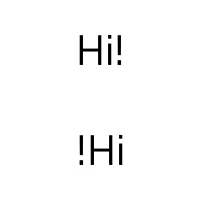
p->setTextAlign(QCanvasPainter::TextAlign::Center);
p->setTextBaseline(QCanvasPainter::TextBaseline::Middle);
QFont font("Titillium Web", 32);
p->setFont(font);
p->setFillStyle(QColorConstants::Black);
p->fillText("Hi!", 100, 50);
p->setTextDirection(QCanvasPainter::TextDirection::RightToLeft);
p->fillText("Hi!", 100, 150);
- setTextLineHeight(height)
- Parameters:
height – float
Sets the line height adjustment in pixels to
heightfor wrapped text. The default line height is0.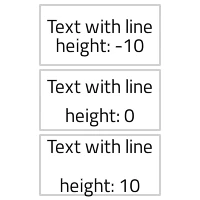
QRectF r1(40, 5, 120, 60);
QRectF r2(40, 70, 120, 60);
QRectF r3(40, 135, 120, 60);
p->strokeRect(r1);
p->strokeRect(r2);
p->strokeRect(r3);
p->setTextLineHeight(-10);
p->fillText("Text with line height: -10", r1);
p->setTextLineHeight(0);
p->fillText("Text with line height: 0", r2);
p->setTextLineHeight(10);
p->fillText("Text with line height: 10", r3);
Sets the text wrap mode to
wrapMode. The default wrap mode isQCanvasPainter::WrapMode::NoWrap.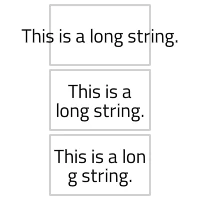
QRectF r1(50, 5, 100, 60);
QRectF r2(50, 70, 100, 60);
QRectF r3(50, 135, 100, 60);
p->strokeRect(r1);
p->strokeRect(r2);
p->strokeRect(r3);
QString s("This is a long string.");
p->setTextWrapMode(QCanvasPainter::WrapMode::NoWrap);
p->fillText(s, r1);
p->setTextWrapMode(QCanvasPainter::WrapMode::Wrap);
p->fillText(s, r2);
p->setTextWrapMode(QCanvasPainter::WrapMode::WrapAnywhere);
p->fillText(s, r3);
- setTransform(transform)
- Parameters:
transform –
QTransform
Resets the current transform and uses
transforminstead.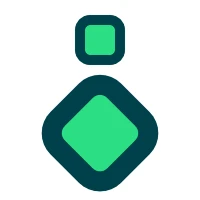
p->beginPath();
p->roundRect(80, 20, 40, 40, 10);
p->fill();
p->stroke();
QTransform t;
t.translate(100, 20);
t.rotate(45);
t.scale(2.0, 2.0);
p->setTransform(t);
p->beginPath();
p->roundRect(20, 20, 40, 40, 10);
p->fill();
p->stroke();
See also
- setWindingEnforce(enabled)
- Parameters:
enabled – bool
Sets the winding enforcing to
enabled. Setting this tofalsedisables enforcing of path winding to match what has been set intosetPathWinding(). Disabling allows e.g. creating holes into paths by adding the points in clock wise order. Disabling can also increase the performance. The default value istrue.p->setWindingEnforce(false); p->beginPath(); // Outer shape, counterclockwise p->moveTo(20, 20); p->lineTo(100, 180); p->lineTo(180, 20); p->closePath(); // Inner shape, clockwise p->moveTo(100, 40); p->lineTo(125, 90); p->lineTo(75, 90); p->closePath(); p->fill(); p->stroke();
- skew(angleX[, angleY=0.0])
- Parameters:
angleX – float
angleY – float
Skews (shears) the current coordinate system along X axis by
angleXand along Y axis byangleY. Angles are specified in radians.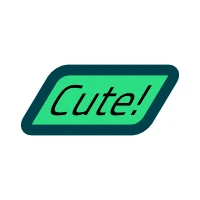
QRectF rect(40, 70, 120, 60);
p->translate(rect.center());
p->skew(-0.6);
p->translate(-rect.center());
p->beginPath();
p->roundRect(rect, 10);
p->fill();
p->stroke();
p->setFillStyle(QColorConstants::Black);
p->fillText("Cute!", rect);
- stroke()
Strokes the current path with the current stroke style.
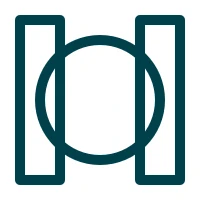
p->beginPath();
p->rect(20, 20, 40, 160);
p->rect(140, 20, 40, 160);
p->circle(100, 100, 60);
p->stroke();
See also
- stroke(path[, pathGroup=-1])
- Parameters:
path –
QCanvasPathpathGroup – int
Strokes the
pathwith the current stroke style and belonging intopathGroup. Painting throughQCanvasPathis optimal when the path contains more commands and is mostly static.When
pathGroupis-1, the path’s rendering-related data will not be cached. This is the default. To request caching of path data, pass a value equal to or greater than0. More information about using path cache groups can be found in theQCanvasPathdocumentation.Calling
beginPath()before this method is not required.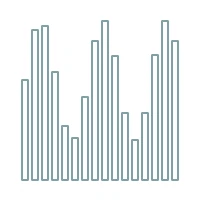
// m_path is QCanvasPath
if (m_path.isEmpty()) {
    for (int i = 0; i < 16; i++) {
        int h = 100 + 60 * sin(i);
        m_path.rect(22 + i * 10,
                    180 - h,
                    6, h);
    }
}
p->stroke(m_path);
See also
Draws a stroked rectangle into
rect. This is an overloaded method using QRectF.Note
This is provided for convenience. When stroking more than just a single rect, prefer using
rect().- strokeRect(x, y, width, height)
- Parameters:
x – float
y – float
width – float
height – float
Draws a stroked rectangle into the specified position (
x,y) with sizewidth,height.Note
This is provided for convenience. When stroking more than just a single rect, prefer using
rect().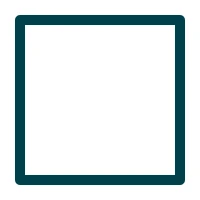
p->strokeRect(20, 20, 160, 160);
// The above code does same as:
// p->beginPath();
// p->rect(20, 20, 160, 160);
// p->stroke();
Measures bounding box of a
textstring atrect. Returns QRectF with values [xmin, ymin, width, height]. Measured values are returned in local coordinate space.- textBoundingBox(text, point[, maxWidth=0])
Measures bounding box of a
textstring atpoint.To measure multi-line text, set the text wrap mode using
setTextWrapMode()to something else than the defaultNoWrap. Also set the optionalmaxWidthparameter to preferred row width in pixels.Returns QRectF with values [xmin, ymin, width, height]. Measured values are returned in local coordinate space.
- textBoundingBox(text, x, y[, maxWidth=0])
- Parameters:
text – str
x – float
y – float
maxWidth – float
- Return type:
Measures bounding box of a
textstring at (x,y).To measure multi-line text, set the text wrap mode using
setTextWrapMode()to something else than the defaultNoWrap. Also set the optionalmaxWidthparameter to preferred row width in pixels.Returns QRectF with values [xmin, ymin, width, height]. Measured values are returned in local coordinate space.
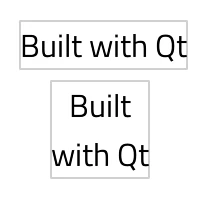
QString s("Built with Qt");
QPointF pos1(20, 20);
QRectF box1 = p->textBoundingBox(s, pos1);
p->strokeRect(box1);
p->fillText(s, pos1);
p->setTextWrapMode(QCanvasPainter::WrapMode::WordWrap);
p->setTextAlign(QCanvasPainter::TextAlign::Center);
QPointF pos2(100, 80);
QRectF box2 = p->textBoundingBox(s, pos2, 100);
p->strokeRect(box2);
p->fillText(s, pos2, 100);
- transform(transform)
- Parameters:
transform –
QTransform
Multiplies the current coordinate system by the specified
transform.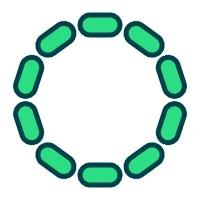
QTransform t;
t.translate(100, 100);
t.rotate(36);
t.translate(-100, -100);
for (int i = 0; i < 10; i++) {
    p->transform(t);
    p->beginPath();
    p->roundRect(80, 15, 40, 20, 10);
    p->fill();
    p->stroke();
}
See also
Translates the current coordinate system by
point.- translate(x, y)
- Parameters:
x – float
y – float
Translates the current coordinate system by
xandy.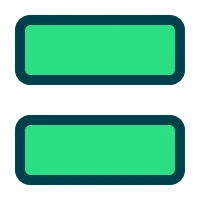
auto paintRect = [p]() {
    p->beginPath();
    p->roundRect(20, 20, 160, 60, 10);
    p->fill();
    p->stroke();
};
paintRect();
p->translate(0, 100);
paintRect();