PySide6.QtCanvasPainter.QCanvasGridPattern
- class QCanvasGridPattern
QCanvasGridPatternis a brush for painting grid patterns.Details
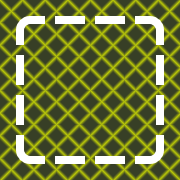
QCanvasGridPatternis a brush for painting grid and bar patterns.Here is a simple example:
// Rotated grid into background
QRectF rect(20, 20, 180, 180);
QCanvasGridPattern gp1(rect.topLeft(), QSizeF(16, 16));
gp1.setLineColor("#DBEB00");
gp1.setBackgroundColor("#373F26");
gp1.setLineWidth(2.0);
gp1.setRotation(M_PI / 4);
gp1.setFeather(5.0);
painter.setFillStyle(gp1);
painter.fillRect(rect);
// Rounded rectangle, stroked with
// grid pattern for dashes.
qreal strokeW = 10;
QRectF rect2(40, 40, 140, 140);
QCanvasGridPattern gp2;
gp2.setLineColor(Qt::transparent);
gp2.setBackgroundColor(Qt::white);
gp2.setStartPosition(rect2.x() - strokeW,
                     rect2.y() - strokeW);
gp2.setCellSize(40, 40);
gp2.setLineWidth(strokeW);
painter.setLineWidth(8);
painter.setStrokeStyle(gp2);
painter.beginPath();
painter.roundRect(rect2, 10);
painter.stroke();
Synopsis
Methods
def
__init__()def
cellSize()def
feather()def
lineColor()def
lineWidth()def
__ne__()def
__eq__()def
rotation()def
setCellSize()def
setFeather()def
setLineColor()def
setLineWidth()def
setRotation()def
startPosition()def
swap()
Note
This documentation may contain snippets that were automatically translated from C++ to Python. We always welcome contributions to the snippet translation. If you see an issue with the translation, you can also let us know by creating a ticket on https:/bugreports.qt.io/projects/PYSIDE
- __init__()
- __init__(arg__1)
- Parameters:
arg__1 –
QCanvasGridPattern
Destroys the grid pattern.
Constructs a grid pattern starting at
startPosition, with a single cell sizedcellSize.See also
- __init__(startX, startY, cellWidth, cellHeight)
- Parameters:
startX – float
startY – float
cellWidth – float
cellHeight – float
Constructs a grid pattern starting at
startX,startY, with a single cell sizedcellWidth,cellHeight.Returns the pattern grid background color.
See also
Returns the size of a single cell in grid pattern.
See also
- feather()
- Return type:
float
Returns the pattern feather in pixels.
See also
Returns the pattern grid line color.
See also
- lineWidth()
- Return type:
float
Returns the width of a stroke line in grid pattern.
See also
- __ne__(rhs)
- Parameters:
rhs –
QCanvasGridPattern- Return type:
bool
- __eq__(rhs)
- Parameters:
rhs –
QCanvasGridPattern- Return type:
bool
- rotation()
- Return type:
float
Returns the pattern rotation in radians.
See also
Sets the pattern grid background color to
color. The default value is black.See also
Sets the size of a single cell in grid pattern to
size. When width is0, the horizontal bars are not painted. When height is0, the vertical bars are not painted. The default value is(10, 10).- setCellSize(width, height)
- Parameters:
width – float
height – float
Sets the size of a single cell in grid pattern to
width,height. When width is0, the horizontal bars are not painted. When height is0, the vertical bars are not painted. The default value is(10, 10).See also
- setFeather(feather)
- Parameters:
feather – float
Sets the pattern feather to
featherin pixels. The default value is1.0, meaning a single pixel antialiasing.See also
Sets the pattern grid line color to
color. The default value is white.See also
- setLineWidth(width)
- Parameters:
width – float
Sets the width of a stroke line in grid pattern to
width. The default value is1.0.See also
- setRotation(rotation)
- Parameters:
rotation – float
Sets the pattern rotation to
rotationin radians. Rotation is done around the gridstartPosition(). The default value is0.0, meaning the grid is not rotated.See also
Sets the start point of grid pattern to
point. Start position means top-left corner of the grid in pattern. Pattern will then be extended to all positions from here. The default value is(0.0, 0.0).- setStartPosition(x, y)
- Parameters:
x – float
y – float
Sets the start point of grid pattern to (
x,y). Start position means top-left corner of the grid in pattern. Pattern will then be extended to all positions from here. The default value is(0.0, 0.0).See also
Returns the start point of grid pattern.
See also
- swap(other)
- Parameters:
other –
QCanvasGridPattern