PySide6.QtCanvasPainter.QCanvasGradient
- class QCanvasGradient
QCanvasGradientis the base class for allQCanvasPaintergradient brushes.Details
QCanvasGradientis the base class for allQCanvasPaintergradient brushes. Currently there are four type of gradients:QCanvasLinearGradient,QCanvasRadialGradient,QCanvasConicalGradientandQCanvasBoxGradient.If no stops are provided with
setStartColor(),setEndColor(),setColorAt()orsetStops(), the gradient is rendered as transparent black (0,0,0,0). If only a single stop is provided, the gradient is filled with this color.QCanvasPainteruses two different approaches for painting gradients.With maximum of 2 stops, the colors are passed into shader as 2 vec4 uniforms. This makes animating 2 stop gradients very performant, with no extra steps in between.
With more than 2 stops, the colors are passed into shader as a one dimensional texture. By default the texture size is 1x256 pixels, optimized for quality and performance. The textures are cached, so when gradient stops or colors don’t change, previous texture can be reused even when other gradient properties (like position, angle etc.) change. Although animating multi-stop gradients is fast, it will cause texture uploads, so consider if it is worth it.
There are few environment variables to control the gradients texture usage:
QCPAINTER_DISABLE_TEXTURE_USAGE_TRACKING - By default, gradient texture usage is tracked and kept under the max amount. Set this environment variable to disable the tracking and keep all gradient textures in memory.
QCPAINTER_MAX_TEXTURES - By default, the maximum amount of textures is
1024. Set this environt variable to contain number of desired maximum texture amount. The currently unused temporary gradient textures are automatically removed when the maximum amount is reached.Note
This does not have an effect when the texture usage tracking has been disabled.
Inherited by:
QCanvasRadialGradient,QCanvasLinearGradient,QCanvasConicalGradient,QCanvasBoxGradientSynopsis
Methods
def
__init__()def
addColorStop()def
endColor()def
__ne__()def
__eq__()def
setColorAt()def
setEndColor()def
setImage()def
setStartColor()def
setStops()def
startColor()def
stops()def
swap()def
type()
Note
This documentation may contain snippets that were automatically translated from C++ to Python. We always welcome contributions to the snippet translation. If you see an issue with the translation, you can also let us know by creating a ticket on https:/bugreports.qt.io/projects/PYSIDE
- __init__(brush)
- Parameters:
brush –
QCanvasBrush
- __init__(arg__1)
- Parameters:
arg__1 –
QCanvasGradient
Copy-constructs an instance of
QCanvasGradient.Creates a stop point at the given
positionwith the givencolor. The givenpositionmust be in the range 0 to 1.This method is provided for HTML CanvasGradient compatibility. It is equivalent to
setColorAt().See also
Returns the gradient end color or the color at the largest position. If any stops have not been set, returns transparent black (0, 0, 0, 0).
See also
- __ne__(rhs)
- Parameters:
rhs –
QCanvasGradient- Return type:
bool
- __eq__(rhs)
- Parameters:
rhs –
QCanvasGradient- Return type:
bool
Creates a stop point at the given
positionwith the givencolor. The givenpositionmust be in the range 0 to 1.See also
Sets the end color of gradient to
color. This is equal to callingsetColorAt()with position1.See also
- setImage(image[, index=0])
- Parameters:
image –
QCanvasImageindex – int
Uses the
imageas the gradient source at the y-coordinateindex. This is an alternative for setting the gradient stops using e.g.setStops()orsetColorAt(). The expected default width of the image is 256 pixels, but it can be adjusted by defining the QCPAINTER_GRADIENT_SIZE. Index parameter is optional and not needed when the height of the image is 1 pixel. The maximum value of index should be image height - 1.Possible reasons to use this method instead of setting stops:
Slightly faster to create as stops don’t need to be parsed. Also, multiple gradients can be included in a single image using
index.The ability to use gradient from design / image directly, instead of converting it to set of stops.
The ability to have non-linear gradients, like e.g. Gaussian curve.
Note
If both the stops and the image have been set, stops will be used.
Here is a simple example of how to use a
256x1gradient image:
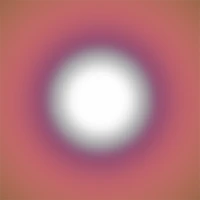
static QImage image(":/gradient1.png");
QCanvasImage gradImage = p->addImage(image);
QRectF rect(0, 0, 200, 200);
QCanvasRadialGradient rg(rect.center(), 20, 150);
rg.setImage(gradImage);
p->setFillStyle(rg);
p->fillRect(rect);
See also
Sets the start color of gradient to
color. This is equal to callingsetColorAt()with position0.See also
- setStops(stops)
- Parameters:
stops – .list of QCanvasGradientStop
Replaces the current set of stop points with the given
stops.The rules for the stops list are following:
The list should contain at least 2 stops.
The positions of the stops must be in the range 0 to 1, and must be sorted with the lowest stops first.
The first position must be at 0.0 and the last position at 1.0.
See also
Returns the gradient start color or the color at the smallest position. If any stops have not been set, returns transparent black (0, 0, 0, 0).
See also
- stops()
- Return type:
.list of QCanvasGradientStop
Returns the stop points for this gradient.
See also
- swap(other)
- Parameters:
other –
QCanvasGradient
Returns the type of gradient.