PySide6.QtCanvasPainter.QCanvasImage
- class QCanvasImage
QCanvasImageis the image class forQCanvasPainter.Details
QCanvasImageis the image class used byQCanvasPainter. To be able to paint images, they fist need to be made available with e.g.addImage(). Then images can be painted as-is usingdrawImage()or used withQCanvasImagePatternbrush to fill / stroke.Here is a simple example:
static QImage logoImage(":/qtlogo.png");
// Paint an image pattern.
QCanvasImage bg = painter.addImage(logoImage,
             QCanvasPainter::ImageFlag::Repeat |
             QCanvasPainter::ImageFlag::GenerateMipmaps);
QCanvasImagePattern ip(bg, 0, 0, 44, 32);
painter.setFillStyle(ip);
painter.fillRect(50, 50, 320, 230);
// Paint a single image, with tint color.
QCanvasImage logo = painter.addImage(logoImage);
logo.setTintColor("#2cde85");
painter.drawImage(logo, 100, 80);
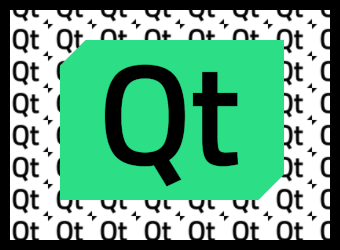
In the above example the QImage is static and addImage() is called on every repaint. This is not a problem as when the image and flags remain the same, addImage() fetches the image from cache instead of uploads it again as a texture. But a more common approac is having
QCanvasImagevariables as class members and callingaddImage()e.g. ininitializeResources().Similarly to
QCanvasBrushandQCanvasOffscreenCanvas,QCanvasImageis explicitly shared. See Implicit Data Sharing and QSharedDataPointer for details.Note
A
QCanvasImageobject contains only a handle to a graphics resource, such as a texture. Even when a detach occurs, the actual resource, i.e. the underlying texture and the image data in it, is never actually copied or duplicated. The actual owner of the real graphics resource (e.g., a QRhiTexture) is theQCanvasPainterthat handed out theQCanvasImageviaaddImage().A
QCanvasImagealways belongs to theQCanvasPainterthat created it. Manually removing images is done by callingremoveImage(). In most cases this will not be necessary, however, since the painter will automatically destroy any images during its own destruction.Synopsis
Methods
def
__init__()def
height()def
id()def
isNull()def
__ne__()def
__eq__()def
setTintColor()def
size()def
sizeInBytes()def
swap()def
tintColor()def
width()
Note
This documentation may contain snippets that were automatically translated from C++ to Python. We always welcome contributions to the snippet translation. If you see an issue with the translation, you can also let us know by creating a ticket on https:/bugreports.qt.io/projects/PYSIDE
- __init__()
Constructs a default image.
- __init__(image)
- Parameters:
image –
QCanvasImage
Constructs an image that is a copy of the given
image.- devicePixelRatio()
- Return type:
float
Returns the device pixel ratio for the image. This is the ratio between device pixels and device independent pixels.
A
QCanvasImagewith a greater than 1 device pixel ratio applies that scale factor when using the image. For example,drawImage(image, 0, 0)is then equivalent todrawImage(image, 0, 0, image.width() / image.devicePixelRatio(), image.height() / image.devicePixelRatio()).The default value is 1.0.
The value is carried over from the QImage the
QCanvasImageis created from. AQCanvasImagecreated from a texture oroffscreen canvasalways has a device pixel ratio of 1.See also
- height()
- Return type:
int
Returns the height of this image in pixels;
- id()
- Return type:
int
Returns the texture id for this image. When the image has not been assigned yet, this returns 0.
See also
- isNull()
- Return type:
bool
Returns true if the image has not been assigned yet. See
addImage()for details.- __ne__(rhs)
- Parameters:
rhs –
QCanvasImage- Return type:
bool
- __eq__(rhs)
- Parameters:
rhs –
QCanvasImage- Return type:
bool
Set the tint
colorof the image. This color will be multiplied with the image color to colorize the image. This can be used for example to highlight icons or to adjust images becase on the theme.See also
Returns the size (width and height) of this image in pixels.
- sizeInBytes()
- Return type:
int
Returns the size of this image in bytes.
QCanvasPainterdoes not keep copies of the CPU-side QImage data onceaddImage()has returned. If the source is aoffscreen canvas, then there is no CPU-side image data in the first place. Therefore, the result of this function is an approximation of the GPU memory that is used for the underlying texture.Note
The value is only an estimate based on the image format and dimensions. Qt has no knowledge of how the data for textures is stored and laid out in memory on the GPU side.
Note
This function does not take mipmap or multisample data into consideration.
- swap(other)
- Parameters:
other –
QCanvasImage
Swaps this image with
other. This operation is very fast and never fails.Returns the tint color of the image. The default value is Qt::white.
See also
- width()
- Return type:
int
Returns the width of this image in pixels.