PySide6.QtCanvasPainter.QCanvasImagePattern
- class QCanvasImagePattern
QCanvasImagePatternis a brush for painting image patterns.Details
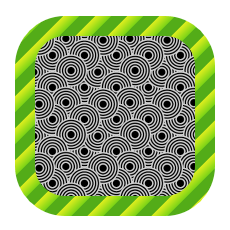
QCanvasImagePatternis a brush for painting image patterns. To useQCanvasImageas a pattern, it should have some repeat flags turned on likeRepeat.Here is a simple example:
// Setup 2 image patterns
static QImage image1(":/pattern2.png");
static QImage image2(":/pattern3.png");
auto flags = QCanvasPainter::ImageFlag::Repeat |
             QCanvasPainter::ImageFlag::GenerateMipmaps;
QCanvasImage bg1 = painter.addImage(image1, flags);
QCanvasImage bg2 = painter.addImage(image2, flags);
QCanvasImagePattern ip1(bg1, 0, 0, 64, 64);
QCanvasImagePattern ip2(bg2, 0, 0, 32, 32);
// Fill and stroke round rectangle with
// these image pattern brushes.
painter.beginPath();
painter.roundRect(50, 50, 180, 180, 40);
painter.setFillStyle(ip1);
painter.setStrokeStyle(ip2);
painter.fill();
painter.setLineWidth(20);
painter.stroke();
Note
When using image patterns, images are often scaled to smaller and it can be useful to set
GenerateMipmapsfor the usedQCanvasImageto have smooth patterns.Synopsis
Methods
def
__init__()def
image()def
imageSize()def
__ne__()def
__eq__()def
rotation()def
serialNumber()def
setImage()def
setImageSize()def
setRotation()def
setTintColor()def
startPosition()def
swap()def
tintColor()
Note
This documentation may contain snippets that were automatically translated from C++ to Python. We always welcome contributions to the snippet translation. If you see an issue with the translation, you can also let us know by creating a ticket on https:/bugreports.qt.io/projects/PYSIDE
- __init__()
- __init__(image)
- Parameters:
image –
QCanvasImage
Constructs an image pattern. Pattern will use
image. Please note thatimageshould usually have at leastRepeatflag set. Pattern start position position is (0, 0) and pattern size (100, 100). Pattern angle is 0.0 and tint color white (no tinting).- __init__(arg__1)
- Parameters:
arg__1 –
QCanvasImagePattern
Destroys the image pattern.
- __init__(image, startPosition, imageSize)
- Parameters:
image –
QCanvasImagestartPosition –
QPointFimageSize –
QSizeF
Constructs an image pattern using
image, starting atstartPositionand with the image drawn atimageSize. Please note thatimageshould usually have at leastRepeatflag set.See also
- __init__(image, startX, startY, imageWidth, imageHeight)
- Parameters:
image –
QCanvasImagestartX – float
startY – float
imageWidth – float
imageHeight – float
Constructs an image pattern using
image, starting atstartX,startYand with the image drawn atimageWidth,imageHeight. Please note thatimageshould usually have at leastRepeatflag set.See also
- image()
- Return type:
Returns the image of the pattern.
See also
Returns the size of a single image in pattern.
See also
- __ne__(rhs)
- Parameters:
rhs –
QCanvasImagePattern- Return type:
bool
- __eq__(rhs)
- Parameters:
rhs –
QCanvasImagePattern- Return type:
bool
- rotation()
- Return type:
float
Returns the pattern rotation in radians.
See also
- serialNumber()
- Return type:
int
- setImage(image)
- Parameters:
image –
QCanvasImage
Sets the image of the pattern to
image. Note: Image should usually haveRepeatflag set when used in image pattern.See also
Sets the size of a single image in pattern to
size.- setImageSize(width, height)
- Parameters:
width – float
height – float
Sets the size of a single image in pattern to (
width,height).See also
- setRotation(rotation)
- Parameters:
rotation – float
Sets the pattern rotation to
rotationin radians. Rotation is done around the imagestartPosition(). The default value is0.0, meaning the image is not rotated.See also
Sets the start point of image pattern to
point. Start position means top-left corner of an image in pattern. Pattern will then be extended to all positions from here (if imageRepeatflag has been set).- setStartPosition(x, y)
- Parameters:
x – float
y – float
Sets the start point of image pattern to (
x,y). Start position means top-left corner of an image in pattern. Pattern will then be extended to all positions from here (if imageRepeatflag has been set).See also
Sets the pattern tint color to
color. The color of the pattern image will be multiplied with this tint color in the shader. The default value is white, meaning no tinting.Returns the start point of image pattern.
See also
- swap(other)
- Parameters:
other –
QCanvasImagePattern
Returns the pattern tint color.
See also