Qt Canvas Painter - Hello Widget Example
The example demonstrates the use of
QCanvasanvasPainter
and QCanvasPainterWidget
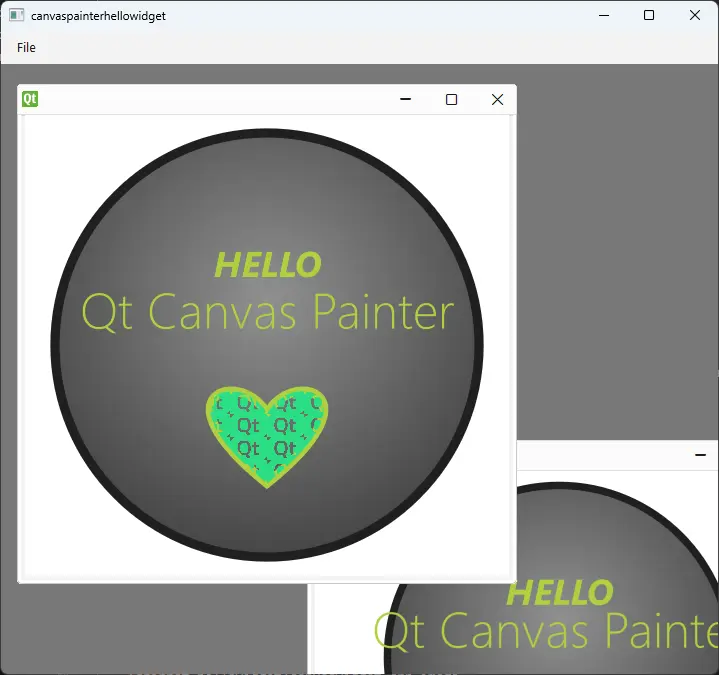
The example implements a QCanvasPainterWidget subclass. One or more instances
of this widget can then be added into a QMdiArea
inside the QMainWindow.
QCanvasPainterWidget itself derives from
QRhiWidget, and is always using accelerated 3D
rendering via QRhi.
Subclasses of QCanvasPainterWidget will at minimum want to implement
paint(). This example
also uses an image, loaded from a PNG file.
The paint() function can start drawing using the provider QCanvasPainter
right away.
See QCanvasPainter,
QCanvasBrush,
QCanvasRadialGradient,
QCanvasImagePattern,
QCanvasImage and
QFont for more information on the features used by
this example.
The image is used as a pattern, for filling the heart shape.
When resources like QCanvasImage and
QCanvasOffscreenCanvas and
are involved, these are
managed in QCanvasPainterWidget.initializeResources() and
QCanvasPainterWidget.graphicsResourcesInvalidated().
initializeResources() is merely a convenience. Instead of implementing it,
one could also write the following in paint():
if self.m_image.isNull():
    self.m_image = p.addImage(QImage(":/qt-translucent.png"),
                              QCanvasPainter.ImageFlag.Repeat)
This example does not reparent widgets between windows, so graphics resources
are not going to be lost. It is nonetheless a good pattern to assign a default,
empty object to all QCanvasImage and QCanvasOffscreenCanvas variables in
graphicsResourcesInvalidated().
The main() function creates a QMainWindow and a QMdiArea. Multiple
instances of the CanvasWidget class can be added as sub-windows. Due to
QCanvasPainterWidget.hasSharedPainter() defaulting to true, and due to being
placed within the same top-level widget, all the painter widgets will share the
same QCanvasPainter and the associated rendering infrastructure, instead of
creating dedicated ones.
import sys
from PySide6.QtWidgets import (QApplication, QMainWindow, QMdiArea)
from PySide6.QtGui import QKeySequence
from PySide6.QtCore import QCoreApplication, Slot

from canvaswidget import CanvasWidget


class MainWindow(QMainWindow):
    def __init__(self, parent=None):
        super().__init__(parent)

        self.mdi = QMdiArea()
        self.setCentralWidget(self.mdi)
        self.createCanvasWidget()

        fileMenu = self.menuBar().addMenu("File")
        fileMenu.addAction("New widget",
                           QKeySequence(QKeySequence.StandardKey.New),
                           self.createCanvasWidget)
        fileMenu.addAction("Exit",
                           QKeySequence(QKeySequence.StandardKey.Quit),
                           qApp.quit)  # noqa: F821

    @Slot()
    def createCanvasWidget(self):
        canvasWidget = CanvasWidget()
        subWin = self.mdi.addSubWindow(canvasWidget)
        subWin.resize(500, 500)
        canvasWidget.show()


if __name__ == "__main__":
    app = QApplication(sys.argv)
    mainWindow = MainWindow()
    mainWindow.resize(1280, 720)
    mainWindow.show()
    sys.exit(QCoreApplication.exec())
from PySide6.QtCanvasPainter import (QCanvasPainter, QCanvasPainterWidget,
                                     QCanvasImagePattern, QCanvasRadialGradient)
from PySide6.QtGui import QColor, QFont, QImage
from PySide6.QtCore import QPointF, Qt

import rc_hellowidget  # noqa F401


class CanvasWidget(QCanvasPainterWidget):

    def __init__(self, parent=None):
        super().__init__(parent)
        self.m_image = None
        self.setFillColor(Qt.GlobalColor.white)

    def initializeResources(self, p):
        assert (self.m_image is None)
        flags = QCanvasPainter.ImageFlag.Repeat | QCanvasPainter.ImageFlag.GenerateMipmaps
        image = QImage(":/qt-translucent.png")
        assert (not image.size().isEmpty())
        self.m_image = p.addImage(image, flags)

    def graphicsResourcesInvalidated(self):
        self.m_image = None

    def paint(self, p):
        size = min(self.width(), self.height())
        centerX = self.width() / 2
        centerY = self.height() / 2

        # Paint the background circle
        gradient1 = QCanvasRadialGradient(centerX, centerY - size * 0.1, size * 0.6)
        gradient1.setStartColor(QColor(0x909090))
        gradient1.setEndColor(QColor(0x404040))
        p.beginPath()
        p.circle(QPointF(centerX, centerY), size * 0.46)
        p.setFillStyle(gradient1)
        p.fill()
        p.setStrokeStyle(QColor(0x202020))
        p.setLineWidth(size * 0.02)
        p.stroke()
        # Hello text
        p.setTextAlign(QCanvasPainter.TextAlign.Center)
        p.setTextBaseline(QCanvasPainter.TextBaseline.Middle)
        font1 = QFont()
        font1.setWeight(QFont.Weight.Bold)
        font1.setItalic(True)
        font1.setPixelSize(round(size * 0.08))
        p.setFont(font1)
        p.setFillStyle(QColor(0xB0D040))
        p.fillText("HELLO", centerX, centerY - size * 0.18)

        # QCanvasPainter text
        font2 = QFont()
        font2.setWeight(QFont.Weight.Thin)
        font2.setPixelSize(round(size * 0.11))
        p.setFont(font2)
        p.fillText("Qt Canvas Painter", centerX, centerY - size * 0.08)

        # Paint heart
        pattern = QCanvasImagePattern(self.m_image, centerX, centerY, size * 0.08, size * 0.05)
        p.setFillStyle(pattern)
        p.setLineCap(QCanvasPainter.LineCap.Round)
        p.setStrokeStyle(QColor(0xB0D040))
        p.beginPath()
        p.moveTo(centerX, centerY + size * 0.3)
        p.bezierCurveTo(centerX - size * 0.25, centerY + size * 0.1,
                        centerX - size * 0.05, centerY + size * 0.05,
                        centerX, centerY + size * 0.15)
        p.bezierCurveTo(centerX + size * 0.05, centerY + size * 0.05,
                        centerX + size * 0.25, centerY + size * 0.1,
                        centerX, centerY + size * 0.3)
        p.stroke()
        p.fill()
<RCC>
    <qresource prefix="/">
        <file>qt-translucent.png</file>
    </qresource>
</RCC>