Reactive Properties Tutorial
In this tutorial you will learn how to make a QObject
reactive and QML-bindable with very little code, using the decorators from the
PySide6.QtQmlFeatures module:
auto_properties(),
computed(),
watch(), and
effect().
We start from a small shopping-cart class written the traditional way, with
Property and Signal, and then
rewrite it step by step, letting each decorator remove a chunk of boilerplate.
Note
The PySide6.QtQmlFeatures module is currently in technical
preview.
The example
The cart has two inputs and one derived value:
priceandquantity: plain integer inputs.total: always equal toprice * quantity.
On top of that we want two reactions whenever something changes:
warn when the price jumps by more than 50% (we need the old and new values to decide), and
log the cart’s state after any change (we only need the new state).
These three needs map exactly onto the three decorators, as you will see:
total becomes a computed(), the price jump
warning becomes a watch(), and the logging becomes
an effect().
Step 1: The traditional approach
Without the new decorators, every property is declared with the
Property decorator and needs a backing attribute, a
getter, a setter, and a notify Signal. The derived
total has to be recomputed by hand, and the two reactions have to be called
explicitly from inside each setter.
 1from PySide6.QtCore import QObject, Property, Signal
 2
 3
 4class Cart(QObject):
 5    # One notify signal per property, declared by hand.
 6    priceChanged = Signal()
 7    quantityChanged = Signal()
 8    totalChanged = Signal()
 9
10    def __init__(self, parent=None):
11        super().__init__(parent)
12        self._price = 10
13        self._quantity = 2
14        self._total = self._price * self._quantity
15
16        # Keep the derived value in sync by hand
17        # whenever an input changes, recompute the total.
18        self.priceChanged.connect(self._recompute_total)
19        self.quantityChanged.connect(self._recompute_total)
20
21    # price: backing field + getter + setter, declared with @Property.
22    @Property(int, notify=priceChanged)
23    def price(self):
24        return self._price
25
26    @price.setter
27    def price(self, value):
28        if self._price == value:
29            return
30        old = self._price
31        self._price = value
32        self.priceChanged.emit()
33        # "watch" behaviour: react to the old and new values by hand.
34        if value > old * 1.5:
35            print(f"warning: price jumped {old} -> {value}")
36        # "effect" behaviour: log the new state by hand.
37        self._log_state()
38
39    # quantity: the same boilerplate, a second time.
40    @Property(int, notify=quantityChanged)
41    def quantity(self):
42        return self._quantity
43
44    @quantity.setter
45    def quantity(self, value):
46        if self._quantity == value:
47            return
48        self._quantity = value
49        self.quantityChanged.emit()
50        self._log_state()
51
52    # total: read-only derived property, kept in sync manually. With no
53    # setter it cannot be written from QML.
54    @Property(int, notify=totalChanged)
55    def total(self):
56        return self._total
57
58    def _recompute_total(self):
59        new_total = self._price * self._quantity
60        if new_total != self._total:
61            self._total = new_total
62            self.totalChanged.emit()
63
64    def _log_state(self):
65        print(f"cart: {self._price} x {self._quantity}")
66
67
68if __name__ == "__main__":
69    cart = Cart()
70    print(f"initial total: {cart.total}")
71    cart.price = 16      # 16 > 10 * 1.5, so the jump warning fires
72    cart.quantity = 3
73    print(f"final total: {cart.total}")
This works, but notice everything you had to write by hand:
three
Signaldeclarations,a backing field, a getter, and a setter for
priceandquantity,a read-only
totalproperty plus a_recompute_totalslot connected to both inputs,the old/new comparison for the price jump warning, inlined in the setter, and
a
_log_statecall inlined in every setter.
The rest of the tutorial removes these one group at a time.
Step 2: Generate properties with @auto_properties and @computed
auto_properties() is a class decorator. It turns
every plain self.<name> = <value> assignment in __init__ into a real
Q_PROPERTY with a <name>Changed notify signal, and it turns every
computed() method into a cached, read-only
property.
 1from PySide6.QtCore import QObject
 2from PySide6.QtQmlFeatures import auto_properties, computed
 3
 4
 5# @auto_properties turns the plain "self.price = ..." / "self.quantity = ..."
 6# assignments into real Q_PROPERTYs with priceChanged/quantityChanged notify
 7# signals, and turns the @computed method into a cached, read-only property.
 8@auto_properties
 9class Cart(QObject):
10    def __init__(self, parent=None):
11        super().__init__(parent)
12        self.price = 10
13        self.quantity = 2
14
15    # 'total' recomputes only when price or quantity changes. No backing
16    # field, no notify signal, no manual recompute wiring.
17    @computed("price", "quantity")
18    def total(self) -> int:
19        return self.price * self.quantity
20
21
22if __name__ == "__main__":
23    cart = Cart()
24    print(f"initial total: {cart.total}")
25    cart.price = 16
26    cart.quantity = 3
27    print(f"final total: {cart.total}")
The @computed("price", "quantity") decorator declares that total depends
on price and quantity. The value is cached and recomputed only when one
of those dependencies changes; its totalChanged signal is emitted
automatically, so any QML binding reading total refreshes on its own. The
return annotation (-> int) lets @auto_properties infer the Qt type of
the property.
Compared to Step 1, the backing fields, getters, setters, the three explicit
Signal objects, and the entire _recompute_total wiring are gone.
Step 3: React to changes with @watch
A watch() method observes a single property. After
that property changes, the method is called with a
Change describing what happened: it carries the
property name, the old value, the new value, and the owner.
 1from PySide6.QtCore import QObject
 2from PySide6.QtQmlFeatures import auto_properties, computed, watch, Change
 3
 4
 5@auto_properties
 6class Cart(QObject):
 7    def __init__(self, parent=None):
 8        super().__init__(parent)
 9        self.price = 10
10        self.quantity = 2
11
12    @computed("price", "quantity")
13    def total(self) -> int:
14        return self.price * self.quantity
15
16    # Runs after 'price' changes. The Change carries the old and new values,
17    # so we can compare them. This replaces the by-hand tracking that lived
18    # inside the manual setter.
19    @watch("price")
20    def on_price_changed(self, change: Change):
21        if change.new > change.old * 1.5:
22            print(f"warning: price jumped {change.old} -> {change.new}")
23
24
25if __name__ == "__main__":
26    cart = Cart()
27    print(f"initial total: {cart.total}")
28    cart.price = 16      # 16 > 10 * 1.5, so the @watch callback warns
29    cart.quantity = 3
30    print(f"final total: {cart.total}")
The price jump warning that lived inside the manual setter in Step 1 is now a
self-contained method. Because the Change gives
us both change.old and change.new, we can compare them directly. A
@watch callback only runs when the value actually changes. Setting a
property to its current value does not trigger it.
Note
To watch more than one property, stack several @watch decorators
on the same method, one per property.
Step 4: Run side effects with @effect
An effect() runs whenever any of the properties
it lists changes. Unlike @watch it receives no
Change; it is simply called with self so it
can react to the new state.
 1from PySide6.QtCore import QObject
 2from PySide6.QtQmlFeatures import auto_properties, computed, watch, effect, Change
 3
 4
 5@auto_properties
 6class Cart(QObject):
 7    def __init__(self, parent=None):
 8        super().__init__(parent)
 9        self.price = 10
10        self.quantity = 2
11
12    @computed("price", "quantity")
13    def total(self) -> int:
14        return self.price * self.quantity
15
16    @watch("price")
17    def on_price_changed(self, change: Change):
18        if change.new > change.old * 1.5:
19            print(f"warning: price jumped {change.old} -> {change.new}")
20
21    # Runs after price or quantity changes. Unlike @watch it gets no Change;
22    # it just reacts to the new state. This replaces the _log_state() calls
23    # that the manual setters had to make by hand.
24    @effect("price", "quantity")
25    def log_state(self):
26        print(f"cart: {self.price} x {self.quantity}")
27
28
29if __name__ == "__main__":
30    cart = Cart()
31    print(f"initial total: {cart.total}")
32    cart.price = 16
33    cart.quantity = 3
34    print(f"final total: {cart.total}")
The _log_state calls that Step 1 had to sprinkle inside both setters are now
a single @effect("price", "quantity") method. Use @watch when you need
the before/after values and @effect when you only need to react to the new
state. See Comparison: @watch vs @effect in the module reference for a side-by-side
comparison.
Run any of these steps directly to see the reactions on the console:
$ python steps/04-effect.py
initial total: 20
warning: price jumped 10 -> 16
cart: 16 x 2
cart: 16 x 3
final total: 48
Step 5: Bind it all from QML
So far the cart has been driven from Python. The real payoff is that the
generated properties are ordinary Q_PROPERTY objects, so QML can both read
and write them, and the observers fire on changes written from QML too.
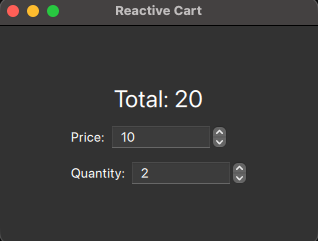
Add the @QmlElement decorator on top of
@auto_properties and define the QML_IMPORT_NAME /
QML_IMPORT_MAJOR_VERSION variables. Stack the decorators so
@auto_properties runs first (innermost): it must add the generated
properties to the QMetaObject before @QmlElement registers the type.
 1import sys
 2from pathlib import Path
 3
 4from PySide6.QtCore import QObject
 5from PySide6.QtGui import QGuiApplication
 6from PySide6.QtQml import QQmlApplicationEngine, QmlElement
 7from PySide6.QtQmlFeatures import auto_properties, computed, watch, effect, Change
 8
 9# To be used on the @QmlElement decorator.
10QML_IMPORT_NAME = "Shop"
11QML_IMPORT_MAJOR_VERSION = 1
12
13
14# Stack the decorators so @auto_properties runs first (innermost): it must
15# add the generated Q_PROPERTYs to the QMetaObject before @QmlElement
16# registers the type with the QML engine.
17@QmlElement
18@auto_properties
19class Cart(QObject):
20    def __init__(self, parent=None):
21        super().__init__(parent)
22        self.price = 10
23        self.quantity = 2
24
25    @computed("price", "quantity")
26    def total(self) -> int:
27        return self.price * self.quantity
28
29    @watch("price")
30    def on_price_changed(self, change: Change):
31        if change.new > change.old * 1.5:
32            print(f"warning: price jumped {change.old} -> {change.new}")
33
34    @effect("price", "quantity")
35    def log_state(self):
36        print(f"cart: {self.price} x {self.quantity}")
37
38
39if __name__ == "__main__":
40    app = QGuiApplication(sys.argv)
41    engine = QQmlApplicationEngine()
42    engine.addImportPath(sys.path[0])
43    qml_file = Path(__file__).parent / "cart.qml"
44    engine.load(qml_file)
45    if not engine.rootObjects():
46        sys.exit(-1)
47    exit_code = app.exec()
48    del engine
49    sys.exit(exit_code)
The QML file reads total and writes price and quantity:
 1import QtQuick
 2import QtQuick.Controls
 3import QtQuick.Layouts
 4import Shop
 5
 6ApplicationWindow {
 7    visible: true
 8    width: 320
 9    height: 220
10    title: "Reactive Cart"
11
12    Cart { id: cart }
13
14    ColumnLayout {
15        anchors.centerIn: parent
16        spacing: 12
17
18        // Reads the @computed 'total'. It re-evaluates automatically whenever
19        // price or quantity changes, because each fires its notify signal.
20        Label {
21            text: `Total: ${cart.total}`
22            font.pixelSize: 24
23            Layout.alignment: Qt.AlignHCenter
24        }
25
26        RowLayout {
27            Label { text: "Price:" }
28            // Writing cart.price runs the generated setter, which fires the
29            // @watch and @effect callbacks and invalidates 'total'.
30            SpinBox {
31                from: 1
32                to: 999
33                value: cart.price
34                onValueModified: cart.price = value
35            }
36        }
37
38        RowLayout {
39            Label { text: "Quantity:" }
40            SpinBox {
41                from: 1
42                to: 99
43                value: cart.quantity
44                onValueModified: cart.quantity = value
45            }
46        }
47    }
48}
When you drag a SpinBox, QML writes cart.price (or cart.quantity).
That runs the generated setter, which fires the @watch and @effect
callbacks on the Python side, invalidates total, and emits the notify
signal so the Total label re-evaluates, all without a single hand-written
signal connection.
Step 6: Load the view from Python with load_qml_component
Step 5 let QML own the object: Cart { id: cart } instantiates the Python
type from QML, and QQmlApplicationEngine.load() brings the whole UI up. This last
step shows the mirror image. The reactive Cart stays in Python, and we pull
a QML view into Python with
load_qml_component, then feed the reactive
values into it.
This time there is no @QmlElement on the Cart: QML never creates it. The
model is a plain Python object, and a small display-only QML component is loaded
and driven from Python.
 1import sys
 2
 3from PySide6.QtCore import QObject, QTimer
 4from PySide6.QtGui import QGuiApplication
 5from PySide6.QtQml import QQmlApplicationEngine
 6from PySide6.QtQmlFeatures import (auto_properties, computed, watch, effect,
 7                                   Change, load_qml_component)
 8
 9
10# The reactive model is unchanged from Step 4: no @QmlElement this time,
11# because the model stays in Python and QML never instantiates it.
12@auto_properties
13class Cart(QObject):
14    def __init__(self, parent=None):
15        super().__init__(parent)
16        self.price = 10
17        self.quantity = 2
18
19    @computed("price", "quantity")
20    def total(self) -> int:
21        return self.price * self.quantity
22
23    @watch("price")
24    def on_price_changed(self, change: Change):
25        if change.new > change.old * 1.5:
26            print(f"warning: price jumped {change.old} -> {change.new}")
27
28    @effect("price", "quantity")
29    def log_state(self):
30        print(f"cart: {self.price} x {self.quantity}")
31
32
33if __name__ == "__main__":
34    app = QGuiApplication(sys.argv)
35    engine = QQmlApplicationEngine()
36
37    # This time the reactive model lives in Python, not in QML.
38    cart = Cart()
39
40    # Pull the QML view into Python with load_qml_component() and create an
41    # instance. 'view' is a Pythonic wrapper whose QML properties are plain
42    # attributes, so we can assign to view.total, view.price, etc.
43    view_factory = load_qml_component(engine, "cartview.qml")
44    view = view_factory.create()
45
46    # Push the reactive values into the loaded QML view. Connecting to the
47    # input notify signals is enough: reading cart.total recomputes the
48    # @computed value on demand.
49    def sync():
50        view.price = cart.price
51        view.quantity = cart.quantity
52        view.total = cart.total
53
54    cart.priceChanged.connect(sync)
55    cart.quantityChanged.connect(sync)
56    sync()
57
58    # Drive the reactive model from Python. Each assignment runs the @watch
59    # and @effect callbacks (console output) and, through sync(), updates the
60    # QML view that was loaded from Python.
61    def tick():
62        cart.price += 2
63        if cart.price > 30:
64            cart.price = 10
65            cart.quantity = cart.quantity % 5 + 1
66
67    timer = QTimer()
68    timer.timeout.connect(tick)
69    timer.start(500)
70
71    exit_code = app.exec()
72    del engine
73    sys.exit(exit_code)
load_qml_component returns a factory; calling
create() on it instantiates the component and returns a Pythonic wrapper
whose QML properties are plain attributes. That is why view.total and
view.price can be assigned directly from sync().
The QML view carries no logic of its own, just three properties that Python writes to:
 1import QtQuick
 2import QtQuick.Controls
 3import QtQuick.Layouts
 4
 5// A pure display component. It has no logic of its own: Python loads it with
 6// load_qml_component(), creates it, and pushes the reactive cart's values
 7// into these three plain properties.
 8ApplicationWindow {
 9    property int price: 0
10    property int quantity: 0
11    property int total: 0
12
13    visible: true
14    width: 320
15    height: 220
16    title: "Reactive Cart (loaded from Python)"
17
18    ColumnLayout {
19        anchors.centerIn: parent
20        spacing: 12
21
22        Label {
23            text: `Total: ${total}`
24            font.pixelSize: 24
25            Layout.alignment: Qt.AlignHCenter
26        }
27
28        Label {
29            text: `price = ${price},  quantity = ${quantity}`
30            Layout.alignment: Qt.AlignHCenter
31        }
32    }
33}
A QTimer nudges cart.price from Python. Each change
runs the @watch and @effect callbacks (printed to the console) exactly
as before, and sync() reads the recomputed total and pushes it into the
QML view loaded from Python. The reactive decorators and
load_qml_component work together: the decorators keep the model consistent,
while load_qml_component lets Python own and drive the view.
Note
We connect to priceChanged and quantityChanged (the input
notify signals) rather than totalChanged. A @computed value is lazy:
total is recomputed when it is read, so sync() reads cart.total
on demand after either input changes.
Note
load_qml_component is part of the
PySide6.QtQmlFeatures technical preview. See the
PySide6.QtQmlFeatures module reference for its full description.
Where to go next
For the full description of each decorator, the
Change type, @auto_properties, @computed, @watch, and
@effect, as well as load_qml_component, see
the PySide6.QtQmlFeatures module reference.