Document Viewer Example
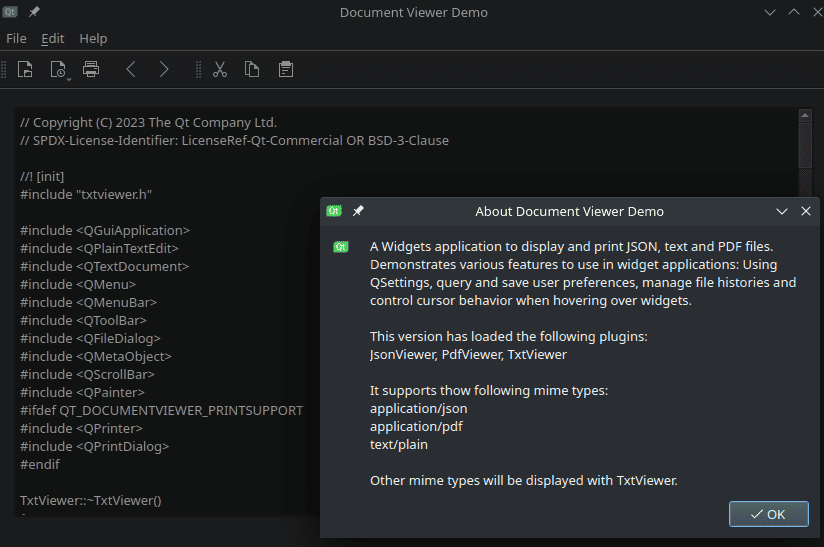
A Widgets application to display and print JSON, text, and PDF files.
Document Viewer demonstrates how to use a QMainWindow with static and dynamic toolbars, menus, and actions.
AbstractViewer provides a generalized API to view, save, and print a
document. Properties of both the document and the viewer can be queried:
Does the document have content?
Has it been modified?
Is an overview (thumbnails or bookmarks) supported?
AbstractViewer provides protected methods for derived classes to create
actions and menus on the main window. In order to display these assets on the
main window, they are parented to it. AbstractViewer is responsible for
removing and destroying the UI assets it creates. It inherits from QObject
to implement signals and slots.
The uiInitialized() signal is emitted after a viewer receives all necessary
information about UI assets on the main window.
The printingEnabledChanged() signal is emitted when document printing is
either enabled or disabled. This happens after a new document was successfully
loaded, or, for example, all content was removed.
The printStatusChanged signal notifies about changes in its progress after
starting the printing process.
The documentLoaded() signal notifies the application that a document was
successfully loaded.
from __future__ import annotations

from PySide6.QtCore import QObject

from PySide6.QtWidgets import QDialog, QMenu, QToolBar
from PySide6.QtCore import QEvent, Signal, Slot
from PySide6.QtPrintSupport import QPrinter, QPrintDialog


MENU_NAME = "qtFileMenu"


class AbstractViewer(QObject):

    uiInitialized = Signal()
    printingEnabledChanged = Signal(bool)
    showMessage = Signal(str, int)
    documentLoaded = Signal(str)

    def __init__(self):
        super().__init__()
        self._file = None
        self._widget = None
        self._uiAssets_mainWindow = None
        self._menus = []
        self._toolBars = []
        self._printingEnabled = False
        self._actions = []
        self._fileMenu = None

    def viewerName(self):
        return ""

    def eventFilter(self, watched, event):
        if event.type() == QEvent.Type.LanguageChange:
            self.retranslate()
        return False

    def retranslate(self):
        pass

    def saveState(self):
        return False

    def restoreState(self, state):
        return False

    def supportedMimeTypes(self):
        return []

    def init(self, file, widget, mainWindow):
        self._file = file
        self._widget = widget
        self._uiAssets_mainWindow = mainWindow
        mainWindow.installEventFilter(self)

    def isEmpty(self):
        return not self.hasContent()

    def isPrintingEnabled(self):
        return self._printingEnabled

    def hasContent(self):
        return False

    def supportsOverview(self):
        return False

    def isModified(self):
        return False

    def saveDocument(self):
        return False

    def saveDocumentAs(self):
        return False

    def actions(self):
        return self._actions

    def widget(self):
        return self._widget

    def menus(self):
        return self._menus

    def mainWindow(self):
        return self._uiAssets_mainWindow

    def statusBar(self):
        return self.mainWindow().statusBar()

    def menuBar(self):
        return self.mainWindow().menuBar()

    def maybeEnablePrinting(self):
        self.maybeSetPrintingEnabled(True)

    def disablePrinting(self):
        self.maybeSetPrintingEnabled(False)

    def isDefaultViewer(self):
        return False

    def viewer(self):
        return self

    def statusMessage(self, message, type="", timeout=8000):
        msg = self.viewerName()
        if type:
            msg += "/" + type
        msg += ": " + message
        self.showMessage.emit(msg, timeout)

    def addToolBar(self):
        bar = QToolBar()
        bar.setObjectName(self.viewerName() + "ToolBar")
        self.mainWindow().addToolBar(bar)
        self._toolBars.append(bar)
        return bar

    def addMenu(self):
        menu = QMenu(self.menuBar())
        menu.setObjectName(self.viewerName() + "Menu")
        self.menuBar().insertMenu(self._uiAssets_help, menu)
        self._menus.append(menu)
        return menu

    def cleanup(self):
        # delete all objects created by the viewer which need to be displayed
        # and therefore parented on MainWindow
        if self._file:
            self._file = None
        while self._menus:
            del self._menus[0]
        while self._toolBars:
            self.mainWindow().removeToolBar(self._toolBars[0])
            del self._toolBars[0]
        if self._uiAssets_mainWindow:
            self._uiAssets_mainWindow.removeEventFilter(self)

    def fileMenu(self):
        if self._fileMenu:
            return self._fileMenu

        menus = self.mainWindow().findChildren(QMenu)
        for menu in menus:
            if menu.objectName() == MENU_NAME:
                self._fileMenu = menu
                return self._fileMenu
        self._fileMenu = self.addMenu(self.tr("&File"))
        self._fileMenu.setObjectName(MENU_NAME)
        return self._fileMenu

    @Slot()
    def print_(self):
        type = self.tr("Printing")
        if not self.hasContent():
            self.statusMessage(self.tr("No content to print."), type)
            return
        printer = QPrinter(QPrinter.PrinterMode.HighResolution)
        dlg = QPrintDialog(printer, self.mainWindow())
        dlg.setWindowTitle(self.tr("Print Document"))
        if dlg.exec() == QDialog.DialogCode.Accepted:
            self.printDocument(printer)
        else:
            self.statusMessage(self.tr("Printing canceled!"), type)
            return
        message = self.viewerName() + " :"
        match printer.printerState():
            case QPrinter.PrinterState.Aborted:
                message += self.tr("Printing aborted.")
            case QPrinter.PrinterState.Active:
                message += self.tr("Printing active.")
            case QPrinter.PrinterState.Idle:
                message += self.tr("Printing completed.")
            case QPrinter.PrinterState.Error:
                message += self.tr("Printing error.")
        self.statusMessage(message, type)

    def maybeSetPrintingEnabled(self, enabled):
        if enabled == self._printingEnabled:
            return
        self._printingEnabled = enabled
        self.printingEnabledChanged.emit(enabled)

    def initViewer(self, back, forward, help, tabs):
        self._uiAssets_back = back
        self._uiAssets_forward = forward
        self._uiAssets_help = help
        self._uiAssets_tabs = tabs
        # Tabs can be populated individually by the viewer, if it
        # supports overview
        tabs.clear()
        tabs.setVisible(self.supportsOverview())
        self.uiInitialized.emit()
<RCC>
    <qresource prefix="/demos/documentviewer">
        <file>images/copy@2x.png</file>
        <file>images/copy.png</file>
        <file>images/cut@2x.png</file>
        <file>images/cut.png</file>
        <file>images/paste@2x.png</file>
        <file>images/paste.png</file>
        <file>images/qt-logo@2x.png</file>
        <file>images/qt-logo.png</file>
        <file>images/zoom-in@2x.png</file>
        <file>images/zoom-in.png</file>
        <file>images/zoom-out@2x.png</file>
        <file>images/zoom-out.png</file>
    </qresource>
    <qresource prefix="/i18n">
        <file>documentviewer_de.qm</file>
    </qresource>
</RCC>
from __future__ import annotations

"""PySide6 port of the Qt Document Viewer demo from Qt v6.x"""

import sys
from argparse import ArgumentParser, RawTextHelpFormatter

from PySide6.QtWidgets import QApplication
from PySide6.QtCore import QCoreApplication

from mainwindow import MainWindow


DESCRIPTION = "A viewer for JSON, PDF and text files"


if __name__ == "__main__":

    app = QApplication([])
    QCoreApplication.setOrganizationName("QtExamples")
    QCoreApplication.setApplicationName("DocumentViewer")
    QCoreApplication.setApplicationVersion("1.0")

    arg_parser = ArgumentParser(description=DESCRIPTION,
                                formatter_class=RawTextHelpFormatter)
    arg_parser.add_argument("file", type=str, nargs="?",
                            help="JSON, PDF or text file to open")
    args = arg_parser.parse_args()
    fileName = args.file

    w = MainWindow()
    w.show()
    if args.file and not w.openFile(args.file):
        sys.exit(-1)

    sys.exit(app.exec())
The MainWindow class provides an application screen with menus, actions,
and a toolbar. It can open a file, automatically detecting its content type. It
also maintains a list of previously opened files, using QSettings to store
and reload settings when launched. The MainWindow creates a suitable viewer
for the opened file, based on its content type, and provides support for
printing a document.
MainWindow's constructor initializes the user interface created in Qt
Designer. The mainwindow.ui file provides a QTabWidget on the left,
showing bookmarks and thumbnails. On the right, there is a QScrollArea for
viewing file content.
from __future__ import annotations

from PySide6.QtWidgets import (QDialog, QFileDialog, QMainWindow, QMessageBox)
from PySide6.QtCore import (QCoreApplication, QDir, QEvent, QFile, QFileInfo, QLocale,
                            QSettings, Slot)

from ui_mainwindow import Ui_MainWindow
from viewerfactory import ViewerFactory
from recentfiles import RecentFiles
from recentfilemenu import RecentFileMenu
from translator import Translator


settingsDir = "WorkingDir"
settingsMainWindow = "MainWindow"
settingsViewers = "Viewers"
settingsFiles = "RecentFiles"


ABOUT_TEXT = """A Widgets application to display and print JSON,
text and PDF files. Demonstrates various features to use
in widget applications: Using QSettings, query and save
user preferences, manage file histories and control cursor
behavior when hovering over widgets.

"""


def getFileUrl(mime):
    if mime.hasUrls():
        for url in mime.urls():
            if url.isLocalFile():
                return url
    return None


class MainWindow(QMainWindow):

    def __init__(self, parent=None):
        super().__init__(parent)
        self.ui = Ui_MainWindow()

        self._translator = Translator()
        self._translator.setBaseName("documentviewer")
        self._translator.install()

        self._currentDir = QDir()
        self._viewer = None
        self._recentFiles = RecentFiles()

        self.ui.setupUi(self)
        self.ui.actionOpen.triggered.connect(self.onActionOpenTriggered)
        self.ui.actionAbout.triggered.connect(self.onActionAboutTriggered)
        self.ui.actionAboutQt.triggered.connect(self.onActionAboutQtTriggered)
        self.ui.actionDeutsch.setData(QLocale.Language.German)
        self.ui.actionDeutsch.triggered.connect(self.onActionSwitchLanguage)
        self.ui.actionEnglish.setData(QLocale.Language.English)
        self.ui.actionEnglish.triggered.connect(self.onActionSwitchLanguage)

        self._recentFiles = RecentFiles(self.ui.actionRecent)
        self._recentFiles.countChanged.connect(self._recentFilesCountChanged)

        self.readSettings()
        self._factory = ViewerFactory(self.ui.viewArea, self)
        viewers = ", ".join(self._factory.viewerNames())
        self.statusBar().showMessage(f'Available viewers: {viewers}')

        menu = RecentFileMenu(self, self._recentFiles)
        self.ui.actionRecent.setMenu(menu)
        menu.fileOpened.connect(self.openFile)
        if button := self.ui.mainToolBar.widgetForAction(self.ui.actionRecent):
            self.ui.actionRecent.triggered.connect(button.showMenu)

    @Slot(int)
    def _recentFilesCountChanged(self, count):
        self.ui.actionRecent.setText(self.tr("%n recent files", None, count))

    def closeEvent(self, event):
        self.saveSettings()

    def dragEnterEvent(self, event):
        if getFileUrl(event.mimeData()):
            event.acceptProposedAction()

    def dragMoveEvent(self, event):
        event.acceptProposedAction()

    def dropEvent(self, event):
        if fileUrl := getFileUrl(event.mimeData()):
            if self.openFile(fileUrl.toLocalFile()):
                event.acceptProposedAction()

    def changeEvent(self, event):
        match event.type():
            case QEvent.Type.LanguageChange:
                self.ui.retranslateUi(self)
                self.statusBar().clearMessage()
            case QEvent.Type.LocaleChange:
                self._translator.setLanguage(QLocale().language())
                self._translator.install()
        super().changeEvent(event)

    @Slot()
    def onActionSwitchLanguage(self):
        lang = self.sender().data()
        QLocale.setDefault(QLocale(lang))
        event = QEvent(QEvent.Type.LocaleChange)
        QCoreApplication.sendEvent(self, event)

    @Slot(int)
    def onActionOpenTriggered(self):
        fileDialog = QFileDialog(self, self.tr("Open Document"),
                                 self._currentDir.absolutePath())
        while (fileDialog.exec() == QDialog.DialogCode.Accepted
               and not self.openFile(fileDialog.selectedFiles()[0])):
            pass

    @Slot(str)
    def openFile(self, fileName):
        file = QFile(fileName)
        if not file.exists():
            nf = QDir.toNativeSeparators(fileName)
            self.statusBar().showMessage(self.tr("File {} could not be opened").format(nf))
            return False

        fileInfo = QFileInfo(file)
        self._currentDir = fileInfo.dir()
        self._recentFiles.addFile(fileInfo.absoluteFilePath())

        # If a viewer is already open, clean it up and save its settings
        self.resetViewer()
        self._viewer = self._factory.viewer(file)
        if not self._viewer:
            nf = QDir.toNativeSeparators(fileName)
            self.statusBar().showMessage(self.tr("File {} can't be opened.").format(nf))
            return False

        self.ui.actionPrint.setEnabled(self._viewer.hasContent())
        self._viewer.printingEnabledChanged.connect(self.ui.actionPrint.setEnabled)
        self.ui.actionPrint.triggered.connect(self._viewer.print_)
        self._viewer.showMessage.connect(self.statusBar().showMessage)

        self._viewer.initViewer(self.ui.actionBack, self.ui.actionForward,
                                self.ui.menuHelp.menuAction(),
                                self.ui.tabWidget)
        self.restoreViewerSettings()
        self.ui.scrollArea.setWidget(self._viewer.widget())
        return True

    @Slot()
    def onActionAboutTriggered(self):
        viewerNames = ", ".join(self._factory.viewerNames())
        mimeTypes = '\n'.join(self._factory.supportedMimeTypes())
        text = ABOUT_TEXT
        text += f"\nThis version has loaded the following plugins:\n{viewerNames}\n"
        text += f"\n\nIt supports the following mime types:\n{mimeTypes}"

        defaultViewer = self._factory.defaultViewer()
        if defaultViewer:
            n = defaultViewer.viewerName()
            text += f"\n\nOther mime types will be displayed with {n}."

        QMessageBox.about(self, self.tr("About Document Viewer Demo"), text)

    @Slot()
    def onActionAboutQtTriggered(self):
        QMessageBox.aboutQt(self)

    def readSettings(self):
        settings = QSettings()

        # Restore working directory
        if settings.contains(settingsDir):
            self._currentDir = QDir(settings.value(settingsDir))
        else:
            self._currentDir = QDir.current()

        # Restore QMainWindow state
        if settings.contains(settingsMainWindow):
            mainWindowState = settings.value(settingsMainWindow)
            self.restoreState(mainWindowState)

        # Restore recent files
        self._recentFiles.restoreFromSettings(settings, settingsFiles)

    def saveSettings(self):
        settings = QSettings()

        # Save working directory
        settings.setValue(settingsDir, self._currentDir.absolutePath())

        # Save QMainWindow state
        settings.setValue(settingsMainWindow, self.saveState())

        # Save recent files
        self._recentFiles.saveSettings(settings, settingsFiles)

        settings.sync()

    def saveViewerSettings(self):
        if not self._viewer:
            return
        settings = QSettings()
        settings.beginGroup(settingsViewers)
        settings.setValue(self._viewer.viewerName(), self._viewer.saveState())
        settings.endGroup()
        settings.sync()

    def resetViewer(self):
        if not self._viewer:
            return
        self.saveViewerSettings()
        self._viewer.cleanup()

    def restoreViewerSettings(self):
        if not self._viewer:
            return
        settings = QSettings()
        settings.beginGroup(settingsViewers)
        viewerSettings = settings.value(self._viewer.viewerName())
        settings.endGroup()
        if viewerSettings:
            self._viewer.restoreState(viewerSettings)
import sys
from PySide6.QtCore import QLocale, QTranslator
from PySide6.QtWidgets import QApplication  # noqa: F401


class Translator:
    def __init__(self):
        self._translator = QTranslator()
        self._baseName = ""
        self._trLocale = QLocale()

    def setBaseName(self, baseName):
        self._baseName = baseName

    def setLanguage(self, lang):
        self._trLocale = QLocale(lang)

    def install(self):
        if not self._baseName:
            print("The basename of the translation is not set. Ignoring.", file=sys.stderr)
            return

        if not self._translator.isEmpty():
            qApp.removeTranslator(self._translator)  # noqa: F821

        if (self._translator.load(self._trLocale, self._baseName, "_", ":/i18n/")
                and qApp.installTranslator(self._translator)):  # noqa: F821
            print("Loaded translation", self._translator.filePath(), file=sys.stderr)
        else:
            if self._trLocale.language() != QLocale.Language.English:
                msg = (f"Failed to load translation {self._baseName} for locale "
                       f"{self._trLocale.name()}. Falling back to English translation")
                print(msg, file=sys.stderr)
                self.setLanguage(QLocale.Language.English)
<?xml version="1.0" encoding="UTF-8"?>
<ui version="4.0">
<class>MainWindow</class>
<widget class="QMainWindow" name="MainWindow">
<property name="geometry">
<rect>
<x>0</x>
<y>0</y>
<width>983</width>
<height>602</height>
</rect>
</property>
<property name="windowTitle">
<string>Document Viewer Demo</string>
</property>
<property name="windowIcon">
<iconset resource="documentviewer.qrc">
<normaloff>:/demos/documentviewer/images/qt-logo.png</normaloff>:/demos/documentviewer/images/qt-logo.png</iconset>
</property>
<widget class="QWidget" name="centralwidget">
<property name="enabled">
<bool>true</bool>
</property>
<layout class="QVBoxLayout" name="verticalLayout">
<item>
<widget class="QWidget" name="viewArea" native="true">
<layout class="QVBoxLayout" name="verticalLayout_2">
<item>
<widget class="QSplitter" name="splitter">
<property name="orientation">
<enum>Qt::Orientation::Horizontal</enum>
</property>
<widget class="QTabWidget" name="tabWidget">
<property name="tabPosition">
<enum>QTabWidget::TabPosition::West</enum>
</property>
<property name="currentIndex">
<number>0</number>
</property>
<widget class="QWidget" name="bookmarkTab">
<attribute name="title">
<string>Pages</string>
</attribute>
</widget>
<widget class="QWidget" name="pagesTab">
<attribute name="title">
<string>Bookmarks</string>
</attribute>
</widget>
</widget>
<widget class="QScrollArea" name="scrollArea">
<property name="sizePolicy">
<sizepolicy hsizetype="Expanding" vsizetype="Expanding">
<horstretch>0</horstretch>
<verstretch>0</verstretch>
</sizepolicy>
</property>
<property name="minimumSize">
<size>
<width>800</width>
<height>0</height>
</size>
</property>
<property name="widgetResizable">
<bool>true</bool>
</property>
<widget class="QWidget" name="scrollAreaWidgetContents">
<property name="geometry">
<rect>
<x>0</x>
<y>0</y>
<width>798</width>
<height>457</height>
</rect>
</property>
</widget>
</widget>
</widget>
</item>
</layout>
</widget>
</item>
</layout>
</widget>
<widget class="QMenuBar" name="menubar">
<property name="geometry">
<rect>
<x>0</x>
<y>0</y>
<width>983</width>
<height>24</height>
</rect>
</property>
<widget class="QMenu" name="qtFileMenu">
<property name="title">
<string>&File</string>
</property>
<addaction name="actionOpen"/>
<addaction name="actionRecent"/>
<addaction name="actionPrint"/>
<addaction name="actionExit"/>
</widget>
<widget class="QMenu" name="menuHelp">
<property name="title">
<string>Help</string>
</property>
<widget class="QMenu" name="menuLanguage">
<property name="title">
<string>Language</string>
</property>
<addaction name="actionEnglish"/>
<addaction name="actionDeutsch"/>
</widget>
<addaction name="actionAbout"/>
<addaction name="actionAboutQt"/>
<addaction name="menuLanguage"/>
</widget>
<addaction name="qtFileMenu"/>
<addaction name="menuHelp"/>
</widget>
<widget class="QStatusBar" name="statusbar"/>
<widget class="QToolBar" name="mainToolBar">
<property name="windowTitle">
<string>ToolBar</string>
</property>
<attribute name="toolBarArea">
<enum>TopToolBarArea</enum>
</attribute>
<attribute name="toolBarBreak">
<bool>false</bool>
</attribute>
<addaction name="actionOpen"/>
<addaction name="actionRecent"/>
<addaction name="actionPrint"/>
<addaction name="separator"/>
<addaction name="actionBack"/>
<addaction name="actionForward"/>
<addaction name="separator"/>
</widget>
<action name="actionOpen">
<property name="icon">
<iconset theme="QIcon::ThemeIcon::DocumentOpen"/>
</property>
<property name="text">
<string>&Open</string>
</property>
<property name="shortcut">
<string>Ctrl+O</string>
</property>
</action>
<action name="actionAbout">
<property name="icon">
<iconset theme="QIcon::ThemeIcon::HelpAbout"/>
</property>
<property name="text">
<string>About Document Viewer</string>
</property>
<property name="toolTip">
<string>Show information about the Document Viewer deomo.</string>
</property>
<property name="shortcut">
<string>Ctrl+H</string>
</property>
</action>
<action name="actionForward">
<property name="icon">
<iconset theme="QIcon::ThemeIcon::GoNext"/>
</property>
<property name="text">
<string>Forward</string>
</property>
<property name="toolTip">
<string>One step forward</string>
</property>
<property name="shortcut">
<string>Right</string>
</property>
</action>
<action name="actionBack">
<property name="icon">
<iconset theme="QIcon::ThemeIcon::GoPrevious"/>
</property>
<property name="text">
<string>Back</string>
</property>
<property name="toolTip">
<string>One step back</string>
</property>
<property name="shortcut">
<string>Left</string>
</property>
</action>
<action name="actionPrint">
<property name="enabled">
<bool>false</bool>
</property>
<property name="icon">
<iconset theme="QIcon::ThemeIcon::DocumentPrint"/>
</property>
<property name="text">
<string>&Print</string>
</property>
<property name="toolTip">
<string>Print current file</string>
</property>
<property name="shortcut">
<string>Ctrl+P</string>
</property>
</action>
<action name="actionAboutQt">
<property name="icon">
<iconset resource="documentviewer.qrc">
<normaloff>:/demos/documentviewer/images/qt-logo.png</normaloff>
<normalon>:/demos/documentviewer/images/qt-logo.png</normalon>:/demos/documentviewer/images/qt-logo.png</iconset>
</property>
<property name="text">
<string>About Qt</string>
</property>
<property name="toolTip">
<string>Show Qt license information</string>
</property>
<property name="shortcut">
<string>Ctrl+I</string>
</property>
</action>
<action name="actionRecent">
<property name="icon">
<iconset theme="QIcon::ThemeIcon::DocumentOpenRecent"/>
</property>
<property name="text">
<string>&Recently opened...</string>
</property>
<property name="shortcut">
<string>Meta+R</string>
</property>
</action>
<action name="actionExit">
<property name="icon">
<iconset theme="application-exit"/>
</property>
<property name="text">
<string>E&xit</string>
</property>
<property name="iconText">
<string>E&xit</string>
</property>
<property name="toolTip">
<string>Exits the application</string>
</property>
<property name="shortcut">
<string>Ctrl+Q</string>
</property>
</action>
<action name="actionEnglish">
<property name="text">
<string>&English</string>
</property>
</action>
<action name="actionDeutsch">
<property name="text">
<string>&Deutsch</string>
</property>
</action>
</widget>
<resources>
<include location="documentviewer.qrc"/>
</resources>
<connections>
<connection>
<sender>actionExit</sender>
<signal>triggered()</signal>
<receiver>MainWindow</receiver>
<slot>close()</slot>
<hints>
<hint type="sourcelabel">
<x>-1</x>
<y>-1</y>
</hint>
<hint type="destinationlabel">
<x>491</x>
<y>300</y>
</hint>
</hints>
</connection>
</connections>
</ui>
ImageViewer displays images as supported by QImageReader, using
a QLabel.
In the constructor, we increase the allocation limit of QImageReader to
allow for larger photos.
In the openFile() function, we load the image and determine its size.
If it is larger than the screen, we downscale it to screen size, maintaining
the aspect ratio. This calculation has to be done in native pixels, and
the device pixel ratio needs to be set on the resulting pixmap for it to
appear crisp.
from __future__ import annotations

import math

from PySide6.QtWidgets import QLabel
from PySide6.QtCore import Qt, QDir, QSizeF
from PySide6.QtGui import (QPixmap, QImageReader, QIcon, QKeySequence,
                           QGuiApplication, QColorSpace, QPainter, QAction)

from abstractviewer import AbstractViewer


def imageFormats():
    result = []
    all_formats = QImageReader.supportedImageFormats()

    for format_bytes in all_formats:
        format_str = bytes(format_bytes).decode("utf-8")  # Convert QByteArray to str
        if format_str not in ["pdf", "tif", "cur"]:  # Exclude duplicate/non-existent formats
            result.append(f"image/{format_str}")

    return result


def msgOpen(name, image):
    description = (image.colorSpace().description() if image.colorSpace().isValid()
                   else ImageViewer.tr("unknown"))
    return 'Opened "{0}", {1}x{2}, Depth: {3} ({4})'.format(
        QDir.toNativeSeparators(name),
        image.width(),
        image.height(),
        image.depth(),
        description
    )


class ImageViewer(AbstractViewer):

    def __init__(self):
        super().__init__()

        self.formats = imageFormats()
        self.uiInitialized.connect(self.setupImageUi)
        QImageReader.setAllocationLimit(1024)  # MB

        icon = QIcon.fromTheme(QIcon.ThemeIcon.ZoomIn,
                               QIcon(":/demos/documentviewer/images/zoom-in.png"))
        self.zoom_in_act = QAction(self)
        self.zoom_in_act.setIcon(icon)
        self.zoom_in_act.setShortcut(QKeySequence.StandardKey.ZoomIn)
        self.zoom_in_act.triggered.connect(self.zoomIn)

        icon = QIcon.fromTheme(QIcon.ThemeIcon.ZoomOut,
                               QIcon(":/demos/documentviewer/images/zoom-out.png"))
        self.zoom_out_act = QAction(self)
        self.zoom_out_act.setIcon(icon)
        self.zoom_out_act.setShortcut(QKeySequence.StandardKey.ZoomOut)
        self.zoom_out_act.triggered.connect(self.zoomOut)

        icon = QIcon.fromTheme(QIcon.ThemeIcon.ZoomFitBest,
                               QIcon(":/demos/documentviewer/images/zoom-fit-best.png"))
        self.reset_zoom_act = QAction(self)
        self.reset_zoom_act.setIcon(icon)
        self.reset_zoom_act.setShortcut(QKeySequence
                                        (Qt.KeyboardModifier.ControlModifier | Qt.Key.Key_0))
        self.reset_zoom_act.triggered.connect(self.resetZoom)

        self.image_label = None

    def retranslate(self):
        if not self._toolBars:
            return
        self._toolBars[0].setWindowTitle(self.tr("Images"))
        self.zoom_in_act.setText(self.tr("Zoom &In"))
        self.zoom_out_act.setText(self.tr("Zoom &Out"))
        self.reset_zoom_act.setText(self.tr("Reset Zoom"))

    def init(self, file, parent, mainWindow):
        self.image_label = QLabel(parent)
        self.image_label.setFrameShape(QLabel.Box)
        self.image_label.setAlignment(Qt.AlignCenter)
        self.image_label.setScaledContents(True)

        # AbstractViewer.init(file, self.image_label, mainWindow)
        super().init(file, self.image_label, mainWindow)

        tool_bar = self.addToolBar()
        tool_bar.addAction(self.zoom_in_act)
        tool_bar.addAction(self.zoom_out_act)
        tool_bar.addAction(self.reset_zoom_act)

    def cleanup(self):
        del self.image_label
        self.image_label = None
        super().cleanup()

    def supportedMimeTypes(self):
        return self.formats

    def clear(self):
        self.image_label.setPixmap(QPixmap())
        self.max_scale_factor = self.min_scale_factor = 1
        self.initial_scale_factor = self.scale_factor = 1

    def setupImageUi(self):
        self.openFile()

    def openFile(self):

        QGuiApplication.setOverrideCursor(Qt.WaitCursor)

        name = self._file.fileName()
        reader = QImageReader(name)
        orig_image = reader.read()

        if orig_image.isNull():
            msg = self.tr("Cannot read file {}:\n{}").format(name, reader.errorString())
            self.statusMessage(msg, "open")
            self.disablePrinting()
            QGuiApplication.restoreOverrideCursor()
            return

        self.clear()

        if orig_image.colorSpace().isValid():
            image = orig_image.convertedToColorSpace(QColorSpace.SRgb)
        else:
            image = orig_image

        device_pixel_ratio = self.image_label.devicePixelRatioF()
        self.image_size = QSizeF(image.size()) / device_pixel_ratio

        pixmap = QPixmap.fromImage(image)
        pixmap.setDevicePixelRatio(device_pixel_ratio)
        self.image_label.setPixmap(pixmap)

        target_size = self.image_label.parentWidget().size()
        if (self.image_size.width() > target_size.width()
                or self.image_size.height() > target_size.height()):
            self.initial_scale_factor = min(target_size.width() / self.image_size.width(),
                                            target_size.height() / self.image_size.height())

        self.max_scale_factor = 3 * self.initial_scale_factor
        self.min_scale_factor = self.initial_scale_factor / 3
        self.doSetScaleFactor(self.initial_scale_factor)

        self.statusMessage(msgOpen(name, orig_image))
        QGuiApplication.restoreOverrideCursor()

        self.maybeEnablePrinting()

    def setScaleFactor(self, scaleFactor):
        if not math.isclose(self.scale_factor, scaleFactor):
            self.doSetScaleFactor(scaleFactor)

    def doSetScaleFactor(self, scaleFactor):
        self.scale_factor = scaleFactor
        label_size = (self.image_size * self.scale_factor).toSize()
        self.image_label.setFixedSize(label_size)
        self.enableZoomActions()

    def zoomIn(self):
        self.setScaleFactor(self.scale_factor * 1.25)

    def zoomOut(self):
        self.setScaleFactor(self.scale_factor * 0.8)

    def resetZoom(self):
        self.setScaleFactor(self.initial_scale_factor)

    def hasContent(self):
        return not self.image_label.pixmap().isNull()

    def enableZoomActions(self):
        self.reset_zoom_act.setEnabled(not math.isclose(self.scale_factor,
                                                        self.initial_scale_factor))
        self.zoom_in_act.setEnabled(self.scale_factor < self.max_scale_factor)
        self.zoom_out_act.setEnabled(self.scale_factor > self.min_scale_factor)

    def printDocument(self, printer):
        if not self.hasContent():
            return

        with QPainter(printer) as painter:
            pixmap = self.image_label.pixmap()
            rect = painter.viewport()
            size = pixmap.size()
            size.scale(rect.size(), Qt.KeepAspectRatio)
            painter.setViewport(rect.x(), rect.y(), size.width(), size.height())
            painter.setWindow(pixmap.rect())
            painter.drawPixmap(0, 0, pixmap)
JsonViewer displays a JSON file in a QTreeView. Internally, it loads
the contents of a file into a data structure via a string and uses it to
populate a custom tree model with JsonItemModel.
The JSON viewer demonstrates how to implement a custom item model
inherited from QAbstractItemModel.
JsonViewer uses the top-level objects of the document as bookmarks for
navigation. Other nodes (keys and values) can be added as additional bookmarks,
or removed from the bookmark list. A QLineEdit is used as a search field to
navigate through the JSON tree.
from __future__ import annotations

import json

from PySide6.QtWidgets import QListWidget, QListWidgetItem, QMenu, QTreeView
from PySide6.QtGui import QAction, QIcon, QTextDocument
from PySide6.QtCore import QAbstractItemModel, QDir, QIODevice, QModelIndex, QPoint, Qt, Slot

from abstractviewer import AbstractViewer


def resizeToContents(tree):
    for i in range(0, tree.header().count()):
        tree.resizeColumnToContents(i)


class JsonTreeItem:

    def __init__(self, parent=None):
        self._key = ""
        self._value = None
        self._children = []
        self._parent = parent

    def key(self):
        return self._key

    def value(self):
        return self._value

    def appendChild(self, item):
        self._children.append(item)

    def child(self, row):
        return self._children[row]

    def parent(self):
        return self._parent

    def childCount(self):
        return len(self._children)

    def row(self):
        if self._parent:
            return self._parent._children.index(self)
        return 0

    def setKey(self, key):
        self._key = key

    def setValue(self, value):
        self._value = value

    @staticmethod
    def load(value, parent=None):
        rootItem = JsonTreeItem(parent)
        rootItem.setKey("root")

        if isinstance(value, dict):
            for key, val in value.items():
                child = JsonTreeItem.load(val, rootItem)
                child.setKey(key)
                rootItem.appendChild(child)

        elif isinstance(value, list):
            for index, val in enumerate(value):
                child = JsonTreeItem.load(val, rootItem)
                child.setKey(f"{index}")
                rootItem.appendChild(child)

        else:
            rootItem.setValue(value)

        return rootItem


class JsonItemModel(QAbstractItemModel):

    def columnCount(self, index=QModelIndex()):
        return 2

    def itemFromIndex(self, index):
        return index.internalPointer()

    def __init__(self, doc, parent):
        super().__init__(parent)
        self._textItem = JsonTreeItem()

        # Append header lines
        self._headers = ["Key", "Value"]

        # Reset the model. Root can either be a value or an array.
        self.beginResetModel()
        self._textItem = JsonTreeItem.load(doc) if doc else JsonTreeItem()
        self.endResetModel()

    def data(self, index, role):
        if not index.isValid():
            return None

        item = self.itemFromIndex(index)
        match role:
            case Qt.ItemDataRole.DisplayRole:
                match index.column():
                    case 0:
                        return item.key()
                    case 1:
                        return item.value()
            case Qt.ItemDataRole.EditRole:
                if index.column() == 1:
                    return item.value()
        return None

    def headerData(self, section, orientation, role):
        return (self._headers[section]
                if role == Qt.ItemDataRole.DisplayRole and orientation == Qt.Orientation.Horizontal
                else None)

    def index(self, row, column, parent=QModelIndex()):
        if not self.hasIndex(row, column, parent):
            return None

        parentItem = JsonTreeItem()

        if not parent.isValid():
            parentItem = self._textItem
        else:
            parentItem = self.itemFromIndex(parent)

        childItem = parentItem.child(row)
        if childItem:
            return self.createIndex(row, column, childItem)
        return None

    def parent(self, index):
        if not index.isValid():
            return None

        childItem = self.itemFromIndex(index)
        parentItem = childItem.parent()

        if parentItem == self._textItem:
            return QModelIndex()

        return self.createIndex(parentItem.row(), 0, parentItem)

    def rowCount(self, parent=QModelIndex()):
        parentItem = JsonTreeItem()
        if parent.column() > 0:
            return 0

        if not parent.isValid():
            parentItem = self._textItem
        else:
            parentItem = self.itemFromIndex(parent)
        return parentItem.childCount()


class JsonViewer(AbstractViewer):

    def __init__(self):
        super().__init__()
        self._tree = None
        self._toplevel = None
        self._text = ""
        self.uiInitialized.connect(self.setupJsonUi)

        self._expand_all_act = QAction(self)
        self._expand_all_act.setIcon(QIcon.fromTheme(QIcon.ThemeIcon.ZoomIn))

        self._collapse_all_act = QAction(self)
        self._collapse_all_act.setIcon(QIcon.fromTheme(QIcon.ThemeIcon.ZoomOut))

    def init(self, file, parent, mainWindow):
        self._tree = QTreeView(parent)
        self._expand_all_act.triggered.connect(self._tree.expandAll)
        self._collapse_all_act.triggered.connect(self._tree.collapseAll)
        super().init(file, self._tree, mainWindow)

    def viewerName(self):
        return "JsonViewer"

    def supportedMimeTypes(self):
        return ["application/json"]

    def retranslate(self):
        if not self._toolBars:
            return
        self._menus[0].setTitle(self.tr("Json"))
        self._toolBars[0].setWindowTitle(self.tr("Json Actions"))
        self._expand_all_act.setText(self.tr("&+Expand all"))
        self._collapse_all_act.setText(self.tr("&-Collapse all"))
        tabIndex = self._uiAssets_tabs.indexOf(self._toplevel)
        if tabIndex >= 0:
            self._uiAssets_tabs.setTabText(tabIndex, self.tr("Bookmarks"))
        for i in range(self._toplevel.count()):
            self._toplevel.item(i).setToolTip(self.tr("Toplevel Item {}").format(i))

    @Slot()
    def setupJsonUi(self):
        # Build Menus and toolbars
        menu = self.addMenu()
        tb = self.addToolBar()
        menu.addAction(self._expand_all_act)
        tb.addAction(self._expand_all_act)
        menu.addAction(self._collapse_all_act)
        tb.addAction(self._collapse_all_act)

        if not self.openJsonFile():
            return

        # Populate bookmarks with toplevel
        self._uiAssets_tabs.clear()
        self._toplevel = QListWidget(self._uiAssets_tabs)
        self._uiAssets_tabs.addTab(self._toplevel, "")
        for i in range(0, self._tree.model().rowCount()):
            index = self._tree.model().index(i, 0)
            self._toplevel.addItem(index.data())
            item = self._toplevel.item(i)
            item.setData(Qt.ItemDataRole.UserRole, index)

        self._toplevel.setAcceptDrops(True)
        self._tree.setDragEnabled(True)
        self._tree.setContextMenuPolicy(Qt.ContextMenuPolicy.CustomContextMenu)
        self._toplevel.setContextMenuPolicy(Qt.ContextMenuPolicy.CustomContextMenu)

        self._toplevel.itemClicked.connect(self.onTopLevelItemClicked)
        self._toplevel.itemDoubleClicked.connect(self.onTopLevelItemDoubleClicked)
        self._toplevel.customContextMenuRequested.connect(self.onBookmarkMenuRequested)
        self._tree.customContextMenuRequested.connect(self.onJsonMenuRequested)

        # Connect back and forward
        self._uiAssets_back.triggered.connect(self._back)
        self._uiAssets_forward.triggered.connect(self._forward)

        self.retranslate()

    @Slot()
    def _back(self):
        index = self._tree.indexAbove(self._tree.currentIndex())
        if index.isValid():
            self._tree.setCurrentIndex(index)

    @Slot()
    def _forward(self):
        current = self._tree.currentIndex()
        next = self._tree.indexBelow(current)
        if next.isValid():
            self._tree.setCurrentIndex(next)
            return
        # Expand last item to go beyond
        if not self._tree.isExpanded(current):
            self._tree.expand(current)
            next = self._tree.indexBelow(current)
            if next.isValid():
                self._tree.setCurrentIndex(next)

    def openJsonFile(self):
        self.disablePrinting()
        file_name = QDir.toNativeSeparators(self._file.fileName())
        type = "open"
        self._file.open(QIODevice.OpenModeFlag.ReadOnly)
        self._text = self._file.readAll().data().decode("utf-8")
        self._file.close()

        data = None
        message = None
        try:
            data = json.loads(self._text)
            message = self.tr("Json document {} opened").format(file_name)
            model = JsonItemModel(data, self)
            self._tree.setModel(model)
        except ValueError as e:
            message = self.tr("Unable to parse Json document from {}: {}").format(file_name, e)
        self.statusMessage(message, type)
        self.maybeEnablePrinting()

        return self._tree.model() is not None

    def indexOf(self, item):
        return QModelIndex(item.data(Qt.ItemDataRole.UserRole))

    @Slot(QListWidgetItem)
    def onTopLevelItemClicked(self, item):
        """Move to the clicked toplevel index"""
        # return in the unlikely case that the tree has not been built
        if not self._tree.model():
            return

        index = self.indexOf(item)
        if not index.isValid():
            return

        self._tree.setCurrentIndex(index)

    @Slot(QListWidgetItem)
    def onTopLevelItemDoubleClicked(self, item):
        """Toggle double clicked index between collaps/expand"""

        # return in the unlikely case that the tree has not been built
        if not self._tree.model():
            return

        index = self.indexOf(item)
        if not index.isValid():
            return

        if self._tree.isExpanded(index):
            self._tree.collapse(index)
            return

        # Make sure the node and all parents are expanded
        while index.isValid():
            self._tree.expand(index)
            index = index.parent()

    @Slot(QPoint)
    def onJsonMenuRequested(self, pos):
        index = self._tree.indexAt(pos)
        if not index.isValid():
            return

        # Don't show a context menu, if the index is already a bookmark
        for i in range(0, self._toplevel.count()):
            if self.indexOf(self._toplevel.item(i)) == index:
                return

        menu = QMenu(self._tree)
        action = QAction(self.tr("Add bookmark"))
        action.setData(index)
        menu.addAction(action)
        action.triggered.connect(self.onBookmarkAdded)
        menu.exec(self._tree.mapToGlobal(pos))

    @Slot(QPoint)
    def onBookmarkMenuRequested(self, pos):
        item = self._toplevel.itemAt(pos)
        if not item:
            return

        # Don't delete toplevel items
        index = self.indexOf(item)
        if not index.parent().isValid():
            return

        menu = QMenu()
        action = QAction(self.tr("Delete bookmark"))
        action.setData(self._toplevel.row(item))
        menu.addAction(action)
        action.triggered.connect(self.onBookmarkDeleted)
        menu.exec(self._toplevel.mapToGlobal(pos))

    @Slot()
    def onBookmarkAdded(self):
        action = self.sender()
        if not action:
            return

        index = action.data()
        if not index.isValid():
            return

        item = QListWidgetItem(index.data(Qt.ItemDataRole.DisplayRole), self._toplevel)
        item.setData(Qt.ItemDataRole.UserRole, index)

        # Set a tooltip that shows where the item is located in the tree
        parent = index.parent()
        tooltip = index.data(Qt.ItemDataRole.DisplayRole).toString()
        while parent.isValid():
            tooltip = parent.data(Qt.ItemDataRole.DisplayRole).toString() + "." + tooltip
            parent = parent.parent()

        item.setToolTip(tooltip)

    @Slot()
    def onBookmarkDeleted(self):
        action = self.sender()
        if not action:
            return

        row = action.data().toInt()
        if row < 0 or row >= self._toplevel.count():
            return

        self._toplevel.takeItem(row)

    def hasContent(self):
        return bool(self._text)

    def supportsOverview(self):
        return True

    def printDocument(self, printer):
        if not self.hasContent():
            return
        doc = QTextDocument(self._text)
        doc.print_(printer)
from __future__ import annotations

from math import sqrt

from PySide6.QtWidgets import (QListView, QTreeView)
from PySide6.QtGui import QAction, QIcon, QKeySequence, QPainter
from PySide6.QtCore import (QDir, QIODevice, QModelIndex,
                            QPointF, Slot)
from PySide6.QtPrintSupport import QPrinter
from PySide6.QtPdf import QPdfDocument, QPdfBookmarkModel
from PySide6.QtPdfWidgets import QPdfView, QPdfPageSelector

from abstractviewer import AbstractViewer
from pdfviewer.zoomselector import ZoomSelector


ZOOM_MULTIPLIER = sqrt(2.0)


class PdfViewer(AbstractViewer):

    def __init__(self):
        super().__init__()
        self.uiInitialized.connect(self.initPdfViewer)
        self._zoomSelector = None
        self._pageSelector = None
        self._document = None
        self._pdfView = None
        self._actionForward = None
        self._actionBack = None
        self._bookmarks = None
        self._pages = None

        icon = QIcon.fromTheme(QIcon.ThemeIcon.ZoomIn,
                               QIcon(":/demos/documentviewer/images/zoom-in.png"))
        self._actionZoomIn = QAction(self)
        self._actionZoomIn.setIcon(icon)
        self._actionZoomIn.setShortcut(QKeySequence.StandardKey.ZoomIn)
        self._actionZoomIn.setToolTip(self.tr("Increase zoom level"))
        self._actionZoomIn.triggered.connect(self.onActionZoomInTriggered)

        icon = QIcon.fromTheme(QIcon.ThemeIcon.ZoomOut,
                               QIcon(":/demos/documentviewer/images/zoom-out.png"))
        self._actionZoomOut = QAction(self)
        self._actionZoomOut.setIcon(icon)
        self._actionZoomOut.setShortcut(QKeySequence.StandardKey.ZoomOut)
        self._actionZoomOut.setToolTip(self.tr("Decrease zoom level"))
        self._actionZoomOut.triggered.connect(self.onActionZoomOutTriggered)

    def init(self, file, parent, mainWindow):
        self._pdfView = QPdfView(parent)
        super().init(file, self._pdfView, mainWindow)
        self._document = QPdfDocument(self)

    def supportedMimeTypes(self):
        return ["application/pdf"]

    def cleanup(self):
        super().cleanup()
        del self._pageSelector
        self._pageSelector = None
        del self._zoomSelector
        self._zoomSelector = None
        del self._pages
        self._pages = None
        del self._bookmarks
        self._bookmarks = None
        del self._document
        self._document = None

    def retranslate(self):
        if not self._toolBars:
            return
        self._toolBars[0].setWindowTitle(self.tr("PDF"))
        self._actionZoomIn.setText(self.tr("Zoom in"))
        self._actionZoomIn.setToolTip(self.tr("Increase zoom level"))
        self._actionZoomOut.setText(self.tr("Zoom out"))
        self._actionZoomOut.setToolTip(self.tr("Decrease zoom level"))
        index = self._uiAssets_tabs.indexOf(self._pages)
        if index >= 0:
            self._uiAssets_tabs.setTabText(index, self.tr("Pages"))
        index = self._uiAssets_tabs.indexOf(self._bookmarks)
        if index >= 0:
            self._uiAssets_tabs.setTabText(index, self.tr("Bookmarks"))

    def initPdfViewer(self):
        toolBar = self.addToolBar()
        self._zoomSelector = ZoomSelector(toolBar)

        nav = self._pdfView.pageNavigator()
        self._pageSelector = QPdfPageSelector(toolBar)
        toolBar.insertWidget(self._uiAssets_forward, self._pageSelector)
        self._pageSelector.setDocument(self._document)
        self._pageSelector.currentPageChanged.connect(self.pageSelected)
        nav.currentPageChanged.connect(self._pageSelector.setCurrentPage)
        nav.backAvailableChanged.connect(self._uiAssets_back.setEnabled)
        self._actionBack = self._uiAssets_back
        self._actionForward = self._uiAssets_forward
        self._uiAssets_back.triggered.connect(self.onActionBackTriggered)
        self._uiAssets_forward.triggered.connect(self.onActionForwardTriggered)

        toolBar.addSeparator()
        toolBar.addWidget(self._zoomSelector)

        toolBar.addAction(self._actionZoomIn)
        toolBar.addAction(self._actionZoomOut)

        nav.backAvailableChanged.connect(self._actionBack.setEnabled)
        nav.forwardAvailableChanged.connect(self._actionForward.setEnabled)

        self._zoomSelector.zoomModeChanged.connect(self._pdfView.setZoomMode)
        self._zoomSelector.zoomFactorChanged.connect(self._pdfView.setZoomFactor)
        self._zoomSelector.reset()
        self._pdfView.zoomFactorChanged.connect(self._zoomSelector.setZoomFactor)

        bookmarkModel = QPdfBookmarkModel(self)
        bookmarkModel.setDocument(self._document)
        self._uiAssets_tabs.clear()
        self._bookmarks = QTreeView(self._uiAssets_tabs)
        self._bookmarks.activated.connect(self.bookmarkSelected)
        self._bookmarks.setModel(bookmarkModel)
        self._pdfView.setDocument(self._document)
        self._pdfView.setPageMode(QPdfView.PageMode.MultiPage)

        self.openPdfFile()
        if not self._document.pageCount():
            return

        self._pages = QListView(self._uiAssets_tabs)
        self._pages.setModel(self._document.pageModel())

        self._pages.selectionModel().currentRowChanged.connect(self._currentRowChanged)
        self._pdfView.pageNavigator().currentPageChanged.connect(self._pageChanged)

        self._uiAssets_tabs.addTab(self._pages, "")
        self._uiAssets_tabs.addTab(self._bookmarks, "")

        self.retranslate()

    def viewerName(self):
        return "PdfViewer"

    @Slot(QModelIndex, QModelIndex)
    def _currentRowChanged(self, current, previous):
        if previous == current:
            return

        nav = self._pdfView.pageNavigator()
        row = current.row()
        if nav.currentPage() == row:
            return
        nav.jump(row, QPointF(), nav.currentZoom())

    @Slot(int)
    def _pageChanged(self, page):
        if self._pages.currentIndex().row() == page:
            return
        self._pages.setCurrentIndex(self._pages.model().index(page, 0))

    @Slot()
    def openPdfFile(self):
        self.disablePrinting()

        if self._file.open(QIODevice.OpenModeFlag.ReadOnly):
            self._document.load(self._file)

        documentTitle = self._document.metaData(QPdfDocument.MetaDataField.Title)
        if not documentTitle:
            documentTitle = self.tr("PDF Viewer")
        self.statusMessage(documentTitle)
        self.pageSelected(0)

        file_name = QDir.toNativeSeparators(self._file.fileName())
        self.statusMessage(self.tr("Opened PDF file {}").format(file_name))
        self.maybeEnablePrinting()

    def hasContent(self):
        return self._document if self._document.pageCount() > 0 else False

    def supportsOverview(self):
        return True

    def printDocument(self, printer):
        if not self.hasContent():
            return

        painter = QPainter()
        painter.begin(printer)
        pageRect = printer.pageRect(QPrinter.Unit.DevicePixel).toRect()
        pageSize = pageRect.size()
        for i in range(0, self._document.pageCount()):
            if i > 0:
                printer.newPage()
            page = self._document.render(i, pageSize)
            painter.drawImage(pageRect, page)
        painter.end()

    @Slot(QModelIndex)
    def bookmarkSelected(self, index):
        if not index.isValid():
            return

        page = index.data(int(QPdfBookmarkModel.Role.Page))
        zoomLevel = index.data(int(QPdfBookmarkModel.Role.Level)).toReal()
        self._pdfView.pageNavigator().jump(page, QPointF(), zoomLevel)

    @Slot(int)
    def pageSelected(self, page):
        nav = self._pdfView.pageNavigator()
        nav.jump(page, QPointF(), nav.currentZoom())

    @Slot()
    def onActionZoomInTriggered(self):
        self._pdfView.setZoomFactor(self._pdfView.zoomFactor() * ZOOM_MULTIPLIER)

    @Slot()
    def onActionZoomOutTriggered(self):
        self._pdfView.setZoomFactor(self._pdfView.zoomFactor() / ZOOM_MULTIPLIER)

    @Slot()
    def onActionPreviousPageTriggered(self):
        nav = self._pdfView.pageNavigator()
        nav.jump(nav.currentPage() - 1, QPointF(), nav.currentZoom())

    @Slot()
    def onActionNextPageTriggered(self):
        nav = self._pdfView.pageNavigator()
        nav.jump(nav.currentPage() + 1, QPointF(), nav.currentZoom())

    @Slot()
    def onActionBackTriggered(self):
        self._pdfView.pageNavigator().back()

    @Slot()
    def onActionForwardTriggered(self):
        self._pdfView.pageNavigator().forward()
from __future__ import annotations

from PySide6.QtWidgets import QComboBox
from PySide6.QtCore import QEvent, QLocale, Signal, Slot
from PySide6.QtPdfWidgets import QPdfView


ZOOM_LEVELS = [12, 25, 33, 50, 66, 75, 100, 125, 150, 200, 400]


class ZoomSelector(QComboBox):
    zoomModeChanged = Signal(QPdfView.ZoomMode)
    zoomFactorChanged = Signal(float)

    def __init__(self, parent):
        super().__init__(parent)

        self.setSizeAdjustPolicy(QComboBox.SizeAdjustPolicy.AdjustToContents)
        self.setEditable(True)

        # ZoomMode::FitToWidth, ZoomMode::FitInView + factors
        for i in range(2 + len(ZOOM_LEVELS)):
            self.addItem("")

        self.retranslate()

        self.currentTextChanged.connect(self.onCurrentTextChanged)
        self.lineEdit().editingFinished.connect(self._editingFinished)

    def changeEvent(self, event):
        if event.type() == QEvent.Type.LanguageChange:
            self.retranslate()
        super().changeEvent(event)

    def retranslate(self):
        i = 0
        self.setItemText(i, self.tr("Fit Width"))
        i += 1
        self.setItemText(i, self.tr("Fit Page"))
        i += 1
        percent = QLocale().percent()
        for z in ZOOM_LEVELS:
            self.setItemText(i, f"{z}{percent}")
            i += 1

    @Slot()
    def _editingFinished(self):
        self.onCurrentTextChanged(self.lineEdit().text())

    @Slot(float)
    def setZoomFactor(self, zoomFactor):
        z = int(100 * zoomFactor)
        self.setCurrentText(f"{z}%")

    @Slot()
    def reset(self):
        self.setCurrentIndex(8)  # 100%

    @Slot(str)
    def onCurrentTextChanged(self, text):
        if text == self.itemText(0):
            self.zoomModeChanged.emit(QPdfView.ZoomMode.FitToWidth)
        elif text == self.itemText(1):
            self.zoomModeChanged.emit(QPdfView.ZoomMode.FitInView)
        else:
            factor = 1.0
            withoutPercent = text.replace(QLocale().percent(), '')
            zoomLevel = int(withoutPercent)
            if zoomLevel:
                factor = zoomLevel / 100.0

            self.zoomModeChanged.emit(QPdfView.ZoomMode.Custom)
            self.zoomFactorChanged.emit(factor)
from __future__ import annotations

from PySide6.QtWidgets import (QDialog, QFileDialog,
                               QPlainTextEdit)
from PySide6.QtGui import QAction, QGuiApplication, QIcon, QKeySequence
from PySide6.QtCore import QDir, QFile, QTextStream, Qt, Slot

from abstractviewer import AbstractViewer


class TxtViewer(AbstractViewer):
    def __init__(self):
        super().__init__()
        self._textEdit = None
        self.uiInitialized.connect(self.setupTxtUi)

        cutIcon = QIcon.fromTheme(QIcon.ThemeIcon.EditCut,
                                  QIcon(":/demos/documentviewer/images/cut.png"))
        self._cutAct = QAction(self)
        self._cutAct.setText(self.tr("Cut"))
        self._cutAct.setIcon(cutIcon)
        self._cutAct.setShortcuts(QKeySequence.StandardKey.Cut)
        self._cutAct.setStatusTip(self.tr("Cut the current selection's contents to the clipboard"))

        copyIcon = QIcon.fromTheme(QIcon.ThemeIcon.EditCopy,
                                   QIcon(":/demos/documentviewer/images/copy.png"))
        self._copyAct = QAction(self)
        self._copyAct.setText(self.tr("Copy"))
        self._copyAct.setIcon(copyIcon)
        self._copyAct.setShortcuts(QKeySequence.StandardKey.Copy)
        self._copyAct.setStatusTip(self.tr("Copy the current selection's contents to the clipboard"))  # noqa: E501

        pasteIcon = QIcon.fromTheme(QIcon.ThemeIcon.EditPaste,
                                    QIcon(":/demos/documentviewer/images/paste.png"))
        self._pasteAct = QAction(self)
        self._pasteAct.setText(self.tr("Paste"))
        self._pasteAct.setIcon(pasteIcon)
        self._pasteAct.setShortcuts(QKeySequence.StandardKey.Paste)
        self._pasteAct.setStatusTip(self.tr("Paste the clipboard's contents into the current selection"))  # noqa: E501

    def init(self, file, parent, mainWindow):
        self._textEdit = QPlainTextEdit(parent)
        super().init(file, self._textEdit, mainWindow)

    def viewerName(self):
        return "TxtViewer"

    def cleanup(self):
        del self._textEdit
        self._textEdit = None
        super().cleanup()

    def supportedMimeTypes(self):
        return ["text/plain"]

    def retranslate(self):
        if not self._toolBars:
            return
        self._menus[0].setTitle(self.tr("Edit"))
        self._toolBars[0].setWindowTitle(self.tr("Edit"))
        self._cutAct.setText(self.tr("C&ut"))
        self._copyAct.setText(self.tr("&Copy"))
        self._pasteAct.setText(self.tr("&Paste"))

    @Slot()
    def setupTxtUi(self):
        editMenu = self.addMenu()
        editToolBar = self.addToolBar()
        editMenu.addAction(self._cutAct)
        editToolBar.addAction(self._cutAct)
        editMenu.addAction(self._copyAct)
        editToolBar.addAction(self._copyAct)
        editMenu.addAction(self._pasteAct)
        editToolBar.addAction(self._pasteAct)

        self.menuBar().addSeparator()

        self._cutAct.setEnabled(False)
        self._copyAct.setEnabled(False)
        self._cutAct.triggered.connect(self._textEdit.cut)
        self._copyAct.triggered.connect(self._textEdit.copy)
        self._pasteAct.triggered.connect(self._textEdit.paste)
        self._textEdit.copyAvailable.connect(self._cutAct.setEnabled)
        self._textEdit.copyAvailable.connect(self._copyAct.setEnabled)

        self.retranslate()
        self.openFile()

        self._textEdit.textChanged.connect(self._textChanged)
        self._uiAssets_back.triggered.connect(self._back)
        self._uiAssets_forward.triggered.connect(self._forward)

    @Slot()
    def _textChanged(self):
        self.maybeSetPrintingEnabled(self.hasContent())

    @Slot()
    def _back(self):
        bar = self._textEdit.verticalScrollBar()
        if bar.value() > bar.minimum():
            bar.setValue(bar.value() - 1)

    @Slot()
    def _forward(self):
        bar = self._textEdit.verticalScrollBar()
        if bar.value() < bar.maximum():
            bar.setValue(bar.value() + 1)

    def openFile(self):
        type = "open"
        file_name = QDir.toNativeSeparators(self._file.fileName())
        if not self._file.open(QFile.OpenModeFlag.ReadOnly
                               | QFile.OpenModeFlag.Text):
            err = self._file.errorString()
            message = self.tr("Cannot read file {}:\n{}.").format(file_name, err)
            self.statusMessage(message, type)
            return

        in_str = QTextStream(self._file)
        QGuiApplication.setOverrideCursor(Qt.CursorShape.WaitCursor)
        if self._textEdit.toPlainText():
            self._textEdit.clear()
            self.disablePrinting()

        self._textEdit.setPlainText(in_str.readAll())
        QGuiApplication.restoreOverrideCursor()

        self.statusMessage(self.tr("File {} loaded.").format(file_name), type)
        self.maybeEnablePrinting()

    def hasContent(self):
        return bool(self._textEdit.toPlainText())

    def printDocument(self, printer):
        if not self.hasContent():
            return

        self._textEdit.print_(printer)

    def saveFile(self, file):
        file_name = QDir.toNativeSeparators(self._file.fileName())
        errorMessage = ""
        QGuiApplication.setOverrideCursor(Qt.CursorShape.WaitCursor)
        if file.open(QFile.OpenModeFlag.WriteOnly | QFile.OpenModeFlag.Text):
            out = QTextStream(file)
            out << self._textEdit.toPlainText()
        else:
            error = file.errorString()
            errorMessage = self.tr("Cannot open file {} for writing:\n{}.").format(file_name, error)
        QGuiApplication.restoreOverrideCursor()

        if errorMessage:
            self.statusMessage(errorMessage)
            return False

        self.statusMessage(self.tr("File {} saved").format(file_name))
        return True

    def saveDocumentAs(self):
        dialog = QFileDialog(self.mainWindow())
        dialog.setWindowModality(Qt.WindowModal)
        dialog.setAcceptMode(QFileDialog.AcceptMode.AcceptSave)
        if dialog.exec() != QDialog.DialogCode.Accepted:
            return False

        files = dialog.selectedFiles()
        self._file.setFileName(files[0])
        return self.saveDocument()
from __future__ import annotations

from PySide6.QtWidgets import QMenu
from PySide6.QtCore import Signal, Slot


class RecentFileMenu(QMenu):
    fileOpened = Signal(str)

    def __init__(self, parent, recent):
        super().__init__(parent)
        self._recentFiles = recent
        self._recentFiles.changed.connect(self.updateList)
        self._recentFiles.destroyed.connect(self.deleteLater)
        self.updateList()

    @Slot()
    def updateList(self):
        for a in self.actions():
            self.removeAction(a)
            del a

        if not self._recentFiles:
            self.addAction(self.tr("<no recent files>"))
            return

        for fileName in self._recentFiles.recentFiles():
            action = self.addAction(fileName)
            action.triggered.connect(self._emitFileOpened)

    @Slot()
    def _emitFileOpened(self):
        action = self.sender()
        self.fileOpened.emit(action.text())
from __future__ import annotations

from enum import Enum, auto

from PySide6.QtCore import QFileInfo, QObject, QSettings, Signal, Slot


DEFAULT_MAX_FILES = 10


# Test if file exists and can be opened
def testFileAccess(fileName):
    return QFileInfo(fileName).isReadable()


class RemoveReason(Enum):
    Other = auto()
    Duplicate = auto()


class EmitPolicy(Enum):
    EmitWhenChanged = auto(),
    NeverEmit = auto()


s_maxFiles = "maxFiles"
s_openMode = "openMode"
s_fileNames = "fileNames"
s_file = "file"


class RecentFiles(QObject):

    countChanged = Signal(int)
    changed = Signal()

    def __init__(self, parent=None):
        super().__init__(parent)
        self._maxFiles = DEFAULT_MAX_FILES
        self._files = []

    # Access to QStringList member functions
    def recentFiles(self):
        return self._files

    def isEmpty(self):
        return not self._files

    # Properties
    def maxFiles(self):
        return self._maxFiles

    def setMaxFiles(self, maxFiles):
        self._maxFiles = maxFiles

    def addFile(self, fileName):
        self._addFile(fileName, EmitPolicy.EmitWhenChanged)

    @Slot()
    def clear(self):
        if self.isEmpty():
            return
        self._files.clear()
        self.countChanged.emit(0)

    def _addFile(self, fileName, policy):
        if not testFileAccess(fileName):
            return

        # Remember size, as cleanup can result in a change without size change
        c = len(self._files)

        # Clean dangling and duplicate files
        i = 0
        while i < len(self._files):
            file = self._files[i]
            if not testFileAccess(file):
                self._removeFile(i, RemoveReason.Other)
            elif file == fileName:
                self._removeFile(i, RemoveReason.Duplicate)
            else:
                i += 1

        # Cut tail
        while len(self._files) > self._maxFiles:
            self._removeFile(len(self._files) - 1, RemoveReason.Other)

        self._files.insert(0, fileName)

        if policy == EmitPolicy.NeverEmit:
            return

        if policy == EmitPolicy.EmitWhenChanged:
            self.changed.emit()
            if c != len(self._files):
                self.countChanged.emit(len(self._files))

    @Slot(list)
    def addFiles(self, files):
        if files.isEmpty():
            return

        if len(files) == 1:
            self.addFile(files[0])
            return

        c = len(self._files)

        for file in files:
            self.addFile(file, EmitPolicy.NeverEmit)

        self.changed.emit()
        if len(self._files) != c:
            self.countChanged.emit(len(self._files))

    def _removeFile(self, index, reason):
        if index < 0 or index >= len(self._files):
            return
        del self._files[index]

        # No emit for duplicate removal, add emits changed later.
        if reason != RemoveReason.Duplicate:
            self.changed.emit()

    @Slot(QSettings, str)
    def saveSettings(self, settings, key):
        settings.beginGroup(key)
        settings.setValue(s_maxFiles, self.maxFiles())
        if self._files:
            settings.beginWriteArray(s_fileNames, len(self._files))
            for index, file in enumerate(self._files):
                settings.setArrayIndex(index)
                settings.setValue(s_file, file)
            settings.endArray()
        settings.endGroup()

    @Slot(QSettings, str)
    def restoreFromSettings(self, settings, key):
        settings.beginGroup(key)
        self.setMaxFiles(settings.value(s_maxFiles, DEFAULT_MAX_FILES, int))
        self._files.clear()  # clear list without emitting
        numberFiles = settings.beginReadArray(s_fileNames)
        for index in range(0, numberFiles):
            settings.setArrayIndex(index)
            absoluteFilePath = settings.value(s_file)
            self._addFile(absoluteFilePath, EmitPolicy.NeverEmit)
        settings.endArray()
        settings.endGroup()
        if self._files:
            self.changed.emit()
        return True
The ViewerFactory class manages viewers for known file types. It loads all
available viewers on construction and provides a public API to query the loaded
plugins, their names, and supported MIME types.
from __future__ import annotations

from enum import Enum, auto

from PySide6.QtWidgets import (QMessageBox)
from PySide6.QtCore import (QFileInfo, QMimeDatabase, QTimer)

from txtviewer.txtviewer import TxtViewer
from jsonviewer.jsonviewer import JsonViewer
from pdfviewer.pdfviewer import PdfViewer
from imageviewer.imageviewer import ImageViewer


class DefaultPolicy(Enum):
    NeverDefault = auto()
    DefaultToTxtViewer = auto()
    DefaultToCustomViewer = auto()


class ViewerFactory:

    def __init__(self, displayWidget, mainWindow,
                 policy=DefaultPolicy.NeverDefault):
        self._viewers = {}
        self._defaultViewer = None
        self._defaultWarning = True
        self._defaultPolicy = policy
        self._displayWidget = displayWidget
        self._mainWindow = mainWindow
        self._mimeTypes = []
        for v in [PdfViewer(), JsonViewer(), TxtViewer(), ImageViewer()]:
            self._viewers[v.viewerName()] = v
            if v.isDefaultViewer():
                self._defaultViewer = v

    def defaultPolicy(self):
        return self._defaultPolicy

    def setDefaultPolicy(self, policy):
        self._defaultPolicy = policy

    def defaultWarning(self):
        return self._defaultWarning

    def setDefaultWarning(self, on):
        self._defaultWarning = on

    def viewer(self, file):
        info = QFileInfo(file)
        db = QMimeDatabase()
        mimeType = db.mimeTypeForFile(info)

        viewer = self.viewerForMimeType(mimeType)
        if not viewer:
            print(f"Mime type {mimeType.name()} not supported.")
            return None

        viewer.init(file, self._displayWidget, self._mainWindow)
        return viewer

    def viewerNames(self, showDefault=False):
        if not showDefault:
            return self._viewers.keys()

        list = []
        for name, viewer in self._viewers.items():
            if ((self._defaultViewer and viewer.isDefaultViewer())
                    or (not self._defaultViewer and name == "TxtViewer")):
                name += "(default)"
            list.append(name)
        return list

    def viewers(self):
        return self._viewers.values()

    def findViewer(self, viewerName):
        for viewer in self.viewers():
            if viewer.viewerName() == viewerName:
                return viewer
        print(f"Plugin {viewerName} not loaded.")
        return None

    def viewerForMimeType(self, mimeType):
        for viewer in self.viewers():
            for type in viewer.supportedMimeTypes():
                if mimeType.inherits(type):
                    return viewer

        viewer = self.defaultViewer()

        if self._defaultWarning:
            mbox = QMessageBox()
            mbox.setIcon(QMessageBox.Warning)
            name = mimeType.name()
            viewer_name = viewer.viewerName()
            m = self.tr("Mime type {} not supported. Falling back to {}.").format(name, viewer_name)
            mbox.setText(m)
            mbox.setStandardButtons(QMessageBox.Ok)
            QTimer.singleShot(8000, mbox.close)
            mbox.exec()
        return viewer

    def defaultViewer(self):
        if self._defaultPolicy == DefaultPolicy.NeverDefault:
            return None
        if self._defaultPolicy == DefaultPolicy.DefaultToCustomViewer and self._defaultViewer:
            return self._defaultViewer
        return self.findViewer("TxtViewer")

    def supportedMimeTypes(self):
        if not self._mimeTypes:
            for viewer in self.viewers():
                self._mimeTypes.extend(viewer.supportedMimeTypes())
        return self._mimeTypes
<?xml version="1.0" encoding="utf-8"?>
<!DOCTYPE TS>
<TS version="2.1" language="en_US"/>
<?xml version="1.0" encoding="utf-8"?>
<!DOCTYPE TS>
<TS version="2.1" language="de_DE">
<context>
<name>AbstractViewer</name>
<message>
<location filename="abstractviewer.py" line="141"/>
<source>&File</source>
<translation>&Datei</translation>
</message>
<message>
<location filename="abstractviewer.py" line="147"/>
<source>Printing</source>
<translation>Drucken</translation>
</message>
<message>
<location filename="abstractviewer.py" line="149"/>
<source>No content to print.</source>
<translation>Kein Inhalt zum Drucken vorhanden.</translation>
</message>
<message>
<location filename="abstractviewer.py" line="153"/>
<source>Print Document</source>
<translation>Dokument drucken</translation>
</message>
<message>
<location filename="abstractviewer.py" line="157"/>
<source>Printing canceled!</source>
<translation>Druckvorgang abgebrochen!</translation>
</message>
<message>
<location filename="abstractviewer.py" line="162"/>
<source>Printing aborted.</source>
<translation>Druckvorgang abgebrochen.</translation>
</message>
<message>
<location filename="abstractviewer.py" line="164"/>
<source>Printing active.</source>
<translation>Druckvorgang läuft.</translation>
</message>
<message>
<location filename="abstractviewer.py" line="166"/>
<source>Printing completed.</source>
<translation>Druckvorgang abgeschlossen.</translation>
</message>
<message>
<location filename="abstractviewer.py" line="168"/>
<source>Printing error.</source>
<translation>Druckfehler.</translation>
</message>
</context>
<context>
<name>ImageViewer</name>
<message>
<location filename="imageviewer/imageviewer.py" line="28"/>
<source>unknown</source>
<translation>unbekannt</translation>
</message>
<message>
<location filename="imageviewer/imageviewer.py" line="56"/>
<source>Images</source>
<translation>Bilder</translation>
</message>
<message>
<location filename="imageviewer/imageviewer.py" line="60"/>
<source>Zoom &In</source>
<translation>&Vergrößern</translation>
</message>
<message>
<location filename="imageviewer/imageviewer.py" line="67"/>
<source>Zoom &Out</source>
<translation>&Verkleinern</translation>
</message>
<message>
<location filename="imageviewer/imageviewer.py" line="74"/>
<source>Reset Zoom</source>
<translation>Zoom zurücksetzen</translation>
</message>
<message>
<location filename="imageviewer/imageviewer.py" line="100"/>
<source>Cannot read file {}:
{}</source>
<translation>Die Datei {} kann nicht gelesen werden:
{}</translation>
</message>
</context>
<context>
<name>JsonViewer</name>
<message>
<location filename="jsonviewer/jsonviewer.py" line="188"/>
<source>Json</source>
<translation>Json</translation>
</message>
<message>
<location filename="jsonviewer/jsonviewer.py" line="189"/>
<source>Json Actions</source>
<translation>Json-Aktionen</translation>
</message>
<message>
<location filename="jsonviewer/jsonviewer.py" line="192"/>
<source>&+Expand all</source>
<translation>&+Alle erweitern</translation>
</message>
<message>
<location filename="jsonviewer/jsonviewer.py" line="198"/>
<source>&-Collapse all</source>
<translation>&-Alle reduzieren</translation>
</message>
<message>
<location filename="jsonviewer/jsonviewer.py" line="219"/>
<source>Bookmarks</source>
<translation>Lesezeichen</translation>
</message>
<message>
<location filename="jsonviewer/jsonviewer.py" line="273"/>
<source>Json document {} opened</source>
<translation>Json-Dokument {} wurde geöffnet</translation>
</message>
<message>
<location filename="jsonviewer/jsonviewer.py" line="277"/>
<source>Unable to parse Json document from {}: {}</source>
<translation>Json-Dokument aus {} konnte nicht geparst werden: {}</translation>
</message>
<message>
<location filename="jsonviewer/jsonviewer.py" line="332"/>
<source>Add bookmark</source>
<translation>Lesezeichen hinzufügen</translation>
</message>
<message>
<location filename="jsonviewer/jsonviewer.py" line="350"/>
<source>Delete bookmark</source>
<translation>Lesezeichen löschen</translation>
</message>
</context>
<context>
<name>MainWindow</name>
<message>
<location filename="mainwindow.py" line="67"/>
<source>Open Document</source>
<translation>Dokument öffnen</translation>
</message>
<message>
<location filename="mainwindow.py" line="78"/>
<source>File {} could not be opened</source>
<translation>Datei {} konnte nicht geöffnet werden</translation>
</message>
<message>
<location filename="mainwindow.py" line="90"/>
<source>File {} can't be opened.</source>
<translation>Datei {} kann nicht geöffnet werden.</translation>
</message>
<message>
<location filename="mainwindow.py" line="118"/>
<source>About Document Viewer Demo</source>
<translation>Über Dokumentenanzeige-Demo</translation>
</message>
<message>
<location filename="mainwindow.ui" line="14"/>
<source>Document Viewer Demo</source>
<translation>Dokumentenanzeige-Demo</translation>
</message>
<message>
<location filename="mainwindow.ui" line="42"/>
<source>Pages</source>
<translation>Seiten</translation>
</message>
<message>
<location filename="mainwindow.ui" line="47"/>
<source>Bookmarks</source>
<translation>Lesezeichen</translation>
</message>
<message>
<location filename="mainwindow.ui" line="96"/>
<source>&File</source>
<translation>&Datei</translation>
</message>
<message>
<location filename="mainwindow.ui" line="105"/>
<source>Help</source>
<translation>Hilfe</translation>
</message>
<message>
<location filename="mainwindow.ui" line="116"/>
<source>ToolBar</source>
<oldsource>toolBar</oldsource>
<translation>Werkzeugleiste</translation>
</message>
<message>
<location filename="mainwindow.ui" line="137"/>
<source>&Open</source>
<translation>&Öffnen</translation>
</message>
<message>
<location filename="mainwindow.ui" line="140"/>
<source>Ctrl+O</source>
<translation>Strg+O</translation>
</message>
<message>
<location filename="mainwindow.ui" line="148"/>
<source>About Document Viewer</source>
<translation>Über Dokumentenanzeige</translation>
</message>
<message>
<location filename="mainwindow.ui" line="151"/>
<source>Show information about the Document Viewer deomo.</source>
<translation>Informationen über die Dokumentenanzeige-Demo anzeigen.</translation>
</message>
<message>
<location filename="mainwindow.ui" line="154"/>
<source>Ctrl+H</source>
<translation>Strg+H</translation>
</message>
<message>
<location filename="mainwindow.ui" line="162"/>
<source>Forward</source>
<oldsource>actionForward</oldsource>
<translation>Vorwärts</translation>
</message>
<message>
<location filename="mainwindow.ui" line="165"/>
<source>One step forward</source>
<translation>Einen Schritt vorwärts</translation>
</message>
<message>
<location filename="mainwindow.ui" line="168"/>
<source>Right</source>
<translation>Rechts</translation>
</message>
<message>
<location filename="mainwindow.ui" line="176"/>
<source>Back</source>
<translation>Zurück</translation>
</message>
<message>
<location filename="mainwindow.ui" line="179"/>
<source>One step back</source>
<translation>Einen Schritt zurück</translation>
</message>
<message>
<location filename="mainwindow.ui" line="182"/>
<source>Left</source>
<translation>Links</translation>
</message>
<message>
<location filename="mainwindow.ui" line="193"/>
<source>&Print</source>
<translation>&Drucken</translation>
</message>
<message>
<location filename="mainwindow.ui" line="196"/>
<source>Print current file</source>
<translation>Aktuelle Datei drucken</translation>
</message>
<message>
<location filename="mainwindow.ui" line="199"/>
<source>Ctrl+P</source>
<translation>Strg+P</translation>
</message>
<message>
<location filename="mainwindow.ui" line="209"/>
<source>About Qt</source>
<translation>Über Qt</translation>
</message>
<message>
<location filename="mainwindow.ui" line="212"/>
<source>Show Qt license information</source>
<translation>Qt-Lizenzinformationen anzeigen</translation>
</message>
<message>
<location filename="mainwindow.ui" line="215"/>
<source>Ctrl+I</source>
<translation>Strg+I</translation>
</message>
<message>
<location filename="mainwindow.ui" line="223"/>
<source>&Recently opened...</source>
<translation>&Zuletzt geöffnet...</translation>
</message>
<message>
<location filename="mainwindow.ui" line="226"/>
<source>Meta+R</source>
<translation>Meta+R</translation>
</message>
<message>
<location filename="mainwindow.ui" line="234"/>
<location filename="mainwindow.ui" line="237"/>
<source>E&xit</source>
<translation>&Beenden</translation>
</message>
<message>
<location filename="mainwindow.ui" line="240"/>
<source>Exits the application</source>
<translation>Beendet die Anwendung</translation>
</message>
<message>
<location filename="mainwindow.ui" line="243"/>
<source>Ctrl+Q</source>
<translation>Strg+Q</translation>
</message>
<message>
<location filename="mainwindow.py" line="60"/>
<source>%n recent files</source>
<translation>letzte Datei</translation>
</message>
</context>
<context>
<name>PdfViewer</name>
<message>
<location filename="pdfviewer/pdfviewer.py" line="46"/>
<source>PDF</source>
<translation>PDF</translation>
</message>
<message>
<location filename="pdfviewer/pdfviewer.py" line="66"/>
<source>Zoom in</source>
<translation>Vergrößern</translation>
</message>
<message>
<location filename="pdfviewer/pdfviewer.py" line="102"/>
<source>Pages</source>
<translation>Seiten</translation>
</message>
<message>
<location filename="pdfviewer/pdfviewer.py" line="103"/>
<source>Bookmarks</source>
<translation>Lesezeichen</translation>
</message>
<message>
<location filename="pdfviewer/pdfviewer.py" line="139"/>
<source>Opened PDF file {}</source>
<translation>Die PDF-Datei {} wurde geöffnet</translation>
</message>
<message>
<location filename="pdfviewer/pdfviewer.py" line="67"/>
<source>Increase zoom level</source>
<translation>Vergrößern</translation>
</message>
<message>
<location filename="pdfviewer/pdfviewer.py" line="72"/>
<source>Zoom out</source>
<translation>Verkleinern</translation>
</message>
<message>
<location filename="pdfviewer/pdfviewer.py" line="73"/>
<source>Decrease zoom level</source>
<translation>Verkleinern</translation>
</message>
<message>
<location filename="pdfviewer/pdfviewer.py" line="134"/>
<source>PDF Viewer</source>
<translation>PDF-Betrachter</translation>
</message>
</context>
<context>
<name>RecentFileMenu</name>
<message>
<location filename="recentfilemenu.py" line="25"/>
<source><no recent files></source>
<translation><keine zuletzt geöffneten Dateien></translation>
</message>
</context>
<context>
<name>TxtViewer</name>
<message>
<location filename="txtviewer/txtviewer.py" line="30"/>
<location filename="txtviewer/txtviewer.py" line="31"/>
<source>Edit</source>
<translation>Bearbeiten</translation>
</message>
<message>
<location filename="txtviewer/txtviewer.py" line="34"/>
<source>C&ut</source>
<translation>&Ausschneiden</translation>
</message>
<message>
<location filename="txtviewer/txtviewer.py" line="36"/>
<source>Cut the current selection's contents to the clipboard</source>
<translation>Ausgewählten Inhalt in die Zwischenablage ausschneiden</translation>
</message>
<message>
<location filename="txtviewer/txtviewer.py" line="43"/>
<source>&Copy</source>
<translation>&Kopieren</translation>
</message>
<message>
<location filename="txtviewer/txtviewer.py" line="45"/>
<source>Copy the current selection's contents to the clipboard</source>
<translation>Ausgewählten Inhalt in die Zwischenablage kopieren</translation>
</message>
<message>
<location filename="txtviewer/txtviewer.py" line="52"/>
<source>&Paste</source>
<translation>&Einfügen</translation>
</message>
<message>
<location filename="txtviewer/txtviewer.py" line="54"/>
<source>Paste the clipboard's contents into the current selection</source>
<translation>Inhalt der Zwischenablage in die aktuelle Auswahl einfügen</translation>
</message>
<message>
<location filename="txtviewer/txtviewer.py" line="94"/>
<source>Cannot read file {}:
{}.</source>
<translation>Die Datei {} kann nicht gelesen werden:
{}</translation>
</message>
<message>
<location filename="txtviewer/txtviewer.py" line="107"/>
<source>File {} loaded.</source>
<translation>Datei {} geladen.</translation>
</message>
<message>
<location filename="txtviewer/txtviewer.py" line="128"/>
<source>Cannot open file {} for writing:
{}.</source>
<translation>Datei {} kann nicht zum Schreiben geöffnet werden:
{}.</translation>
</message>
<message>
<location filename="txtviewer/txtviewer.py" line="135"/>
<source>File {} saved</source>
<translation>Datei {} gespeichert</translation>
</message>
</context>
<context>
<name>ViewerFactory</name>
<message>
<location filename="viewerfactory.py" line="98"/>
<source>Mime type {} not supported. Falling back to {}.</source>
<translation>MIME-Typ {} wird nicht unterstützt. Es wird auf {} zurückgegriffen.</translation>
</message>
</context>
<context>
<name>ZoomSelector</name>
<message>
<location filename="pdfviewer/zoomselector.py" line="21"/>
<location filename="pdfviewer/zoomselector.py" line="45"/>
<source>Fit Width</source>
<translation>An Breite anpassen</translation>
</message>
<message>
<location filename="pdfviewer/zoomselector.py" line="22"/>
<location filename="pdfviewer/zoomselector.py" line="47"/>
<source>Fit Page</source>
<translation>An Seite anpassen</translation>
</message>
</context>
</TS>