Minibrowser Example
Simple application that demonstrates how to use a QWebView modules with Qt Quick.
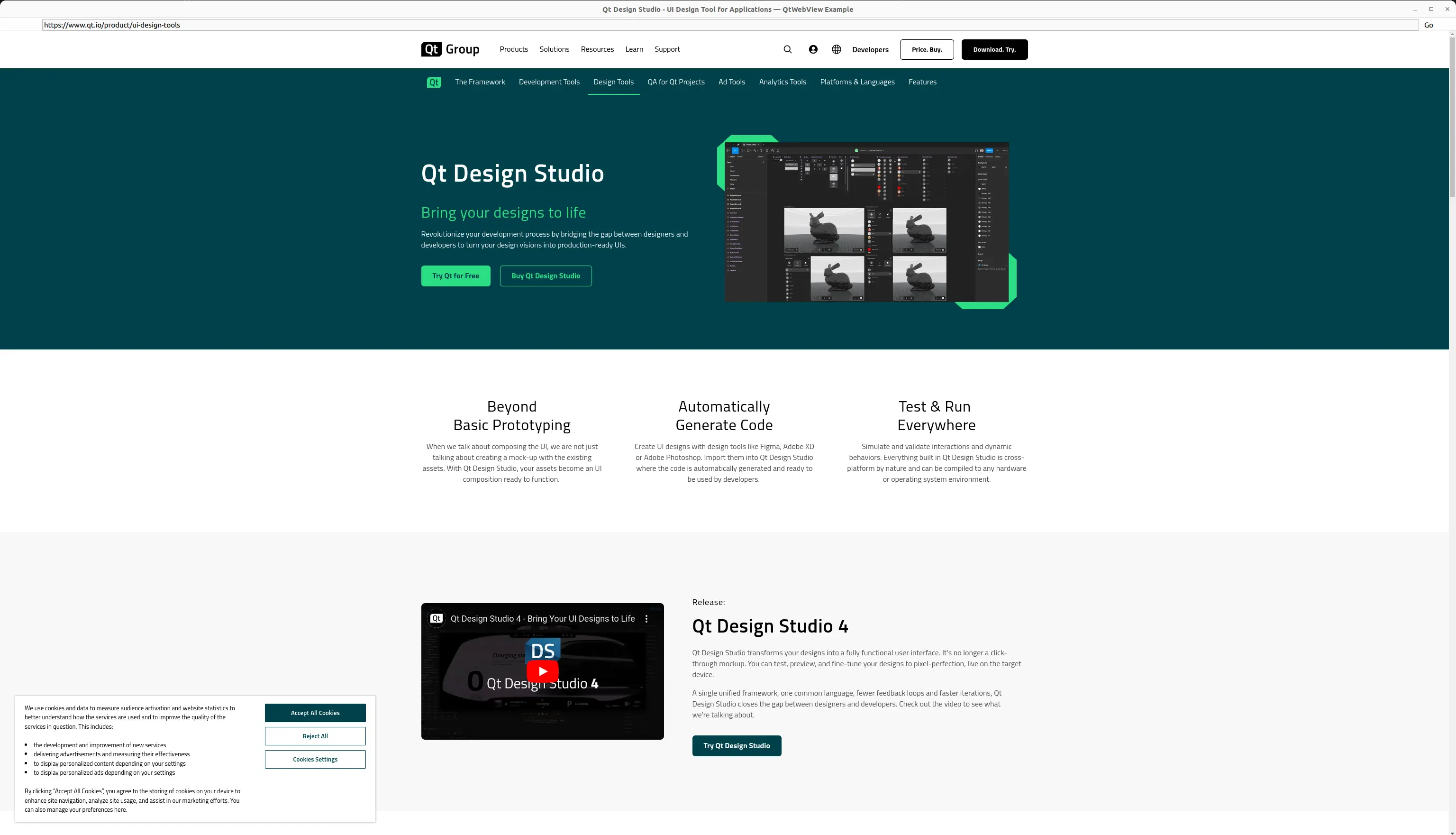
import sys
from pathlib import Path

from PySide6.QtCore import QCoreApplication, QUrl, QRect, QPoint
from PySide6.QtGui import QGuiApplication
from PySide6.QtQml import QQmlApplicationEngine
from PySide6.QtWebView import QtWebView
import argparse

import rc_qml  # noqa: F401


class Utils:
    @staticmethod
    def fromUserInput(userInput):
        if not userInput:
            return QUrl.fromUserInput("about:blank")
        result = QUrl.fromUserInput(userInput)
        return result if result.isValid() else QUrl.fromUserInput("about:blank")


if __name__ == "__main__":
    QtWebView.initialize()
    app = QGuiApplication(sys.argv)
    QGuiApplication.setApplicationDisplayName(QCoreApplication
                                              .translate("main", "QtWebView Example"))

    parser = argparse.ArgumentParser(description=QGuiApplication.applicationDisplayName())
    parser.add_argument("--url", nargs="?",
                        default="https://www.qt.io",
                        help="The initial URL to open.")
    args = parser.parse_args()
    initialUrl = args.url

    engine = QQmlApplicationEngine()
    context = engine.rootContext()
    context.setContextProperty("utils", Utils())
    context.setContextProperty("initialUrl", Utils.fromUserInput(initialUrl))

    geometry = QGuiApplication.primaryScreen().availableGeometry()
    if not QGuiApplication.styleHints().showIsFullScreen():
        size = geometry.size() * 4 / 5
        offset = (geometry.size() - size) / 2
        pos = geometry.topLeft() + QPoint(offset.width(), offset.height())
        geometry = QRect(pos, size)

    engine.setInitialProperties({"x": geometry.x(), "y": geometry.y(),
                                 "width": geometry.width(), "height": geometry.height()})
    qml_file = Path(__file__).parent / "main.qml"
    engine.load(QUrl.fromLocalFile(qml_file))

    if not engine.rootObjects():
        sys.exit(-1)

    exit_code = app.exec()
    del engine
    sys.exit(exit_code)
import QtQuick
import QtQuick.Controls
import QtWebView
import QtQuick.Layouts


ApplicationWindow {
    id: window
    visible: true
    title: webView.title

    menuBar: ToolBar {
        id: navigationBar
        RowLayout {
            anchors.fill: parent
            spacing: 0

            ToolButton {
                id: backButton
                icon.source: "qrc:/left-32.png"
                icon.color: "transparent"
                onClicked: webView.goBack()
                enabled: webView.canGoBack
                Layout.preferredWidth: navigationBar.height
            }

            ToolButton {
                id: forwardButton
                icon.source: "qrc:/right-32.png"
                icon.color: "transparent"
                onClicked: webView.goForward()
                enabled: webView.canGoForward
                Layout.preferredWidth: navigationBar.height
            }

            ToolButton {
                id: reloadButton
                icon.source: webView.loading ? "qrc:/stop-32.png" : "qrc:/refresh-32.png"
                icon.color: "transparent"
                onClicked: webView.loading ? webView.stop() : webView.reload()
                Layout.preferredWidth: navigationBar.height
            }

            Item { Layout.preferredWidth: 5 }

            TextField {
                Layout.fillWidth: true
                id: urlField
                inputMethodHints: Qt.ImhUrlCharactersOnly | Qt.ImhPreferLowercase
                text: webView.url
                onAccepted: webView.url = utils.fromUserInput(text)
             }

            Item { Layout.preferredWidth: 5 }

            ToolButton {
                id: goButton
                text: qsTr("Go")
                onClicked: {
                    Qt.inputMethod.commit()
                    Qt.inputMethod.hide()
                    webView.url = utils.fromUserInput(urlField.text)
                }
            }

            ToolButton {
                id: settingsButton
                icon.source: "qrc:/settings-32.png"
                onClicked: {
                    settingsDrawer.width = (settingsDrawer.width > 0) ? 0 : window.width * 1/4
                }
                Layout.preferredWidth: navigationBar.height
            }

            Item { Layout.preferredWidth: 10 }
         }
         ProgressBar {
             id: progress
             anchors {
                left: parent.left
                top: parent.bottom
                right: parent.right
                leftMargin: parent.leftMargin
                rightMargin: parent.rightMargin
             }
             height:3
             z: Qt.platform.os === "android" ? -1 : -2
             background: Item {}
             visible: Qt.platform.os !== "ios" && Qt.platform.os !== "winrt"
             from: 0
             to: 100
             value: webView.loadProgress < 100 ? webView.loadProgress : 0
        }
    }

    Item {
        id: settingsDrawer
        anchors.right: parent.right
        ColumnLayout {
            Label {
                text: "JavaScript"
            }
            CheckBox {
                id: javaScriptEnabledCheckBox
                text: "enabled"
                onCheckStateChanged: webView.settings.javaScriptEnabled = (checkState == Qt.Checked)
            }
            Label {
                text: "Local storage"
            }
            CheckBox {
                id: localStorageEnabledCheckBox
                text: "enabled"
                onCheckStateChanged: webView.settings.localStorageEnabled = (checkState == Qt.Checked)
            }
            Label {
                text: "Allow file access"
            }
            CheckBox {
                id: allowFileAccessEnabledCheckBox
                text: "enabled"
                onCheckStateChanged: webView.settings.allowFileAccess = (checkState == Qt.Checked)
            }
            Label {
                text: "Local content can access file URLs"
            }
            CheckBox {
                id: localContentCanAccessFileUrlsEnabledCheckBox
                text: "enabled"
                onCheckStateChanged: webView.settings.localContentCanAccessFileUrls = (checkState == Qt.Checked)
            }
        }
    }

    WebView {
        id: webView
        url: initialUrl
        anchors.right: settingsDrawer.left
        anchors.left: parent.left
        height: parent.height
        onLoadingChanged: function(loadRequest) {
            if (loadRequest.errorString)
                console.error(loadRequest.errorString);
        }

        Component.onCompleted: {
            javaScriptEnabledCheckBox.checkState = settings.javaScriptEnabled ? Qt.Checked : Qt.Unchecked
            localStorageEnabledCheckBox.checkState = settings.localStorageEnabled ? Qt.Checked : Qt.Unchecked
            allowFileAccessEnabledCheckBox.checkState = settings.allowFileAccess ? Qt.Checked : Qt.Unchecked
            localContentCanAccessFileUrlsEnabledCheckBox.checkState = settings.localContentCanAccessFileUrls ? Qt.Checked : Qt.Unchecked
        }
    }
}
<RCC>
    <qresource prefix="/">
        <file>main.qml</file>
        <file alias="left-32.png">images/left-32.png</file>
        <file alias="stop-32.png">images/stop-32.png</file>
        <file alias="refresh-32.png">images/refresh-32.png</file>
        <file alias="right-32.png">images/right-32.png</file>
        <file alias="settings-32.png">images/settings-32.png</file>
    </qresource>
</RCC>