Lighting Example
This example demonstrates a PySide6 application that creates a dynamic scene with lighting and shadow effects using QGraphicsView and QGraphicsScene. It features animated light sources and graphical items with drop shadows that respond to the light, showcasing advanced rendering and animation techniques.
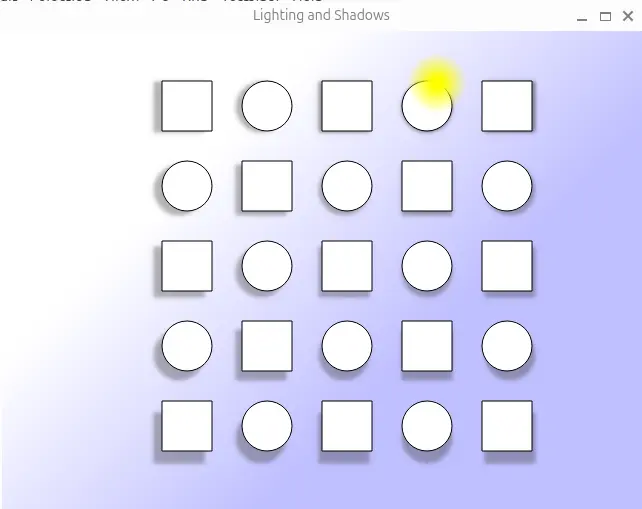
from __future__ import annotations

import math
import sys

from PySide6.QtCore import QPointF, QTimer, Qt
from PySide6.QtGui import (QBrush, QColor, QLinearGradient, QPainter, QPen,
                           QPixmap, QRadialGradient)
from PySide6.QtWidgets import (QApplication, QFrame, QGraphicsDropShadowEffect,
                               QGraphicsEllipseItem, QGraphicsRectItem,
                               QGraphicsScene, QGraphicsView)


class Lighting(QGraphicsView):
    def __init__(self, parent=None):
        super().__init__(parent)

        self.angle = 0.0
        self.m_scene = QGraphicsScene()
        self.m_lightSource = None
        self.m_items = []

        self.setScene(self.m_scene)

        self.setup_scene()

        timer = QTimer(self)
        timer.timeout.connect(self.animate)
        timer.setInterval(30)
        timer.start()

        self.setRenderHint(QPainter.RenderHint.Antialiasing)
        self.setFrameStyle(QFrame.Shape.NoFrame)

    def setup_scene(self):
        self.m_scene.setSceneRect(-300, -200, 600, 460)

        linear_grad = QLinearGradient(QPointF(-100, -100), QPointF(100, 100))
        linear_grad.setColorAt(0, QColor(255, 255, 255))
        linear_grad.setColorAt(1, QColor(192, 192, 255))
        self.setBackgroundBrush(linear_grad)

        radial_grad = QRadialGradient(30, 30, 30)
        radial_grad.setColorAt(0, Qt.GlobalColor.yellow)
        radial_grad.setColorAt(0.2, Qt.GlobalColor.yellow)
        radial_grad.setColorAt(1, Qt.GlobalColor.transparent)

        pixmap = QPixmap(60, 60)
        pixmap.fill(Qt.GlobalColor.transparent)

        with QPainter(pixmap) as painter:
            painter.setPen(Qt.PenStyle.NoPen)
            painter.setBrush(radial_grad)
            painter.drawEllipse(0, 0, 60, 60)

        self.m_lightSource = self.m_scene.addPixmap(pixmap)
        self.m_lightSource.setZValue(2)

        for i in range(-2, 3):
            for j in range(-2, 3):
                if (i + j) & 1:
                    item = QGraphicsEllipseItem(0, 0, 50, 50)
                else:
                    item = QGraphicsRectItem(0, 0, 50, 50)

                item.setPen(QPen(Qt.GlobalColor.black, 1))
                item.setBrush(QBrush(Qt.GlobalColor.white))

                effect = QGraphicsDropShadowEffect(self)
                effect.setBlurRadius(8)
                item.setGraphicsEffect(effect)
                item.setZValue(1)
                item.setPos(i * 80, j * 80)
                self.m_scene.addItem(item)
                self.m_items.append(item)

    def animate(self):
        self.angle += (math.pi / 30)
        xs = 200 * math.sin(self.angle) - 40 + 25
        ys = 200 * math.cos(self.angle) - 40 + 25
        self.m_lightSource.setPos(xs, ys)

        for item in self.m_items:
            effect = item.graphicsEffect()

            delta = QPointF(item.x() - xs, item.y() - ys)
            effect.setOffset(QPointF(delta.toPoint() / 30))

            dd = math.hypot(delta.x(), delta.y())
            color = effect.color()
            color.setAlphaF(max(0.4, min(1 - dd / 200.0, 0.7)))
            effect.setColor(color)

        self.m_scene.update()


if __name__ == '__main__':
    app = QApplication(sys.argv)

    lighting = Lighting()
    lighting.setWindowTitle("Lighting and Shadows")
    lighting.resize(640, 480)
    lighting.show()

    sys.exit(app.exec())